
Arduino Mega 2560 Temperature Logging System with MLX90614 and Micro SD Card Module
View and Edit Project In Cirkit Designer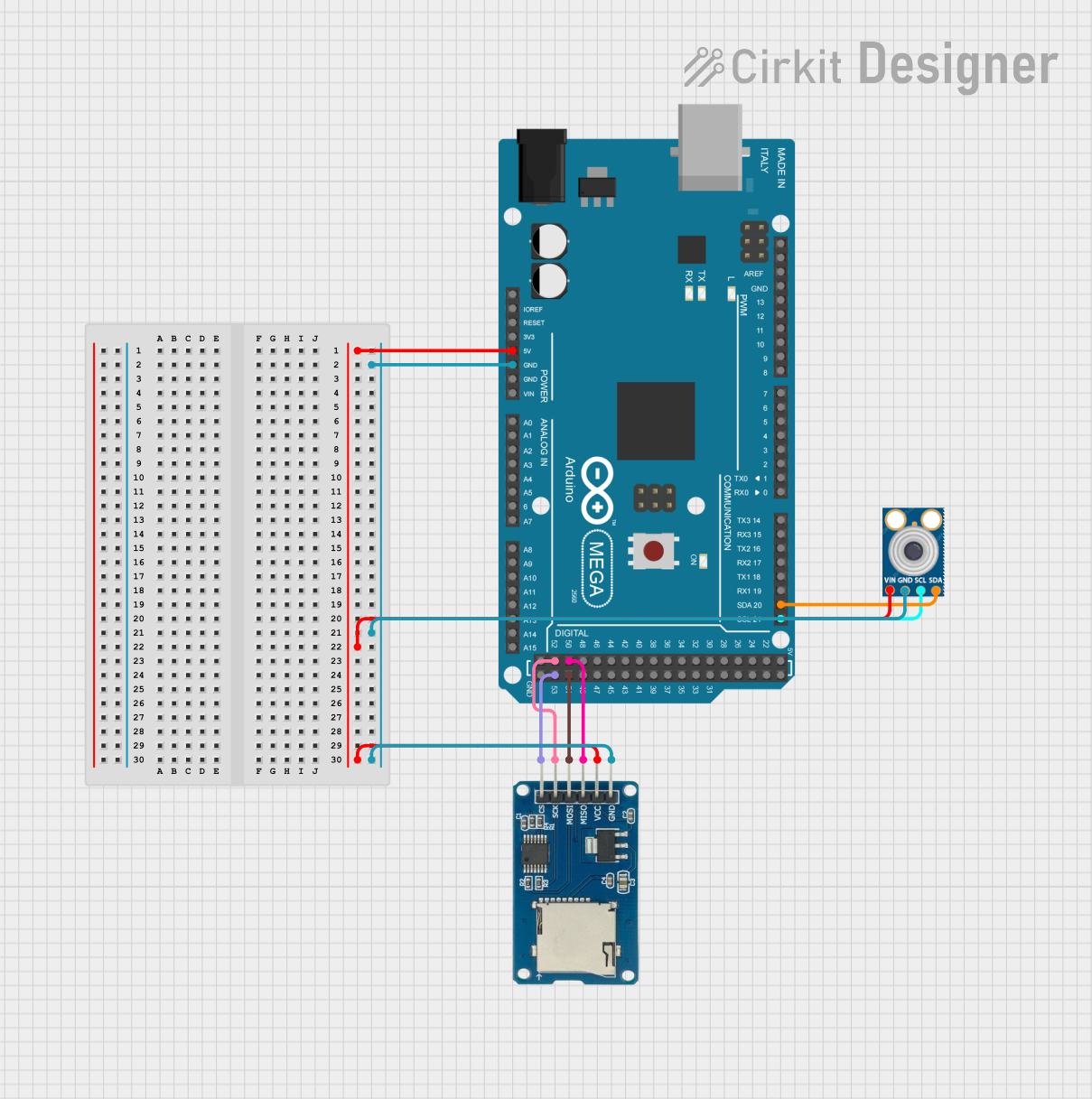
Circuit Documentation
Summary
This circuit involves an Arduino Mega 2560 microcontroller interfacing with an MLX90614 infrared temperature sensor and a Micro SD Card Module. The Arduino reads temperature data from the MLX90614 sensor via I2C and logs the data to the Micro SD Card Module via SPI. The circuit is designed to read and log temperature data in real-time.
Component List
Arduino Mega 2560
- Description: A microcontroller board based on the ATmega2560.
- Pins: IOREF, RESET, 3V3, 5V, GND, VIN, A0-A15, D0-D53, AREF, SDA, SCL.
Micro SD Card Module
- Description: A module for interfacing with micro SD cards.
- Pins: cs, sck, mosi, miso, vcc, gnd.
MLX90614
- Description: An infrared temperature sensor.
- Pins: SDA, SCL, GND, VIN.
Wiring Details
Arduino Mega 2560
- 5V: Connected to the vcc pin of the Micro SD Card Module and the VIN pin of the MLX90614.
- GND: Connected to the gnd pin of the Micro SD Card Module and the GND pin of the MLX90614.
- D21/SCL: Connected to the SCL pin of the MLX90614.
- D20/SDA: Connected to the SDA pin of the MLX90614.
- D52: Connected to the sck pin of the Micro SD Card Module.
- D50: Connected to the miso pin of the Micro SD Card Module.
- D53: Connected to the cs pin of the Micro SD Card Module.
- D51: Connected to the mosi pin of the Micro SD Card Module.
Micro SD Card Module
- vcc: Connected to the 5V pin of the Arduino Mega 2560.
- gnd: Connected to the GND pin of the Arduino Mega 2560.
- sck: Connected to the D52 pin of the Arduino Mega 2560.
- miso: Connected to the D50 pin of the Arduino Mega 2560.
- cs: Connected to the D53 pin of the Arduino Mega 2560.
- mosi: Connected to the D51 pin of the Arduino Mega 2560.
MLX90614
- VIN: Connected to the 5V pin of the Arduino Mega 2560.
- GND: Connected to the GND pin of the Arduino Mega 2560.
- SCL: Connected to the D21/SCL pin of the Arduino Mega 2560.
- SDA: Connected to the D20/SDA pin of the Arduino Mega 2560.
Code Documentation
Arduino Mega 2560 Code
/*
 * Arduino Mega 2560 controlling MLX90614 and ADXL326 sensors.
 * - MLX90614: Infrared temperature sensor connected via I2C (SDA, SCL).
 * - ADXL326: 3-axis accelerometer connected to analog pins (A0, A1, A2).
 * This code reads data from both sensors in parallel and prints the values
 * to the Serial Monitor and Serial Plotter.
 */

#include <Wire.h>

// MLX90614 I2C address
#define MLX90614_ADDR 0x5A

// Function prototypes
float readTemperature();
void readAccelerometer(int &x, int &y, int &z);

void setup() {
  Serial.begin(9600);
  Wire.begin();
}

void loop() {
  // Read temperature from MLX90614
  float temperature = readTemperature();
  Serial.print("Temperature: ");
  Serial.print(temperature);
  Serial.println(" C");

  // Read accelerometer data from ADXL326
  int x, y, z;
  readAccelerometer(x, y, z);
  Serial.print("X: ");
  Serial.print(x);
  Serial.print(" Y: ");
  Serial.print(y);
  Serial.print(" Z: ");
  Serial.println(z);

  // Print data for Serial Plotter
  Serial.print(temperature);
  Serial.print(",");
  Serial.print(x);
  Serial.print(",");
  Serial.print(y);
  Serial.print(",");
  Serial.println(z);

  delay(1000); // Delay for 1 second
}

float readTemperature() {
  Wire.beginTransmission(MLX90614_ADDR);
  Wire.write(0x07); // Command to read object temperature
  Wire.endTransmission(false);
  Wire.requestFrom(MLX90614_ADDR, 3);

  if (Wire.available() == 3) {
    uint16_t temp = Wire.read();
    temp |= Wire.read() << 8;
    Wire.read(); // PEC byte, not used
    return temp * 0.02 - 273.15; // Convert to Celsius
  }
  return NAN; // Return NaN if read failed
}

void readAccelerometer(int &x, int &y, int &z) {
  x = analogRead(A0);
  y = analogRead(A1);
  z = analogRead(A2);
}
Micro SD Card Module Code
/*
 * Arduino Mega 2560 interfacing with MLX90614 and Micro SD Card Module.
 * - MLX90614: Infrared temperature sensor connected via I2C (SDA, SCL).
 * - Micro SD Card Module: Connected via SPI (CS, MOSI, MISO, SCK).
 * This code reads temperature data from the MLX90614 sensor and logs it
 * to a file named 'TempSen.txt' on the Micro SD card in a tabular format.
 */

#include <Wire.h>
#include <SPI.h>
#include <SD.h>

// MLX90614 I2C address
#define MLX90614_ADDR 0x5A

// SD card chip select pin
const int chipSelect = 53;

// Function prototypes
float readTemperature();
void logData(float temperature);

void setup() {
  Serial.begin(9600);
  Wire.begin();
  if (!SD.begin(chipSelect)) {
    Serial.println("SD card initialization failed!");
    return;
  }
  Serial.println("SD card initialized.");
  // Create or open file and write header if it doesn't exist
  File dataFile = SD.open("TempSen.txt", FILE_WRITE);
  if (dataFile) {
    if (dataFile.size() == 0) {
      dataFile.println("Time (s)\tTemperature (C)");
    }
    dataFile.close();
  }
}

void loop() {
  static unsigned long startTime = millis();
  unsigned long currentTime = (millis() - startTime) / 1000;
  // Read temperature from MLX90614
  float temperature = readTemperature();
  Serial.print("Temperature: ");
  Serial.print(temperature);
  Serial.println(" C");
  // Log data to SD card
  logData(currentTime, temperature);
  delay(1000); // Delay for 1 second
}

float readTemperature() {
  Wire.beginTransmission(MLX90614_ADDR);
  Wire.write(0x07); // Command to read object temperature
  Wire.endTransmission(false);
  Wire.requestFrom(MLX90614_ADDR, 3);
  if (Wire.available() == 3) {
    uint16_t temp = Wire.read();
    temp |= Wire.read() << 8;
    Wire.read(); // PEC byte, not used
    return temp * 0.02 - 273.15; // Convert to Celsius
  }
  return NAN; // Return NaN if read failed
}

void logData(unsigned long time, float temperature) {
  File dataFile = SD.open("TempSen.txt", FILE_WRITE);
  if (dataFile) {
    dataFile.print(time);
    dataFile.print("\t");
    dataFile.println(temperature);
    dataFile.close();
    Serial.println("Data written to TempSen.txt");
  } else {
    Serial.println("Error opening TempSen.txt");
  }
}