
Arduino-Based Smart Environmental Control System with Temperature Sensing and Relay Actuation
View and Edit Project In Cirkit Designer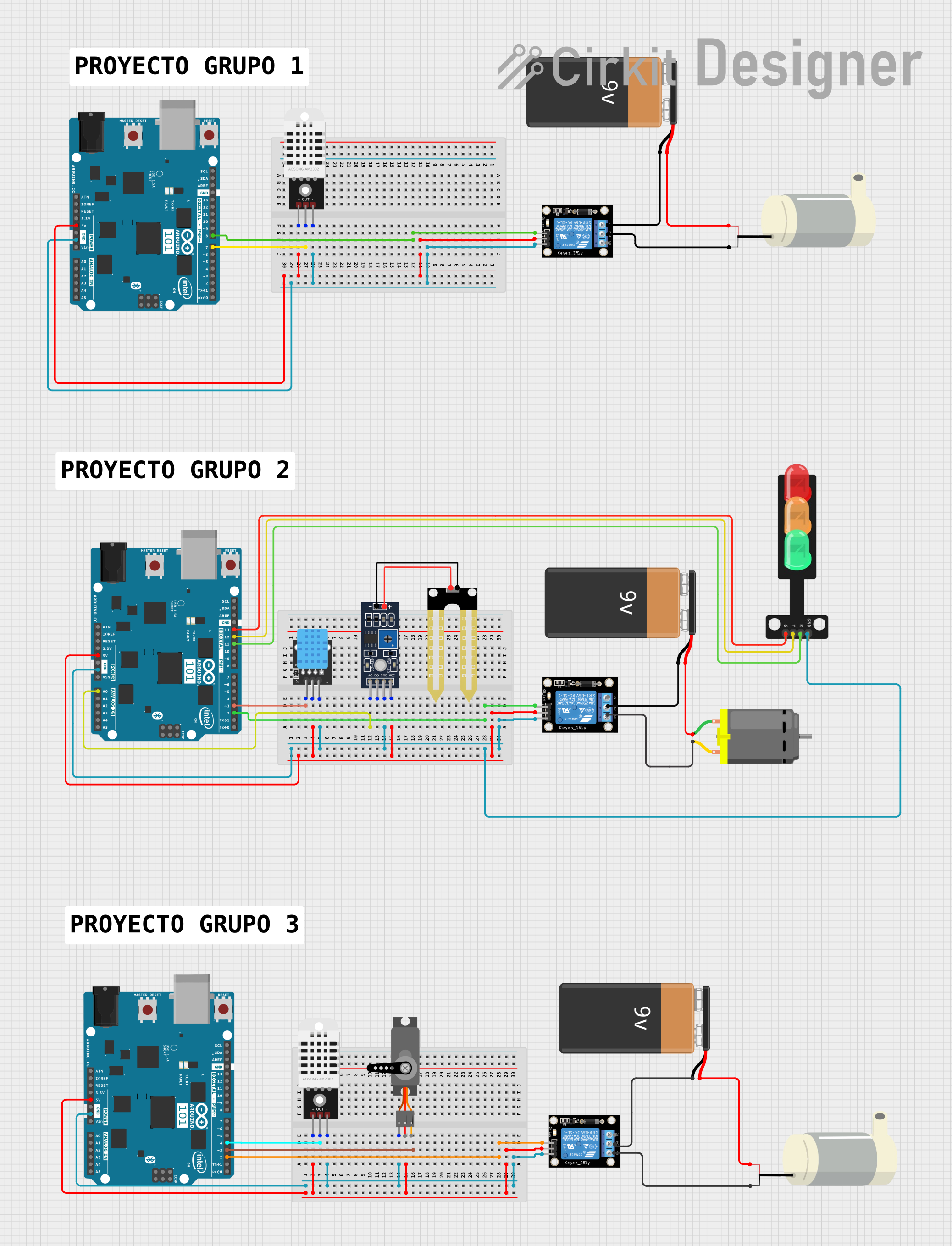
Circuit Documentation
Summary
The circuit in question appears to be a control and sensing system utilizing multiple Arduino 101 microcontroller boards. The system includes temperature and humidity sensors (DHT22 and DHT11), a soil moisture sensor (Humidity YL-69), a traffic light module, a DC motor, a mini water pump, servo motors, relay modules, and power supplied by 9V batteries. The relays are used to control the power to the DC motor and the mini water pump. The traffic light module is directly controlled by one of the Arduino boards. The sensors provide input to the Arduinos, which likely process the data for various control applications.
Component List
Microcontrollers
- Arduino 101: A microcontroller board based on the Intel Curie, which includes a built-in accelerometer and Bluetooth Low Energy (BLE).
Sensors
- DHT22: A temperature and humidity sensor with a digital output.
- DHT11: A basic, ultra-low-cost digital temperature and humidity sensor.
- Humidity YL-69: A soil moisture sensor that can be used to detect the moisture content of the soil.
Actuators
- DC Motor: An electric motor that runs on direct current electricity.
- Mini bomba de Agua (Mini Water Pump): A small pump used for moving water.
- Servo: A rotary actuator or linear actuator that allows for precise control of angular or linear position.
Power
- 9V Battery: Provides power to the circuit.
Control
- Relay module 1 channel: An electrically operated switch that allows you to turn on or off a circuit using voltage and/or current much higher than a microcontroller can handle.
Indicators
- Traffic Light: A module with LEDs simulating a traffic light with green, yellow, and red lights.
Miscellaneous
- Comment: A placeholder for additional information or notes, not an actual physical component.
Wiring Details
Arduino 101
- GND: Connected to the ground pins of the DHT22, DHT11, Relay modules, Humidity YL-69, Traffic Light, and Servo.
- 5V: Powers the DHT22, DHT11, Relay modules, and Humidity YL-69.
- Digital Pins: Various digital pins are used to interface with the DHT22, DHT11, Relay modules, and Traffic Light.
- Analog Pins: Used to read the analog output from the Humidity YL-69 sensor.
DHT22
- +: Connected to 5V power from the Arduino 101.
- Out: Digital output connected to a digital pin on the Arduino 101.
- -: Ground connection.
DHT11
- 5V: Power supply.
- S: Signal pin connected to the Arduino 101.
- GND: Ground connection.
Humidity YL-69
- A0: Analog output connected to an analog pin on the Arduino 101.
- D0: Digital output (not used in this circuit).
- GND: Ground connection.
- VCC: Power supply from the 5V output of the Arduino 101.
DC Motor
- pin 1: Connected to the positive terminal of a 9V battery.
- pin 2: Connected to the Normally Open (NO) terminal of a Relay module.
Mini bomba de Agua (Mini Water Pump)
- 5V: Connected to the positive terminal of a 9V battery.
- GND: Connected to the Common (COM) terminal of a Relay module.
Relay module 1 channel
- S: Signal pin controlled by a digital pin on the Arduino 101.
- 5V: Power supply from the Arduino 101.
- GND: Ground connection.
- NC: Normally Closed terminal (not used in this circuit).
- COM: Common terminal, connected to the ground of the Mini Water Pump or the negative terminal of the 9V battery.
- NO: Normally Open terminal, connected to the DC Motor.
Traffic Light
- Green: Controlled by a digital pin on the Arduino 101.
- Yellow: Controlled by a different digital pin on the Arduino 101.
- Red: Controlled by another digital pin on the Arduino 101.
- GND: Ground connection.
Servo
- GND: Ground connection.
- VCC: Power supply (not specified in the wiring details).
- PWM: Pulse Width Modulation control signal from the Arduino 101 (not specified in the wiring details).
Documented Code
No code was provided in the input. Typically, the code for a microcontroller in such a system would initialize the sensors and actuators, read sensor values, and based on the logic implemented, control the actuators (e.g., turning on the water pump or setting the traffic light). Without the actual code, we cannot document the specific functionalities or logic implemented in the microcontrollers.