
Arduino UNO-Based Smart Weight and Motion Sensor with Bluetooth Connectivity
View and Edit Project In Cirkit Designer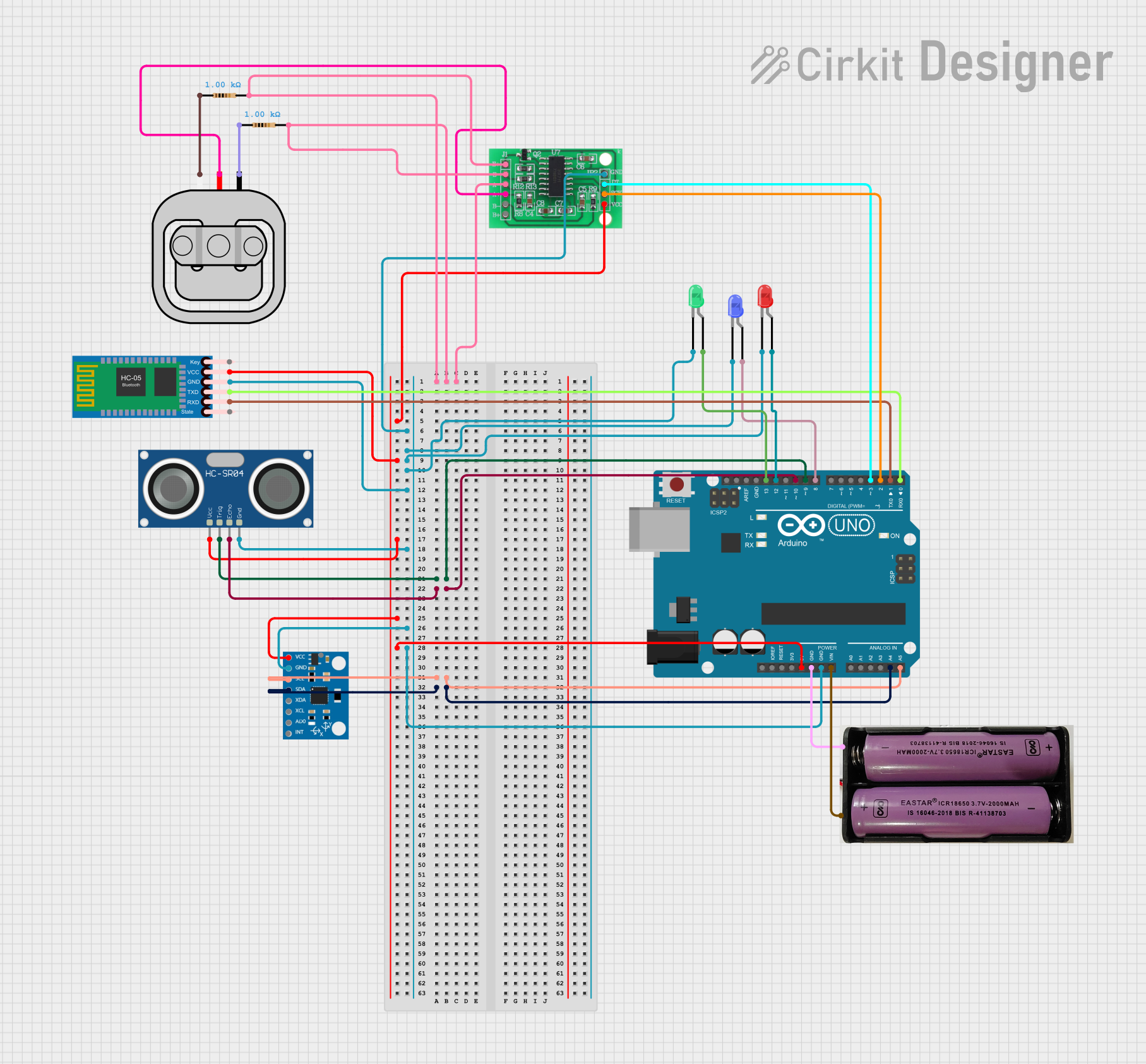
Circuit Documentation
Summary
This circuit integrates an Arduino UNO microcontroller with various sensors and modules, including an HX711 load cell amplifier, an MPU6050 accelerometer and gyroscope, an HC-SR04 ultrasonic sensor, an HC-05 Bluetooth module, and several LEDs. The circuit is designed to measure weight, detect orientation, measure distance, and communicate wirelessly via Bluetooth. Additionally, it includes a buzzer for alerting based on specific conditions.
Component List
Arduino UNO
- Description: Microcontroller board based on the ATmega328P.
- Pins: UNUSED, IOREF, Reset, 3.3V, 5V, GND, Vin, A0, A1, A2, A3, A4, A5, SCL, SDA, AREF, D13, D12, D11, D10, D9, D8, D7, D6, D5, D4, D3, D2, D1, D0
HX711 - Bridge Sensor Interface
- Description: Load cell amplifier for weight measurement.
- Pins: E+, E-, A-, A+, B-, B+, GND - GROUND, DATA (OUT), SCK - CLOCK (IN), 3.3/3.5V Supply
MPU6050
- Description: Accelerometer and gyroscope sensor.
- Pins: vcc, gnd, scl, sda, xda, xcl, AD0, int, 3.3v
Load Sensor - 50kg
- Description: Load cell for weight measurement.
- Pins: W, R, B
HC-SR04 Ultrasonic Sensor
- Description: Ultrasonic distance sensor.
- Pins: VCC, TRIG, ECHO, GND
LED: Two Pin (red)
- Description: Red LED.
- Pins: cathode, anode
LED: Two Pin (green)
- Description: Green LED.
- Pins: cathode, anode
LED: Two Pin (blue)
- Description: Blue LED.
- Pins: cathode, anode
Resistor (1k Ohms)
- Description: Resistor with 1k Ohms resistance.
- Pins: pin1, pin2
HC-05 Bluetooth Module
- Description: Bluetooth module for wireless communication.
- Pins: Key, VCC, TXD, RXD, State, GND
7.4v Battery
- Description: Power supply.
- Pins: +, -
Wiring Details
Arduino UNO
- D9: Connected to TRIG of HC-SR04 Ultrasonic Sensor
- D10: Connected to ECHO of HC-SR04 Ultrasonic Sensor
- A5: Connected to scl of MPU6050
- A4: Connected to sda of MPU6050
- 5V: Connected to VCC of HX711 - Bridge Sensor Interface, HC-05 Bluetooth Module, HC-SR04 Ultrasonic Sensor, MPU6050
- GND: Connected to GND of HX711 - Bridge Sensor Interface, LED: Two Pin (blue), LED: Two Pin (red), LED: Two Pin (green), HC-05 Bluetooth Module, HC-SR04 Ultrasonic Sensor, MPU6050, 7.4v Battery
- Vin: Connected to + of 7.4v Battery
- D13: Connected to anode of LED: Two Pin (green)
- D12: Connected to anode of LED: Two Pin (red)
- D8: Connected to anode of LED: Two Pin (blue)
- D3: Connected to DATA (OUT) of HX711 - Bridge Sensor Interface
- D2: Connected to SCK - CLOCK (IN) of HX711 - Bridge Sensor Interface
- D1: Connected to RXD of HC-05 Bluetooth Module
- D0: Connected to TXD of HC-05 Bluetooth Module
HX711 - Bridge Sensor Interface
- E+, E-, A-: Connected to pin2 of Resistor
- 3.3/3.5V Supply: Connected to VCC of HC-05 Bluetooth Module, HC-SR04 Ultrasonic Sensor, MPU6050, 5V of Arduino UNO
- GND - GROUND: Connected to cathode of LED: Two Pin (blue), LED: Two Pin (red), LED: Two Pin (green), GND of HC-05 Bluetooth Module, HC-SR04 Ultrasonic Sensor, MPU6050, Arduino UNO
- A+: Connected to R of Load Sensor - 50kg
- DATA (OUT): Connected to D3 of Arduino UNO
- SCK - CLOCK (IN): Connected to D2 of Arduino UNO
MPU6050
- vcc: Connected to 5V of Arduino UNO
- gnd: Connected to GND of Arduino UNO
- scl: Connected to A5 of Arduino UNO
- sda: Connected to A4 of Arduino UNO
Load Sensor - 50kg
- W: Connected to pin1 of Resistor
- R: Connected to A+ of HX711 - Bridge Sensor Interface
- B: Connected to pin1 of Resistor
HC-SR04 Ultrasonic Sensor
- VCC: Connected to 5V of Arduino UNO
- TRIG: Connected to D9 of Arduino UNO
- ECHO: Connected to D10 of Arduino UNO
- GND: Connected to GND of Arduino UNO
LED: Two Pin (red)
- cathode: Connected to GND of Arduino UNO
- anode: Connected to D12 of Arduino UNO
LED: Two Pin (green)
- cathode: Connected to GND of Arduino UNO
- anode: Connected to D13 of Arduino UNO
LED: Two Pin (blue)
- cathode: Connected to GND of Arduino UNO
- anode: Connected to D8 of Arduino UNO
Resistor (1k Ohms)
- pin1: Connected to W of Load Sensor - 50kg, B of Load Sensor - 50kg
- pin2: Connected to E+, E-, A- of HX711 - Bridge Sensor Interface
HC-05 Bluetooth Module
- VCC: Connected to 5V of Arduino UNO
- TXD: Connected to D0 of Arduino UNO
- RXD: Connected to D1 of Arduino UNO
- GND: Connected to GND of Arduino UNO
7.4v Battery
- +: Connected to Vin of Arduino UNO
- -: Connected to GND of Arduino UNO
Documented Code
#include <Wire.h>
#include <Adafruit_MPU6050.h>
#include <Adafruit_Sensor.h>
#include <HX711_ADC.h>
#if defined(ESP8266) || defined(ESP32) || defined(AVR)
#include <EEPROM.h>
#endif

// Pins for HX711
const int HX711_dout = 4; // HX711 DOUT
const int HX711_sck = 5;  // HX711 SCK

// HX711 Object
HX711_ADC LoadCell(HX711_dout, HX711_sck);

// MPU6050
Adafruit_MPU6050 mpu;

// Ultrasonic sensor
const int trigPin = 9;
const int echoPin = 10;
long duration;
int distanceCm;
int oldValue = 0, newValue = 0;

// Buzzer
#define BUZZER_PIN 7
#define ANGLE_THRESHOLD 60.0 // Threshold in degrees

// EEPROM Address for HX711 Calibration
const int calVal_eepromAdress = 0;

// Timing variables
unsigned long t = 0;

void setup() {
  // Serial Communication
  Serial.begin(115200);
  Wire.begin();

  // HX711 Initialization
  LoadCell.begin();
  unsigned long stabilizingtime = 2000;
  boolean _tare = true;
  LoadCell.start(stabilizingtime, _tare);
  if (LoadCell.getTare