
Arduino UNO-Based Multi-Sensor Monitoring System with Bluetooth and GPS Capabilities
View and Edit Project In Cirkit Designer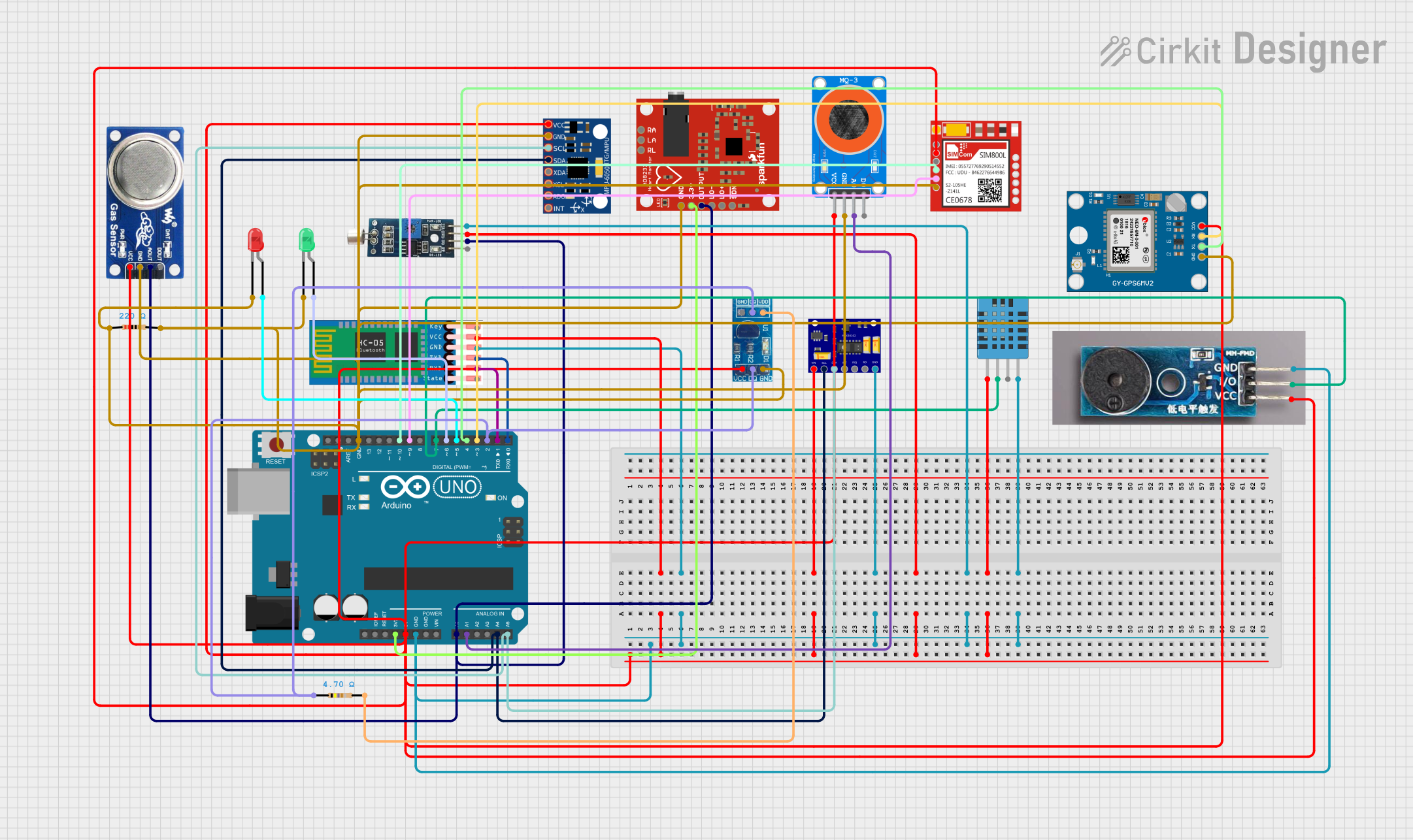
Circuit Documentation
Summary of the Circuit
This circuit is designed to interface various sensors and modules with an Arduino UNO microcontroller. The sensors include a sound sensor, a DHT11 humidity and temperature sensor, a MAX30102 heart rate and oxygen sensor, an AD8232 heart rate monitor, an MPU-6050 accelerometer and gyroscope, an MQ-3 alcohol sensor, an MQ-6 gas sensor, and a DS18B20 temperature sensor. Additionally, the circuit includes a SIM800L GSM module, a Neo 6M GPS module, a passive buzzer module, and two LEDs with corresponding resistors. The HC-05 Bluetooth module is also interfaced for wireless communication. The circuit is powered by the Arduino UNO's 5V and 3.3V outputs, and it includes a common ground for all components.
Component List
Arduino UNO
- Microcontroller board based on the ATmega328P
- Provides I/O pins and power supply pins for interfacing with various components
HC-05 Bluetooth Module
- Wireless communication module for Bluetooth connectivity
Sound Sensor
- Detects sound levels in the environment and provides digital or analog output
DHT11 Humidity and Temperature Sensor
- Measures ambient humidity and temperature
MAX30102 Heart Rate and Oxygen Sensor
- Optical sensor for measuring heart rate and blood oxygen levels
AD8232 Heart Rate Monitor
- Single lead heart rate monitor for measuring electrical activity of the heart
MPU-6050 Accelerometer and Gyroscope
- Motion tracking device with a 3-axis accelerometer and a 3-axis gyroscope
LED: Two Pin (red)
- Red light-emitting diode for visual indication
LED: Two Pin (green)
- Green light-emitting diode for visual indication
Resistor (220 Ohms)
- Limits current to protect components such as LEDs
Resistor (4.7 Ohms)
- Used for pull-up or current limiting purposes
MQ-3 Alcohol Sensor
- Detects alcohol vapors in the air
SIM800L GSM Module
- GSM/GPRS module for cellular communication
DS18B20 Temperature Sensor Module
- Digital temperature sensor for measuring temperature
Neo 6M GPS Module
- GPS receiver module for location tracking
Passive Buzzer Module
- Generates sound when powered
MQ-6 Gas Sensor
- Detects LPG, butane, and propane in the air
Wiring Details
Arduino UNO
- 5V: Powers various sensors and modules
- GND: Common ground for all components
- 3.3V: Powers the AD8232 heart rate monitor
- A0: Connected to MQ6 sensor's A0, Sound Sensor's DO, and AD8232's OUTPUT
- A1: Connected to MQ-3 sensor's A0
- A4: Connected to MPU-6050's SDA and MAX30102's SCL
- A5: Connected to MPU-6050's SCL and MAX30102's SDA
- D0-D13: Various digital I/O connections to modules and sensors
HC-05 Bluetooth Module
- VCC: Powered by Arduino's 5V
- GND: Connected to common ground
- TXD: Connected to Arduino's D0
- RXD: Connected to Arduino's D1
Sound Sensor
- VCC: Powered by Arduino's 5V
- GND: Connected to common ground
- DO: Connected to Arduino's A0
DHT11 Humidity and Temperature Sensor
- VDD: Powered by Arduino's 5V
- GND: Connected to common ground
- DATA: Connected to Arduino's D7
MAX30102 Heart Rate and Oxygen Sensor
- VIN: Powered by Arduino's 5V
- GND: Connected to common ground
- SCL: Connected to Arduino's A5
- SDA: Connected to Arduino's A4
AD8232 Heart Rate Monitor
- 3.3v: Powered by Arduino's 3.3V
- GND: Connected to common ground
- OUTPUT: Connected to Arduino's A0
MPU-6050 Accelerometer and Gyroscope
- VCC: Powered by Arduino's 5V
- GND: Connected to common ground
- SCL: Connected to Arduino's A5
- SDA: Connected to Arduino's A4
LED: Two Pin (red)
- Anode: Connected to Arduino's D5
- Cathode: Connected to common ground through a 220 Ohm resistor
LED: Two Pin (green)
- Anode: Connected to Arduino's D6
- Cathode: Connected to common ground through a 220 Ohm resistor
Resistor (220 Ohms)
- One end connected to LED cathode
- Other end connected to common ground
Resistor (4.7 Ohms)
- One end connected to DS18B20's VCC
- Other end connected to Arduino's D2
MQ-3 Alcohol Sensor
- VCC: Powered by Arduino's 5V
- GND: Connected to common ground
- A0: Connected to Arduino's A1
SIM800L GSM Module
- VCC: Powered by Arduino's 5V
- GND: Connected to common ground
- RXD: Connected to Arduino's D10
- TXD: Connected to Arduino's D9
DS18B20 Temperature Sensor Module
- VCC: Powered by Arduino's 5V through a 4.7 Ohm resistor
- GND: Connected to common ground
- DQ: Connected to Arduino's D2
Neo 6M GPS Module
- VCC: Powered by Arduino's 5V
- GND: Connected to common ground
- TX: Connected to Arduino's D4
- RX: Connected to Arduino's D3
Passive Buzzer Module
- VCC: Powered by Arduino's 5V
- GND: Connected to common ground
- I/O: Connected to Arduino's D7
MQ-6 Gas Sensor
- VCC: Powered by Arduino's 5V
- GND: Connected to common ground
- A0: Connected to Arduino's A0
Documented Code
The code for the Arduino UNO microcontroller is not provided in the input. However, the typical structure of an Arduino sketch includes setup and loop functions, where setup is used for initializing settings such as pin modes, and loop contains the main functionality that runs continuously.
void setup() {
  // Initialize digital and analog pins, communication interfaces, etc.
}

void loop() {
  // Main code to interact with sensors and modules
}
For detailed code implementation, the actual code content is required. Please provide the code content for the Arduino UNO microcontroller to include it in the documentation.