
Arduino UNO-Based Color Sorting Robot with Dual Servomotors and DC Motor Control
View and Edit Project In Cirkit Designer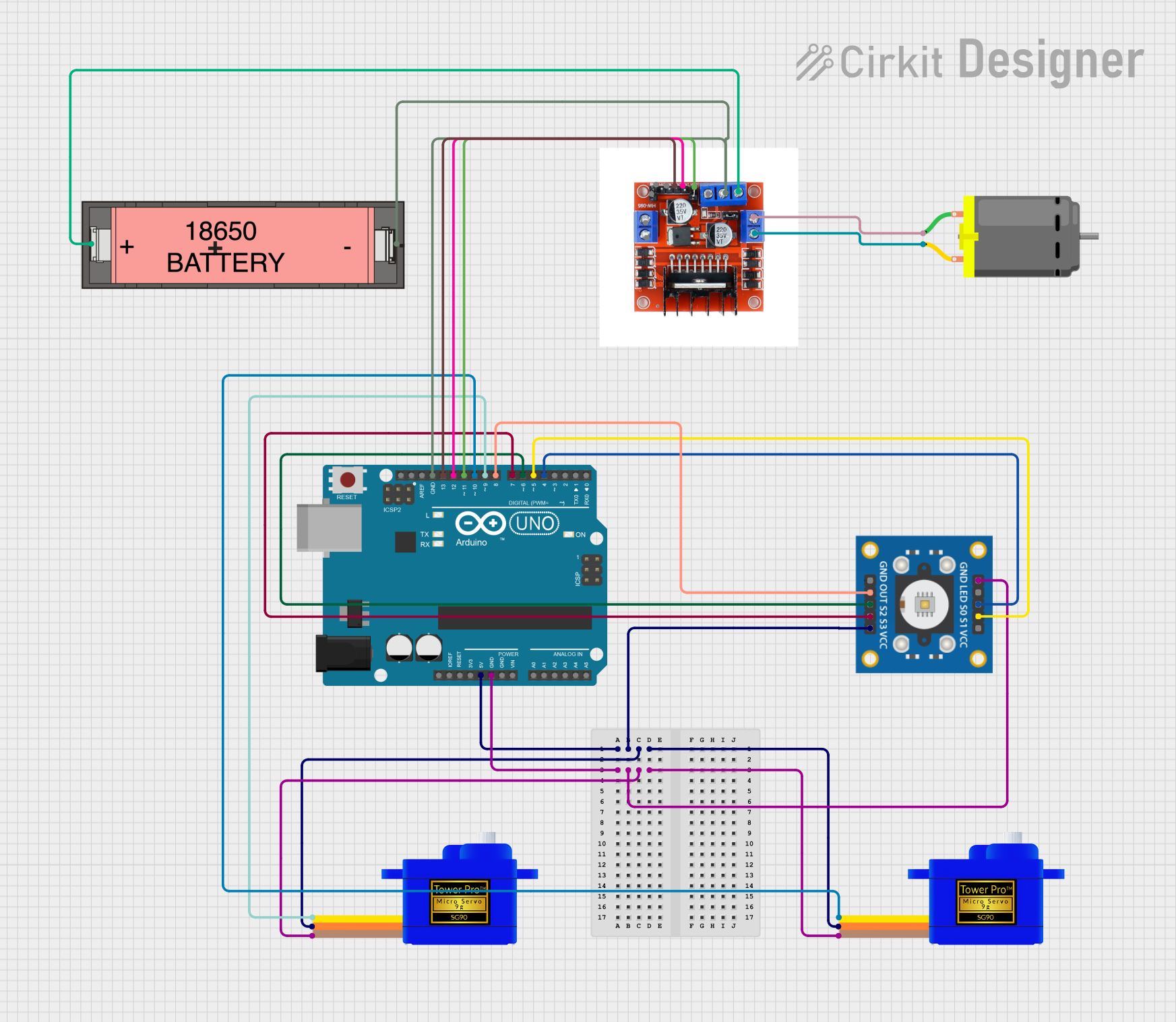
Circuit Documentation
Summary
This circuit involves an Arduino UNO microcontroller, two SG90 servomotors, a DC motor, a TCS3200 color sensor, an L298N motor driver, and a Li-ion 18650 battery. The Arduino UNO controls the servomotors and the DC motor based on the color detected by the TCS3200 sensor. The L298N motor driver is used to control the DC motor, and the Li-ion battery provides power to the motor driver.
Component List
Arduino UNO
- Description: A microcontroller board based on the ATmega328P.
- Pins: UNUSED, IOREF, Reset, 3.3V, 5V, GND, Vin, A0, A1, A2, A3, A4, A5, SCL, SDA, AREF, D13, D12, D11, D10, D9, D8, D7, D6, D5, D4, D3, D2, D1, D0
Servomotor SG90 (x2)
- Description: A small and lightweight servomotor with high output power.
- Pins: SIG, VCC, GND
DC Motor
- Description: A simple DC motor.
- Pins: pin 1, pin 2
Li-ion 18650 Battery
- Description: A rechargeable lithium-ion battery.
- Pins: -, +
L298N 2A Dual Motor Driver Module with PWM Control
- Description: A motor driver module capable of controlling two DC motors with PWM control.
- Pins: OUT1, OUT2, 12V, GND, 5V, OUT4, OUT3, ENA, IN1, IN2, IN3, ENB, IN4
TCS3200
- Description: A color sensor that can detect and measure the intensity of red, green, and blue light.
- Pins: GND, OUT, S2, S3, VCC, LED, S0, S1
Wiring Details
Arduino UNO
- 5V: Connected to VCC of both SG90 servomotors and the TCS3200 color sensor.
- GND: Connected to GND of both SG90 servomotors, the TCS3200 color sensor, and the L298N motor driver.
- D13: Connected to IN2 of the L298N motor driver.
- D12: Connected to IN1 of the L298N motor driver.
- D11: Connected to ENA of the L298N motor driver.
- D10: Connected to SIG of the second SG90 servomotor.
- D9: Connected to SIG of the first SG90 servomotor.
- D8: Connected to OUT of the TCS3200 color sensor.
- D7: Connected to S3 of the TCS3200 color sensor.
- D6: Connected to S2 of the TCS3200 color sensor.
- D5: Connected to S1 of the TCS3200 color sensor.
- D4: Connected to S0 of the TCS3200 color sensor.
Servomotor SG90 (1)
- VCC: Connected to 5V of the Arduino UNO.
- GND: Connected to GND of the Arduino UNO.
- SIG: Connected to D9 of the Arduino UNO.
Servomotor SG90 (2)
- VCC: Connected to 5V of the Arduino UNO.
- GND: Connected to GND of the Arduino UNO.
- SIG: Connected to D10 of the Arduino UNO.
DC Motor
- pin 1: Connected to OUT2 of the L298N motor driver.
- pin 2: Connected to OUT1 of the L298N motor driver.
Li-ion 18650 Battery
- -: Connected to GND of the L298N motor driver.
- +: Connected to 12V of the L298N motor driver.
L298N 2A Dual Motor Driver Module with PWM Control
- GND: Connected to GND of the Arduino UNO and the Li-ion 18650 battery.
- IN2: Connected to D13 of the Arduino UNO.
- IN1: Connected to D12 of the Arduino UNO.
- ENA: Connected to D11 of the Arduino UNO.
- OUT2: Connected to pin 1 of the DC motor.
- OUT1: Connected to pin 2 of the DC motor.
- 12V: Connected to + of the Li-ion 18650 battery.
TCS3200
- VCC: Connected to 5V of the Arduino UNO.
- GND: Connected to GND of the Arduino UNO.
- OUT: Connected to D8 of the Arduino UNO.
- S3: Connected to D7 of the Arduino UNO.
- S2: Connected to D6 of the Arduino UNO.
- S1: Connected to D5 of the Arduino UNO.
- S0: Connected to D4 of the Arduino UNO.
Code Documentation
#include <Servo.h>

// Pin definitions
const int S0 = 4;
const int S1 = 5;
const int S2 = 6;
const int S3 = 7;
const int sensorOut = 8;
const int servoPin1 = 9;
const int servoPin2 = 10;
const int motorENA = 11;
const int motorIN1 = 12;
const int motorIN2 = 13;

// Servo objects
Servo servo1;
Servo servo2;

// Color detection thresholds (calibrate these values)
const int redThreshold = 30;
const int greenThreshold = 30;
const int blueThreshold = 30;

void setup() {
  // Initialize serial communication
  Serial.begin(9600);

  // Set pin modes
  pinMode(S0, OUTPUT);
  pinMode(S1, OUTPUT);
  pinMode(S2, OUTPUT);
  pinMode(S3, OUTPUT);
  pinMode(sensorOut, INPUT);
  pinMode(motorENA, OUTPUT);
  pinMode(motorIN1, OUTPUT);
  pinMode(motorIN2, OUTPUT);

  // Initialize servos
  servo1.attach(servoPin1);
  servo2.attach(servoPin2);
  servo1.write(0);
  servo2.write(0);

  // Set frequency scaling to 20%
  digitalWrite(S0, HIGH);
  digitalWrite(S1, LOW);

  // Start the motor
  digitalWrite(motorIN1, HIGH);
  digitalWrite(motorIN2, LOW);
  analogWrite(motorENA, 255);
}

void loop() {
  // Pause the motor
  analogWrite(motorENA, 0);

  // Read color values
  int red = readColor(LOW, LOW);
  int green = readColor(HIGH, HIGH);
  int blue = readColor(LOW, HIGH);

  // Print color values for debugging
  Serial.print("R: ");
  Serial.print(red);
  Serial.print(" G: ");
  Serial.print(green);
  Serial.print(" B: ");
  Serial.println(blue);

  // Determine color and actuate servos
  if (red > redThreshold && red > green && red > blue) {
    // Detected red
    servo1.write(90);
    delay(1000);
    servo1.write(0);
  } else if (green > greenThreshold && green > red && green > blue) {
    // Detected green
    servo2.write(90);
    delay(1000);
    servo2.write(0);
  }

  // Resume the motor
  analogWrite(motorENA, 255);
  delay(1000); // Adjust delay as needed
}

// Function to read color values
int readColor(int s2State, int s3State) {
  digitalWrite(S2, s2State);
  digitalWrite(S3, s3State);
  return pulseIn(sensorOut, LOW);
}
This code initializes the Arduino UNO, sets up the pins, and controls the servomotors and the DC motor based on the color detected by the TCS3200 sensor. The motor is paused while the color is being read, and the servos are actuated based on the detected color. The motor then resumes operation.