
Arduino UNO-Based Dual Ultrasonic Sensor Distance Measurement System with Buzzer Alert
View and Edit Project In Cirkit Designer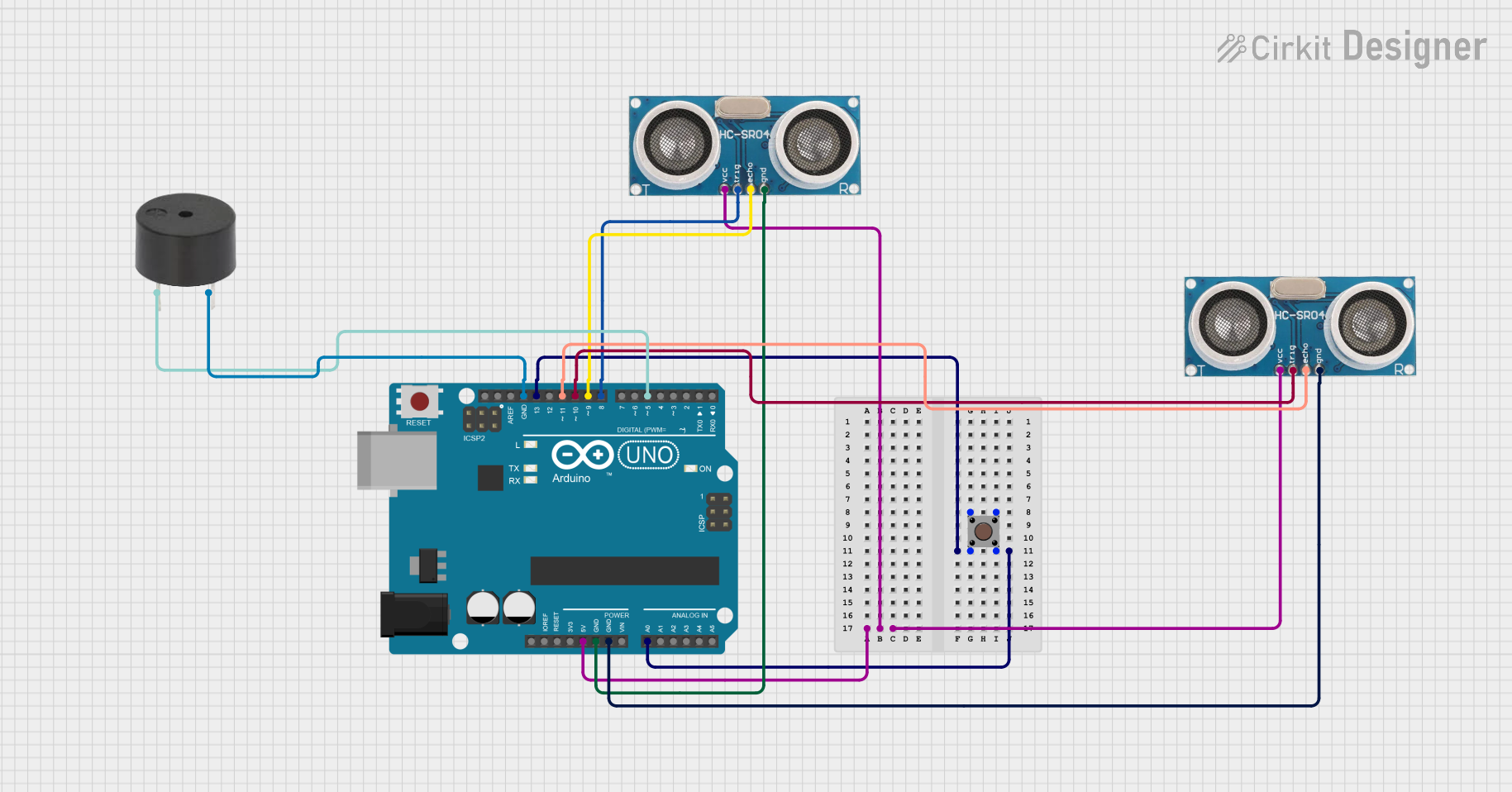
Circuit Documentation
Summary
This circuit involves an Arduino UNO microcontroller, two ultrasonic sensors, a pushbutton, and a buzzer. The circuit is designed to measure distances using the ultrasonic sensors and trigger a buzzer if an object is detected within a certain range. The pushbutton is used to switch between the two ultrasonic sensors.
Component List
Pushbutton
- Pins: Pin 1 (in), Pin 2 (in), Pin 3 (out), Pin 4 (out)
- Description: A simple pushbutton used to switch between two modes of operation.
- Purpose: To toggle between the two ultrasonic sensors.
Arduino UNO
- Pins: UNUSED, IOREF, Reset, 3.3V, 5V, GND, Vin, A0, A1, A2, A3, A4, A5, SCL, SDA, AREF, D13, D12, D11, D10, D9, D8, D7, D6, D5, D4, D3, D2, D1, D0
- Description: A microcontroller board based on the ATmega328P.
- Purpose: To control the ultrasonic sensors and the buzzer, and to read the state of the pushbutton.
Ultrasonic Sensor (U1)
- Pins: +VCC, Trigger, Echo, GND
- Description: A sensor used to measure distance by using ultrasonic waves.
- Purpose: To measure the distance to an object.
Ultrasonic Sensor (U2)
- Pins: +VCC, Trigger, Echo, GND
- Description: A sensor used to measure distance by using ultrasonic waves.
- Purpose: To measure the distance to an object.
Buzzer
- Pins: PIN, GND
- Description: An electronic device that emits a sound when activated.
- Purpose: To alert when an object is detected within a certain range.
Wiring Details
Pushbutton
- Pin 1 (in): Connected to Pin 3 (out) of the same pushbutton.
- Pin 2 (in): Connected to Pin 4 (out) of the same pushbutton and to D13 and A0 of the Arduino UNO.
- Pin 3 (out): Connected to Pin 1 (in) of the same pushbutton.
- Pin 4 (out): Connected to Pin 2 (in) of the same pushbutton and to D13 and A0 of the Arduino UNO.
Arduino UNO
- 5V: Connected to +VCC of both ultrasonic sensors.
- GND: Connected to GND of both ultrasonic sensors and the buzzer.
- D13: Connected to Pin 2 (in) of the pushbutton.
- A0: Connected to Pin 2 (in) of the pushbutton.
- D11: Connected to Echo of Ultrasonic Sensor (U1).
- D10: Connected to Trigger of Ultrasonic Sensor (U1).
- D9: Connected to Echo of Ultrasonic Sensor (U2).
- D8: Connected to Trigger of Ultrasonic Sensor (U2).
- D5: Connected to PIN of the buzzer.
Ultrasonic Sensor (U1)
- +VCC: Connected to 5V of the Arduino UNO.
- Trigger: Connected to D10 of the Arduino UNO.
- Echo: Connected to D11 of the Arduino UNO.
- GND: Connected to GND of the Arduino UNO.
Ultrasonic Sensor (U2)
- +VCC: Connected to 5V of the Arduino UNO.
- Trigger: Connected to D8 of the Arduino UNO.
- Echo: Connected to D9 of the Arduino UNO.
- GND: Connected to GND of the Arduino UNO.
Buzzer
- PIN: Connected to D5 of the Arduino UNO.
- GND: Connected to GND of the Arduino UNO.
Code Documentation
// Define pins for ultrasonic sensors
const int trigPin1 = 8;
const int echoPin1 = 9;
const int trigPin2 = 10;
const int echoPin2 = 11;

// Define other pins
const int controlPin = A0; // Set A0 as high
const int modePin = 13;    // Mode pin
const int buzzerPin = 5;   // Buzzer pin

// Function to measure distance from an ultrasonic sensor
long measureDistance(int trigPin, int echoPin) {
  digitalWrite(trigPin, LOW);
  delayMicroseconds(2);
  digitalWrite(trigPin, HIGH);
  delayMicroseconds(10);
  digitalWrite(trigPin, LOW);

  long duration = pulseIn(echoPin, HIGH);
  long distance = duration * 0.034 / 2; // Convert duration to distance in cm
  return distance;
}

void setup() {
  pinMode(trigPin1, OUTPUT);
  pinMode(echoPin1, INPUT);
  pinMode(trigPin2, OUTPUT);
  pinMode(echoPin2, INPUT);

  pinMode(controlPin, OUTPUT);
  pinMode(modePin, INPUT);
  pinMode(buzzerPin, OUTPUT);

  digitalWrite(controlPin, HIGH); // Set A0 high
  Serial.begin(9600); // Initialize serial communication for debugging
}

void loop() {
  int mode = digitalRead(modePin);

  if (mode == LOW) {
    // Activate sensor U1
    long distance1 = measureDistance(trigPin1, echoPin1);
    if (distance1 < 30) {
      digitalWrite(buzzerPin, HIGH);
    } else {
      digitalWrite(buzzerPin, LOW);
    }
    Serial.print("Distance from U1: ");
    Serial.println(distance1);
  } else {
    // Activate sensor U2
    long distance2 = measureDistance(trigPin2, echoPin2);
    if (distance2 < 30) {
      digitalWrite(buzzerPin, HIGH);
    } else {
      digitalWrite(buzzerPin, LOW);
    }
    Serial.print("Distance from U2: ");
    Serial.println(distance2);
  }
  delay(100);
}
This code initializes the pins for the ultrasonic sensors, the pushbutton, and the buzzer. It measures the distance using the ultrasonic sensors and activates the buzzer if an object is detected within 30 cm. The pushbutton is used to switch between the two ultrasonic sensors.