
Raspberry Pi and Cytron Motor Driver Controlled Dual DC Motor System
View and Edit Project In Cirkit Designer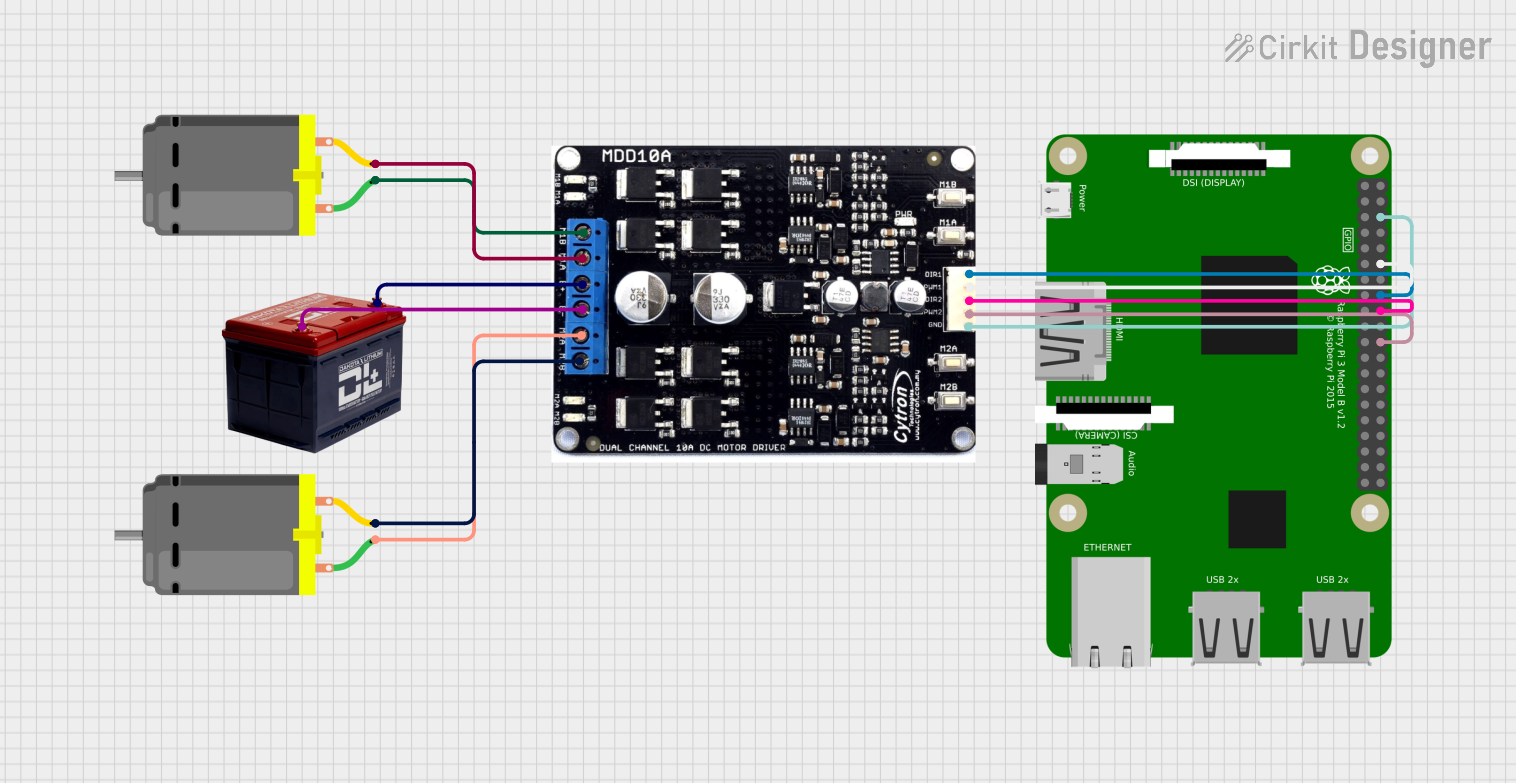
Circuit Documentation
Summary
This circuit is designed to control two DC motors using a Cytron motor driver and a Raspberry Pi 3B. The motors are powered by a 12V battery, and the Raspberry Pi sends control signals to the motor driver to manage the speed and direction of the motors.
Component List
Cytron Motor Driver
- Description: Motor driver for controlling two DC motors.
- Pins: m1b, m1a, b+, b-, m2a, m2b, dir1, pwm1, dir2, pwm2, gnd
Battery 12V
- Description: Power source for the circuit.
- Pins: +, -
DC Motor (Motor 1)
- Description: DC motor to be controlled by the motor driver.
- Pins: pin 1, pin 2
DC Motor (Motor 2)
- Description: DC motor to be controlled by the motor driver.
- Pins: pin 1, pin 2
Raspberry Pi 3B
- Description: Microcontroller for sending control signals to the motor driver.
- Pins: 1, 3, 5, 7, 9, 11, 13, 15, 17, 21, 23, 25, 27, 29, 33, 37, 39, 40, 38, 36, 34, 32, 30, 26, 24, 22, 20, 18, 16, 14, 12, 10, 8, 6, 4, 2(5V), 19, 28, 31, 35
Wiring Details
Cytron Motor Driver
- m1b: Connected to pin 1 of DC Motor 1
- m1a: Connected to pin 2 of DC Motor 1
- b+: Connected to + of Battery 12V
- b-: Connected to - of Battery 12V
- m2a: Connected to pin 1 of DC Motor 2
- m2b: Connected to pin 2 of DC Motor 2
- dir1: Connected to pin 16 of Raspberry Pi 3B
- pwm1: Connected to pin 12 of Raspberry Pi 3B
- dir2: Connected to pin 18 of Raspberry Pi 3B
- pwm2: Connected to pin 22 of Raspberry Pi 3B
- gnd: Connected to pin 6 of Raspberry Pi 3B
Battery 12V
- +: Connected to b+ of Cytron Motor Driver
- -: Connected to b- of Cytron Motor Driver
DC Motor (Motor 1)
- pin 1: Connected to m1b of Cytron Motor Driver
- pin 2: Connected to m1a of Cytron Motor Driver
DC Motor (Motor 2)
- pin 1: Connected to m2a of Cytron Motor Driver
- pin 2: Connected to m2b of Cytron Motor Driver
Raspberry Pi 3B
- Pin 16: Connected to dir1 of Cytron Motor Driver
- Pin 12: Connected to pwm1 of Cytron Motor Driver
- Pin 18: Connected to dir2 of Cytron Motor Driver
- Pin 22: Connected to pwm2 of Cytron Motor Driver
- Pin 6: Connected to gnd of Cytron Motor Driver
Code Documentation
Raspberry Pi 3B Code
#define PWM1 9  // Motor 1 PWM
#define DIR1 8  // Motor 1 arah
#define PWM2 10 // Motor 2 PWM
#define DIR2 7  // Motor 2 arah

void setup() {
  // Setup GPIO
  pinMode(PWM1, OUTPUT);
  pinMode(DIR1, OUTPUT);
  pinMode(PWM2, OUTPUT);
  pinMode(DIR2, OUTPUT);
}

void loop() {
  // Motor 1 maju
  digitalWrite(DIR1, HIGH);
  analogWrite(PWM1, 128); // Kecepatan 50% (0-255)

  // Motor 2 mundur
  digitalWrite(DIR2, LOW);
  analogWrite(PWM2, 192); // Kecepatan 75% (0-255)

  delay(2000);

  // Stop motor
  analogWrite(PWM1, 0);
  analogWrite(PWM2, 0);
  delay(1000);
}
This code sets up the GPIO pins on the Raspberry Pi to control the Cytron motor driver. The setup function initializes the pins, and the loop function controls the motors, making Motor 1 move forward at 50% speed and Motor 2 move backward at 75% speed, then stops both motors after 2 seconds.