
Arduino UNO Temperature Monitoring System with DHT11 and I2C LCD
View and Edit Project In Cirkit Designer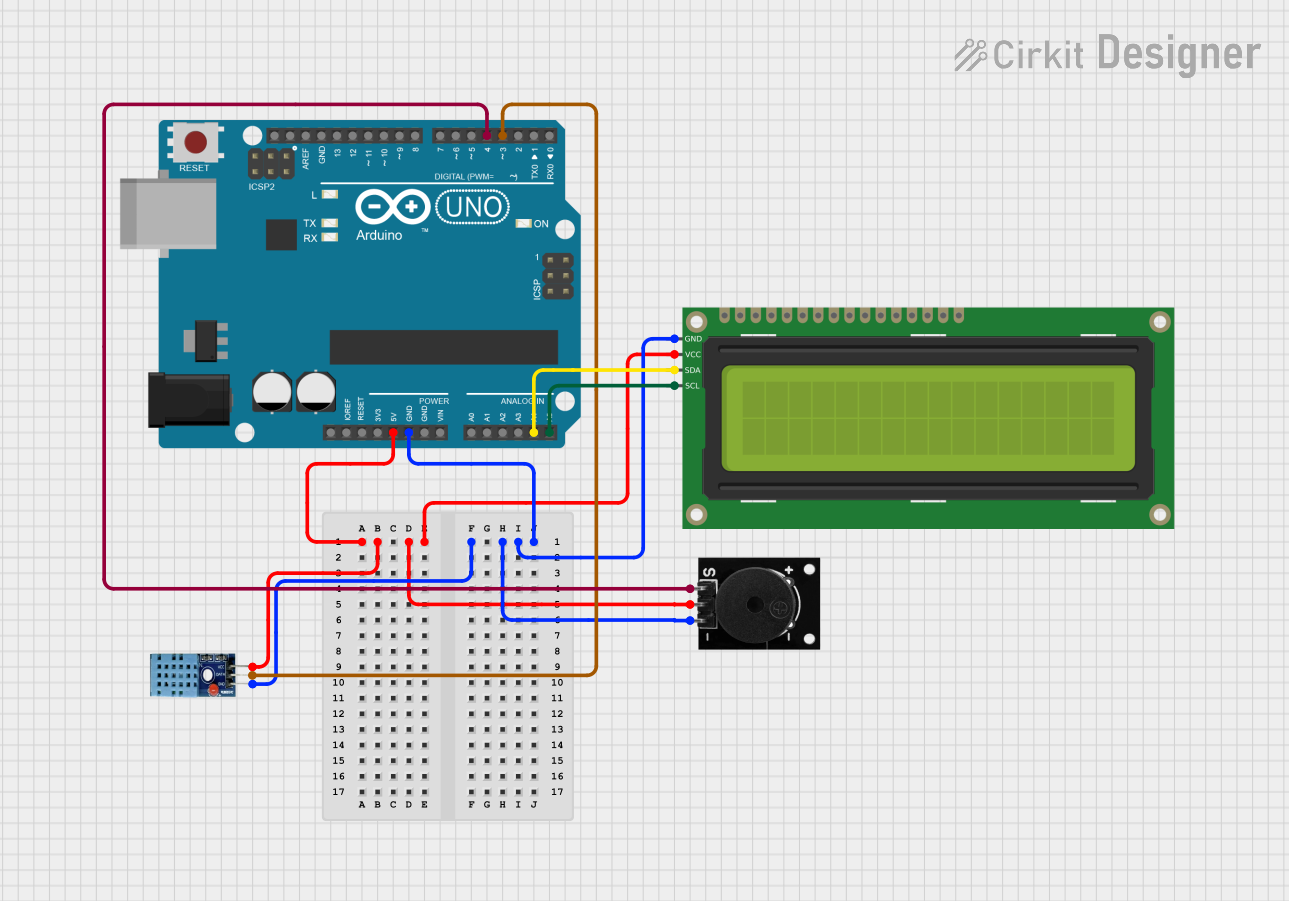
Circuit Documentation
Summary
This circuit is designed to measure temperature using a DHT11 sensor and display the temperature on a 16x2 I2C LCD. Additionally, a passive buzzer is used to alert when the temperature rises significantly. The entire system is controlled by an Arduino UNO.
Component List
Arduino UNO
- Description: A microcontroller board based on the ATmega328P.
- Pins: UNUSED, IOREF, Reset, 3.3V, 5V, GND, Vin, A0, A1, A2, A3, A4, A5, SCL, SDA, AREF, D13, D12, D11, D10, D9, D8, D7, D6, D5, D4, D3, D2, D1, D0
DHT11
- Description: A basic, low-cost digital temperature and humidity sensor.
- Pins: VCC, GND, DATA
16x2 I2C LCD
- Description: A 16x2 character LCD display with I2C interface.
- Pins: GND, VCC, SDA, SCL
Passive Buzzer
- Description: A simple buzzer that can be used to generate sound.
- Pins: S output signal, +VCC, GND
Wiring Details
Arduino UNO
- 5V: Connected to VCC of DHT11, Passive Buzzer, and 16x2 I2C LCD
- GND: Connected to GND of DHT11, Passive Buzzer, and 16x2 I2C LCD
- A4: Connected to SDA of 16x2 I2C LCD
- A5: Connected to SCL of 16x2 I2C LCD
- D4: Connected to S output signal of Passive Buzzer
- D3: Connected to DATA of DHT11
DHT11
- VCC: Connected to 5V of Arduino UNO
- GND: Connected to GND of Arduino UNO
- DATA: Connected to D3 of Arduino UNO
16x2 I2C LCD
- GND: Connected to GND of Arduino UNO
- VCC: Connected to 5V of Arduino UNO
- SDA: Connected to A4 of Arduino UNO
- SCL: Connected to A5 of Arduino UNO
Passive Buzzer
- S output signal: Connected to D4 of Arduino UNO
- +VCC: Connected to 5V of Arduino UNO
- GND: Connected to GND of Arduino UNO
Code Documentation
#include <Wire.h>
#include <LiquidCrystal_I2C.h>
#include <DHT.h>

#define DHTPIN 3
#define DHTTYPE DHT11
#define BUZZER_PIN 4

DHT dht(DHTPIN, DHTTYPE);
LiquidCrystal_I2C lcd(0x27, 16, 2);

float lastTemp = 0.0;

void setup() {
  pinMode(BUZZER_PIN, OUTPUT);
  digitalWrite(BUZZER_PIN, LOW);
  lcd.begin();
  lcd.backlight();
  dht.begin();
  lcd.setCursor(0, 0);
  lcd.print("Temp: ");
}

void loop() {
  float temp = dht.readTemperature();
  if (isnan(temp)) {
    lcd.setCursor(0, 1);
    lcd.print("Error reading");
    delay(5000);
    return;
  }
  lcd.setCursor(6, 0);
  lcd.print(temp);
  lcd.print(" C");
  if (temp - lastTemp >= 0.5) {
    digitalWrite(BUZZER_PIN, HIGH);
    lcd.setCursor(0, 1);
    lcd.print("RUN AWAY!");
  } else {
    digitalWrite(BUZZER_PIN, LOW);
    lcd.setCursor(0, 1);
    lcd.print(" ");
  }
  lastTemp = temp;
  delay(5000);
}
Code Explanation
- Libraries: The code includes libraries for I2C communication, LCD control, and DHT sensor.
- Pin Definitions: Defines the pins for the DHT sensor and the buzzer.
- Setup Function: Initializes the LCD, DHT sensor, and sets the buzzer pin as an output.
- Loop Function: Reads the temperature from the DHT sensor, displays it on the LCD, and activates the buzzer if the temperature rises significantly.