
Arduino UNO Force Sensing Resistor Pressure Sensor with Serial Output
View and Edit Project In Cirkit Designer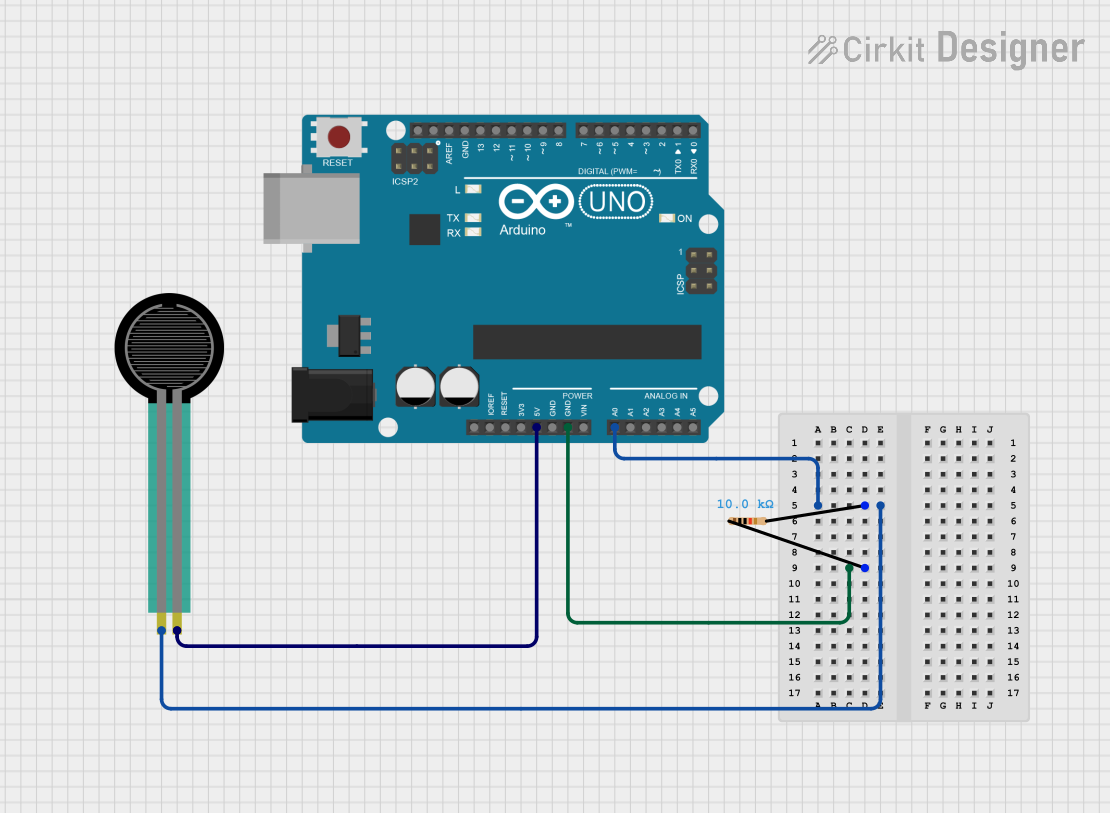
Circuit Documentation
Summary
This circuit consists of a Force Sensing Resistor (FSR) connected to an Arduino UNO through a 10k Ohm resistor. The FSR's resistance changes with applied force, and this change is read by the Arduino UNO's analog input pin. The Arduino UNO then processes this data and outputs it via the serial monitor.
Component List
Resistor
- Component Name: Resistor
- Description: A 10k Ohm resistor used to form a voltage divider with the Force Sensing Resistor.
- Pins: pin1, pin2
- Properties:
- Resistance: 10,000 Ohms
Force Sensing Resistor
- Component Name: Force Sensing Resistor
- Description: A resistor whose resistance changes with applied force.
- Pins: pin 0, pin 1
Arduino UNO
- Component Name: Arduino UNO
- Description: A microcontroller board based on the ATmega328P.
- Pins: UNUSED, IOREF, Reset, 3.3V, 5V, GND, Vin, A0, A1, A2, A3, A4, A5, SCL, SDA, AREF, D13, D12, D11, D10, D9, D8, D7, D6, D5, D4, D3, D2, D1, D0
Wiring Details
Resistor
- pin1 is connected to GND on the Arduino UNO.
- pin2 is connected to pin 0 on the Force Sensing Resistor and A0 on the Arduino UNO.
Force Sensing Resistor
- pin 0 is connected to pin2 on the Resistor and A0 on the Arduino UNO.
- pin 1 is connected to 5V on the Arduino UNO.
Arduino UNO
- A0 is connected to pin2 on the Resistor and pin 0 on the Force Sensing Resistor.
- GND is connected to pin1 on the Resistor.
- 5V is connected to pin 1 on the Force Sensing Resistor.
Code Documentation
Arduino UNO Code
// Pin configuration
const int FSR_PIN = A0; // Connect FSR to A0
int fsrValue = 0;       // Variable to store FSR reading

void setup() {
  Serial.begin(9600); // Start serial communication
}

void loop() {
  fsrValue = analogRead(FSR_PIN); // Read the analog value from the FSR
  Serial.print("FSR Value: ");
  Serial.println(fsrValue); // Print the value to the Serial Monitor

  delay(500); // Delay for readability
}
- FSR_PIN: The analog pin A0 on the Arduino UNO where the FSR is connected.
- fsrValue: A variable to store the analog reading from the FSR.
- setup(): Initializes serial communication at 9600 baud rate.
- loop(): Continuously reads the analog value from the FSR, prints it to the serial monitor, and then delays for 500 milliseconds for readability.