
ESP32-Based Water Quality Monitoring System with LCD Display
View and Edit Project In Cirkit Designer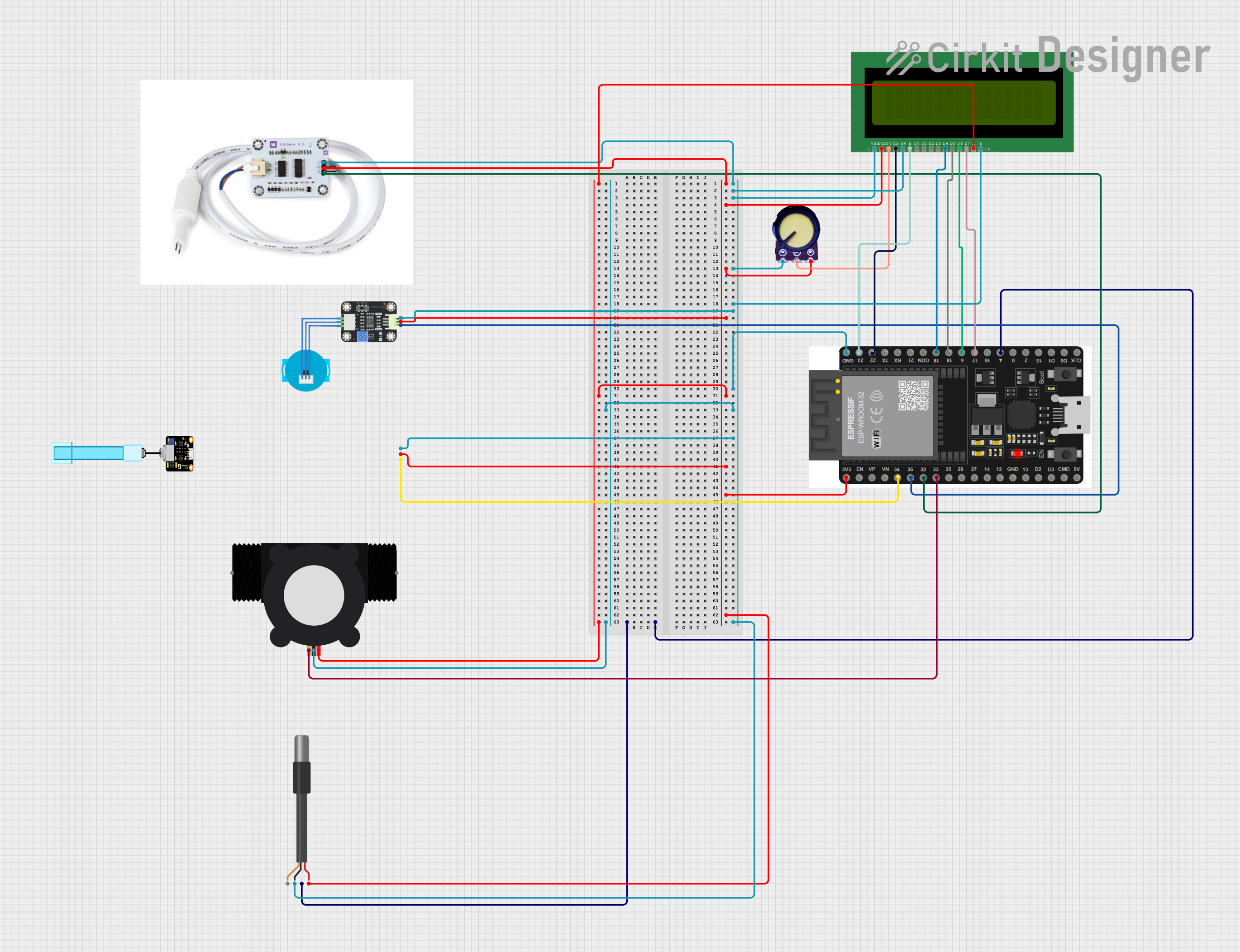
Circuit Documentation
Summary
This circuit is designed to read data from various water quality sensors (TDS, Turbidity, PH, Flow Meter, and Temperature) connected to an ESP32 microcontroller. The sensor readings are displayed on a 16x2 LCD display. The ESP32 reads the sensor data and processes it to be shown on the LCD.
Component List
ESP32 38 PINS
- Description: A powerful microcontroller with built-in Wi-Fi and Bluetooth capabilities.
- Pins: GND, 23, 22/SCL, 1, 2, 21/SDA, 19, 18, 5, 17/TX2, 16/RX2, 4, 0, 15, D1, D0, CLK, 3V3, EN, VP, VN, 34, 35, 32, 33, 25, 26, 27, 14, 12, 13, D2, D3, 11, 5V/VIN
TDS-sensor, voor waterkwaliteit
- Description: Measures the Total Dissolved Solids (TDS) in water.
- Pins: gnd, v, analog pin
Turbidity Sensor
- Description: Measures the turbidity (cloudiness) of water.
- Pins: OUT, VCC, GND
PH Meter
- Description: Measures the pH level of water.
- Pins: Signal, VCC, GND
YF-S201 Water Flow Meter
- Description: Measures the flow rate of water.
- Pins: SIG, GND, VCC
LCD 16x2 (Wokwi Compatible)
- Description: A 16x2 character LCD display.
- Pins: VSS, VDD, V0, RS, RW, E, D0, D1, D2, D3, D4, D5, D6, D7, A, K
DS18B20 1-Wire Temperature Sensor Probe Cable
- Description: Measures the temperature of water.
- Pins: shield, GND, DQ, VDD
Potentiometer
- Description: A variable resistor used to adjust the contrast of the LCD.
- Pins: GND, Output, VCC
Wiring Details
ESP32 38 PINS
- GND: Connected to GND of TDS-sensor, Turbidity Sensor, PH Meter, DS18B20 Temperature Sensor, YF-S201 Water Flow Meter, LCD (VSS, RW, K), and Potentiometer.
- 3V3: Connected to VCC of TDS-sensor, Turbidity Sensor, PH Meter, DS18B20 Temperature Sensor, YF-S201 Water Flow Meter, LCD (VDD, A), and Potentiometer.
- 4: Connected to DQ of DS18B20 Temperature Sensor.
- 22/SCL: Connected to RS of LCD.
- 23: Connected to E of LCD.
- 19: Connected to D4 of LCD.
- 18: Connected to D5 of LCD.
- 5: Connected to D6 of LCD.
- 17/TX2: Connected to D7 of LCD.
- 32: Connected to analog pin of TDS-sensor.
- 33: Connected to SIG of YF-S201 Water Flow Meter.
- 34: Connected to Signal of PH Meter.
- 35: Connected to OUT of Turbidity Sensor.
TDS-sensor, voor waterkwaliteit
- gnd: Connected to GND.
- v: Connected to 3V3.
- analog pin: Connected to pin 32 of ESP32.
Turbidity Sensor
- OUT: Connected to pin 35 of ESP32.
- VCC: Connected to 3V3.
- GND: Connected to GND.
PH Meter
- Signal: Connected to pin 34 of ESP32.
- VCC: Connected to 3V3.
- GND: Connected to GND.
YF-S201 Water Flow Meter
- SIG: Connected to pin 33 of ESP32.
- GND: Connected to GND.
- VCC: Connected to 3V3.
LCD 16x2 (Wokwi Compatible)
- VSS: Connected to GND.
- VDD: Connected to 3V3.
- V0: Connected to Output of Potentiometer.
- RS: Connected to pin 22/SCL of ESP32.
- RW: Connected to GND.
- E: Connected to pin 23 of ESP32.
- D4: Connected to pin 19 of ESP32.
- D5: Connected to pin 18 of ESP32.
- D6: Connected to pin 5 of ESP32.
- D7: Connected to pin 17/TX2 of ESP32.
- A: Connected to 3V3.
- K: Connected to GND.
DS18B20 1-Wire Temperature Sensor Probe Cable
- shield: Not connected.
- GND: Connected to GND.
- DQ: Connected to pin 4 of ESP32.
- VDD: Connected to 3V3.
Potentiometer
- GND: Connected to GND.
- Output: Connected to V0 of LCD.
- VCC: Connected to 3V3.
Code Documentation
ESP32 Code
/*
 * This Arduino Sketch reads data from various water quality sensors
 * (TDS, Turbidity, PH, Flow Meter, and Temperature) connected to an ESP32.
 * The sensor readings are displayed on a 16x2 LCD display.
 */

#include <Wire.h>
#include <LiquidCrystal.h>
#include <OneWire.h>
#include <DallasTemperature.h>

// LCD pins
const int rs = 22, en = 23, d4 = 19, d5 = 18, d6 = 5, d7 = 17;
LiquidCrystal lcd(rs, en, d4, d5, d6, d7);

// DS18B20 Temperature Sensor
#define ONE_WIRE_BUS 4
OneWire oneWire(ONE_WIRE_BUS);
DallasTemperature sensors(&oneWire);

// Sensor pins
const int tdsPin = 32;
const int turbidityPin = 35;
const int phPin = 34;
const int flowMeterPin = 33;

void setup() {
  lcd.begin(16, 2);
  sensors.begin();
  pinMode(tdsPin, INPUT);
  pinMode(turbidityPin, INPUT);
  pinMode(phPin, INPUT);
  pinMode(flowMeterPin, INPUT);
}

void loop() {
  sensors.requestTemperatures();
  float temperature = sensors.getTempCByIndex(0);

  int tdsValue = analogRead(tdsPin);
  int turbidityValue = analogRead(turbidityPin);
  int phValue = analogRead(phPin);
  int flowMeterValue = digitalRead(flowMeterPin);

  lcd.clear();
  lcd.setCursor(0, 0);
  lcd.print("Temp: ");
  lcd.print(temperature);
  lcd.print("C");

  lcd.setCursor(0, 1);
  lcd.print("TDS: ");
  lcd.print(tdsValue);
  lcd.print(" PH: ");
  lcd.print(phValue);

  delay(2000);

  lcd.clear();
  lcd.setCursor(0, 0);
  lcd.print("Turb: ");
  lcd.print(turbidityValue);

  lcd.setCursor(0, 1);
  lcd.print("Flow: ");
  lcd.print(flowMeterValue);

  delay(2000);
}
TDS-sensor Code
void setup() {
  // put your setup code here, to run once:
}

void loop() {
  // put your main code here, to run repeatedly:
}
Documentation File
// No additional documentation provided.