
Solar-Powered Arduino Algae Control System with TDS Sensor and Water Pump
View and Edit Project In Cirkit Designer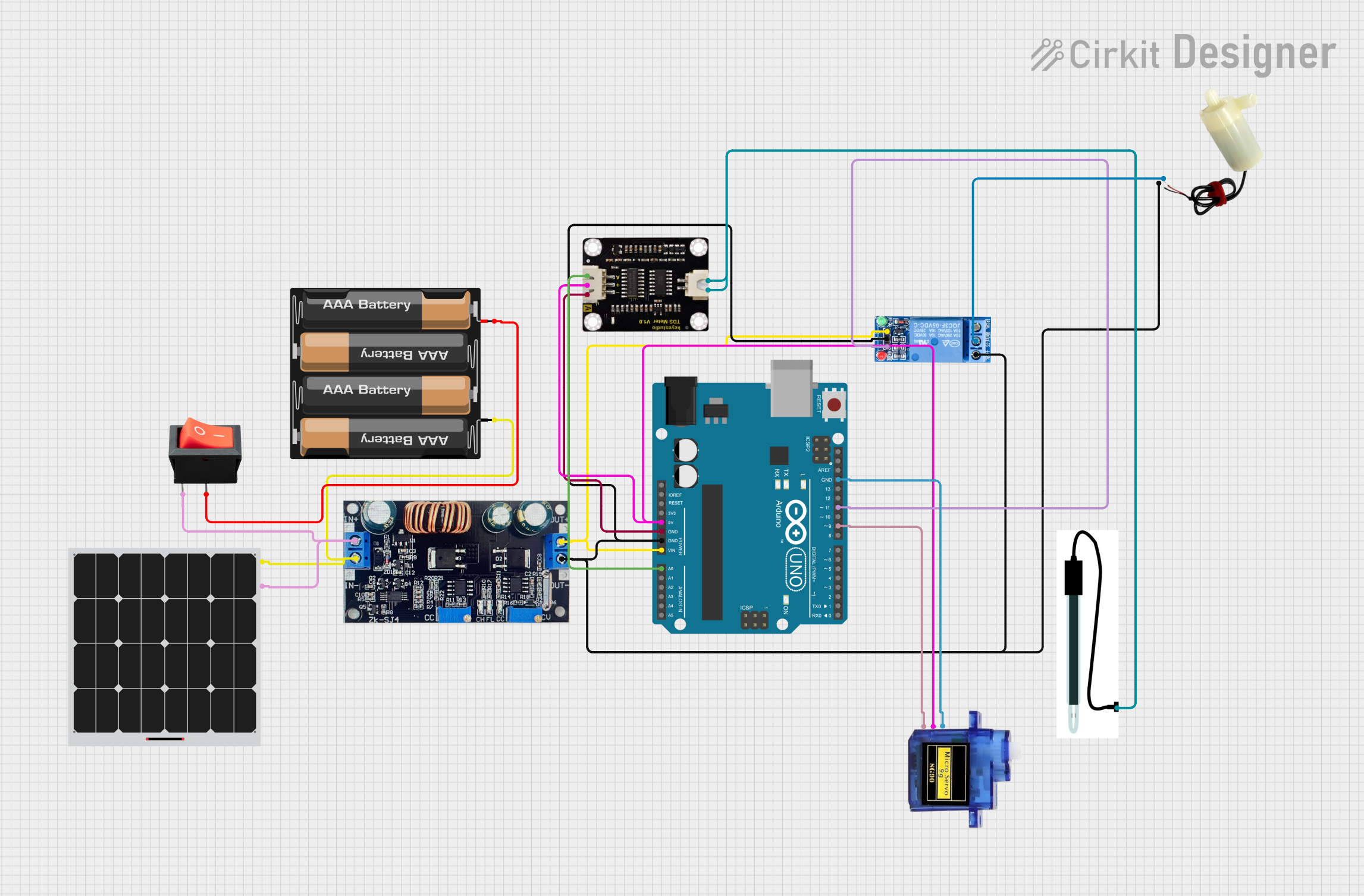
Circuit Documentation
Summary
This document provides a detailed overview of an Algae Control System circuit. The system is designed to monitor water quality using a TDS sensor and control a water pump and a servo motor based on the sensor readings. The circuit is powered by a solar panel and a battery pack, and it includes an Arduino UNO microcontroller to manage the operations.
Component List
Solar Panel
- Description: Converts sunlight into electrical energy.
- Pins: +, -
Charger
- Description: Charges the battery pack using the solar panel.
- Pins: IN+, IN-, OUT+, OUT-
Rocker Switch
- Description: Manually controls the power flow from the solar panel to the charger.
- Pins: input, output
4 x AAA Battery Mount
- Description: Holds and connects four AAA batteries to provide power.
- Pins: +, -
Arduino UNO
- Description: Microcontroller used to control the system.
- Pins: UNUSED, IOREF, Reset, 3.3V, 5V, GND, Vin, A0, A1, A2, A3, A4, A5, SCL, SDA, AREF, D13, D12, D11, D10, D9, D8, D7, D6, D5, D4, D3, D2, D1, D0
TDS Sensor
- Description: Measures the Total Dissolved Solids (TDS) in the water.
- Pins: P1, P2, +, -, A
1 Channel Relay 5V
- Description: Controls the water pump based on the Arduino's signal.
- Pins: VCC, GND, IN, NC, COM, NO
5V Mini Water Pump
- Description: Pumps water for filtration.
- Pins: positive pin, negative pin
Micro Servo 9G
- Description: Scrapes excess algae.
- Pins: GND, +5V, PWM
Probe EC Sensor
- Description: Measures electrical conductivity in the water.
- Pins: to Probe
Wiring Details
Solar Panel
+ connected to:
- Rocker Switch (input)
- Charger (IN+)
- connected to:
- Charger (IN-)
- 4 x AAA Battery Mount (-)
Charger
IN+ connected to:
- Solar Panel (+)
- Rocker Switch (input)
IN- connected to:
- Solar Panel (-)
- 4 x AAA Battery Mount (-)
OUT+ connected to:
- Arduino UNO (Vin)
- 1 Channel Relay 5V (VCC)
OUT- connected to:
- Arduino UNO (GND)
- 1 Channel Relay 5V (GND)
- 1 Channel Relay 5V (NC)
- 5V Mini Water Pump (negative pin)
Rocker Switch
input connected to:
- Solar Panel (+)
- Charger (IN+)
output connected to:
- 4 x AAA Battery Mount (+)
4 x AAA Battery Mount
+ connected to:
- Rocker Switch (output)
- connected to:
- Solar Panel (-)
- Charger (IN-)
Arduino UNO
Vin connected to:
- Charger (OUT+)
GND connected to:
- Charger (OUT-)
- 1 Channel Relay 5V (GND)
- Micro Servo 9G (GND)
- TDS Sensor (-)
5V connected to:
- Micro Servo 9G (+5V)
- TDS Sensor (+)
A0 connected to:
- TDS Sensor (A)
D11 connected to:
- 1 Channel Relay 5V (IN)
D9 connected to:
- Micro Servo 9G (PWM)
TDS Sensor
+ connected to:
- Arduino UNO (5V)
- connected to:
- Arduino UNO (GND)
A connected to:
- Arduino UNO (A0)
P1 connected to:
- Probe EC Sensor (to Probe)
P2 connected to:
- Probe EC Sensor (to Probe)
1 Channel Relay 5V
VCC connected to:
- Charger (OUT+)
GND connected to:
- Charger (OUT-)
- Arduino UNO (GND)
IN connected to:
- Arduino UNO (D11)
NC connected to:
- Charger (OUT-)
- 5V Mini Water Pump (negative pin)
COM connected to:
- 5V Mini Water Pump (positive pin)
5V Mini Water Pump
positive pin connected to:
- 1 Channel Relay 5V (COM)
negative pin connected to:
- Charger (OUT-)
- 1 Channel Relay 5V (NC)
Micro Servo 9G
GND connected to:
- Arduino UNO (GND)
+5V connected to:
- Arduino UNO (5V)
PWM connected to:
- Arduino UNO (D9)
Probe EC Sensor
- to Probe connected to:
- TDS Sensor (P1)
- TDS Sensor (P2)
Documented Code
// Arduino Sketch for Algae Control System
// This code reads the TDS sensor to monitor water quality. If the TDS value
// exceeds a threshold, it activates a relay to turn on a water pump for
// filtration. Additionally, a servo motor is used to scrape excess algae.

#include <Servo.h>

// Pin definitions
const int tdsSensorPin = A0; // TDS sensor connected to analog pin A0
const int relayPin = 11;     // Relay control pin connected to digital pin 11
const int servoPin = 9;      // Servo control pin connected to digital pin 9

// TDS threshold for algae control
const int tdsThreshold = 500;

Servo myServo;

void setup() {
  // Initialize serial communication
  Serial.begin(9600);

  // Initialize relay pin as output
  pinMode(relayPin, OUTPUT);
  digitalWrite(relayPin, LOW); // Ensure relay is off

  // Initialize servo
  myServo.attach(servoPin);
  myServo.write(0); // Initial position
}

void loop() {
  // Read TDS sensor value
  int tdsValue = analogRead(tdsSensorPin);
  Serial.print("TDS Value: ");
  Serial.println(tdsValue);

  // Control water pump based on TDS value
  if (tdsValue > tdsThreshold) {
    digitalWrite(relayPin, HIGH); // Turn on water pump
  } else {
    digitalWrite(relayPin, LOW); // Turn off water pump
  }

  // Control servo to scrape algae
  myServo.write(90); // Move servo to 90 degrees
  delay(1000); // Wait for 1 second
  myServo.write(0); // Move servo back to 0 degrees
  delay(1000); // Wait for 1 second

  // Delay before next reading
  delay(2000);
}
This code initializes the TDS sensor, relay, and servo motor. It continuously reads the TDS value and controls the water pump and servo motor based on the sensor readings. The relay is used to turn the water pump on and off, while the servo motor is used to scrape excess algae.