
Arduino UNO Based IR Sensor and Bluetooth Communication System
View and Edit Project In Cirkit Designer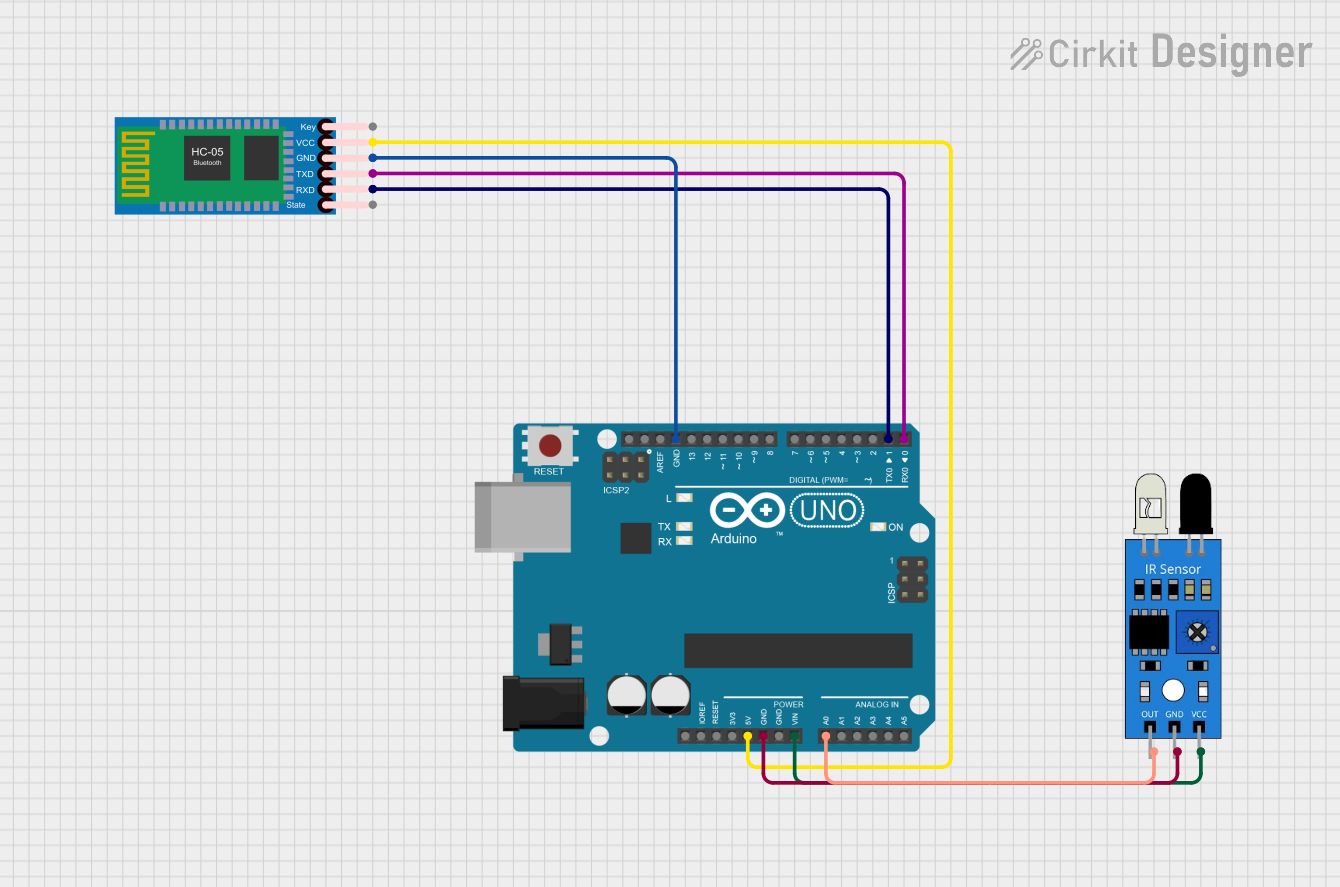
Circuit Documentation
Summary
The circuit in question consists of an Arduino UNO microcontroller, an HC-05 Bluetooth Module, and an IR sensor. The Arduino UNO serves as the central processing unit, managing inputs and outputs, including communication with the Bluetooth module and reading signals from the IR sensor. The HC-05 Bluetooth Module enables wireless communication, and the IR sensor detects infrared signals, which can be used for various applications such as proximity detection or remote control reception.
Component List
Arduino UNO
- Description: A microcontroller board based on the ATmega328P.
- Pins Used:
- 5V
- GND
- Vin
- A0
- D0 (RX)
- D1 (TX)
HC-05 Bluetooth Module
- Description: A wireless communication module that allows for Bluetooth connectivity.
- Pins Used:
- VCC
- GND
- TXD
- RXD
IR Sensor
- Description: A sensor that detects infrared light, commonly used in proximity and object detection.
- Pins Used:
- out
- gnd
- vcc
Wiring Details
Arduino UNO
- 5V connected to HC-05 Bluetooth Module VCC
- GND connected to:
- IR Sensor gnd
- HC-05 Bluetooth Module GND
- Vin connected to IR Sensor vcc
- A0 connected to IR Sensor out
- D0 (RX) connected to HC-05 Bluetooth Module TXD
- D1 (TX) connected to HC-05 Bluetooth Module RXD
HC-05 Bluetooth Module
- VCC connected to Arduino UNO 5V
- GND connected to Arduino UNO GND
- TXD connected to Arduino UNO D0 (RX)
- RXD connected to Arduino UNO D1 (TX)
IR Sensor
- out connected to Arduino UNO A0
- gnd connected to Arduino UNO GND
- vcc connected to Arduino UNO Vin
Documented Code
Arduino UNO Code (sketch.ino)
void setup() {
  // put your setup code here, to run once:

}

void loop() {
  // put your main code here, to run repeatedly:

}
Note: The code provided for the Arduino UNO is a template with empty setup and loop functions. This code should be expanded to initialize the components and define the behavior of the circuit based on the requirements of the application.
Additional Files
- documentation.txt: This file is mentioned but no content is provided. It is likely intended for additional notes or manual documentation.