
Arduino UNO-Based Battery-Powered DC Motor Controller with DHT11 Sensor
View and Edit Project In Cirkit Designer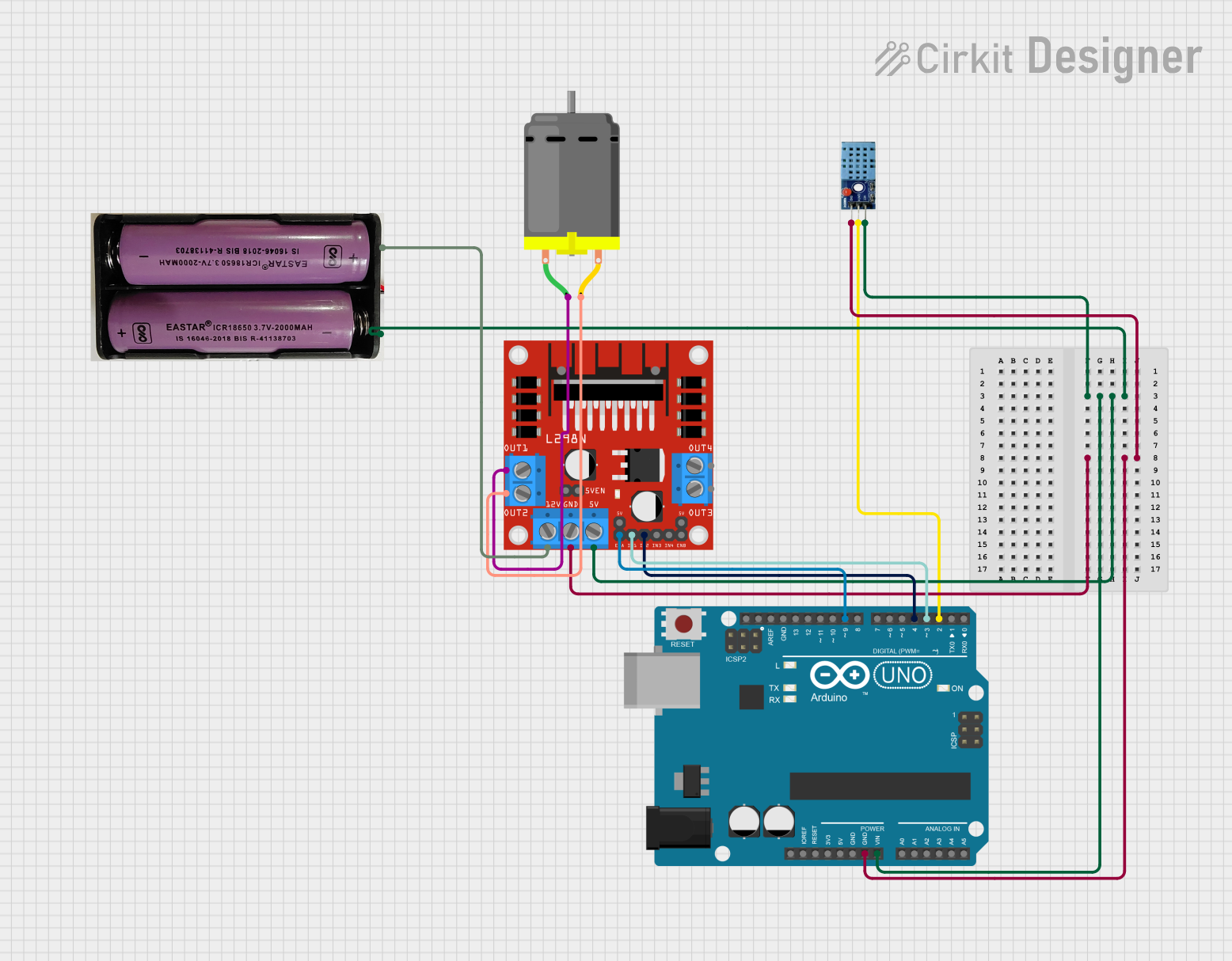
Circuit Documentation
Summary
This document provides a detailed overview of a circuit that includes an Arduino UNO microcontroller, a DC motor, a DHT 11 temperature and humidity sensor, an L298N DC motor driver, and a 7.4V power source. The circuit is designed to control a DC motor and read temperature and humidity data from the DHT 11 sensor.
Component List
7.4V Power Source
- Description: Provides power to the circuit.
- Pins: +, -
Arduino UNO
- Description: Microcontroller used to control the circuit.
- Pins: UNUSED, IOREF, Reset, 3.3V, 5V, GND, Vin, A0, A1, A2, A3, A4, A5, SCL, SDA, AREF, D13, D12, D11, D10, D9, D8, D7, D6, D5, D4, D3, D2, D1, D0
DC Motor
- Description: Actuator used to perform mechanical work.
- Pins: pin 1, pin 2
DHT 11
- Description: Temperature and humidity sensor.
- Pins: VCC, GND, DATA
L298N DC Motor Driver
- Description: Motor driver used to control the DC motor.
- Pins: OUT1, OUT2, 12V, GND, 5V, OUT3, OUT4, 5V-ENA-JMP-I, 5V-ENA-JMP-O, +5V-J1, +5V-J2, ENA, IN1, IN2, IN3, IN4, ENB
Wiring Details
7.4V Power Source
- + connected to 12V of L298N DC Motor Driver
- - connected to Vin of Arduino UNO
Arduino UNO
- Vin connected to - of 7.4V Power Source
- GND connected to GND of L298N DC Motor Driver and GND of DHT 11
- D9 connected to ENA of L298N DC Motor Driver
- D4 connected to IN2 of L298N DC Motor Driver
- D3 connected to IN1 of L298N DC Motor Driver
- D2 connected to DATA of DHT 11
DC Motor
- pin 1 connected to OUT1 of L298N DC Motor Driver
- pin 2 connected to OUT2 of L298N DC Motor Driver
DHT 11
- VCC connected to 5V of L298N DC Motor Driver
- GND connected to GND of Arduino UNO
- DATA connected to D2 of Arduino UNO
L298N DC Motor Driver
- 5V connected to Vin of Arduino UNO
- GND connected to GND of Arduino UNO and GND of DHT 11
- 12V connected to + of 7.4V Power Source
- ENA connected to D9 of Arduino UNO
- IN1 connected to D3 of Arduino UNO
- IN2 connected to D4 of Arduino UNO
- OUT1 connected to pin 1 of DC Motor
- OUT2 connected to pin 2 of DC Motor
Documented Code
Arduino UNO Code (sketch.ino)
void setup() {
  // put your setup code here, to run once:

}

void loop() {
  // put your main code here, to run repeatedly:

}
Additional Documentation (documentation.txt)
This document provides a comprehensive overview of the circuit, including a summary, component list, wiring details, and documented code.