
Arduino UNO-Based Password-Protected Servo Lock with 4x4 Keypad
View and Edit Project In Cirkit Designer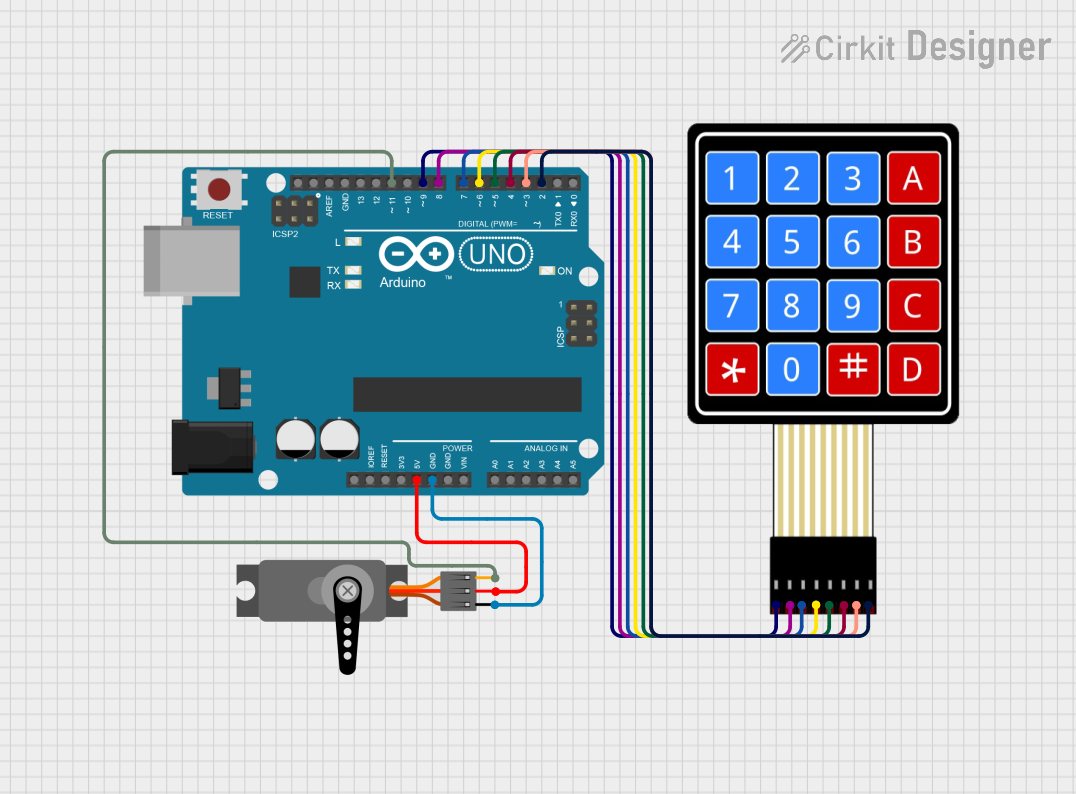
Circuit Documentation
Summary
This circuit is designed to interface an Arduino UNO with a 4x4 Membrane Matrix Keypad and a Servo motor. The Arduino UNO reads inputs from the keypad and controls the position of the Servo motor based on the input sequence, which acts as a password. The circuit is intended to function as a simple security system, where the correct password sequence unlocks the Servo motor, potentially controlling a lock mechanism.
Component List
Arduino UNO
Description: A microcontroller board based on the ATmega328P.
Purpose: Acts as the central processing unit of the circuit, reading keypad inputs, controlling the Servo motor, and managing the locking logic.
4X4 Membrane Matrix Keypad
Description: A 16-button keypad arranged in a 4x4 matrix.
Purpose: Provides user input to the system, allowing the entry of a password sequence.
Servo
Description: A rotary actuator or linear actuator that allows for precise control of angular or linear position.
Purpose: Acts as the locking mechanism, changing position based on the password entered on the keypad.
Wiring Details
Arduino UNO
Digital Pins:
- D9 to Keypad R1
- D8 to Keypad R2
- D7 to Keypad R3
- D6 to Keypad R4
- D5 to Keypad C1
- D4 to Keypad C2
- D3 to Keypad C3
- D2 to Keypad C4
- D11 to Servo PWM
Power Pins:
- 5V to Servo VCC
- GND to Servo GND
4X4 Membrane Matrix Keypad
Row Pins:
- R1 to Arduino D9
- R2 to Arduino D8
- R3 to Arduino D7
- R4 to Arduino D6
Column Pins:
- C1 to Arduino D5
- C2 to Arduino D4
- C3 to Arduino D3
- C4 to Arduino D2
Servo
Pins:
- VCC to Arduino 5V
- GND to Arduino GND
- PWM to Arduino D11
Documented Code
#include <Servo.h>
#include <Keypad.h>

Servo ServoMotor;
char* password = "0221"; // You can change the Password

int position = 0;
const byte ROWS = 4;
const byte COLS = 4;
char keys[ROWS][COLS] = {
  {'1','2','3','A'},
  {'4','5','6','B'},
  {'7','8','9','C'},
  {'*','0','#','D'}
};
byte rowPins[ROWS] = { 9, 8, 7, 6 };
byte colPins[COLS] = { 5, 4, 3, 2 };
Keypad keypad = Keypad( makeKeymap(keys), rowPins, colPins, ROWS, COLS );

// Create two variables for LED Lights
int RedpinLock = 12;
int GreenpinUnlock = 10;

unsigned long lastUnlockedTime = 0; // To store the time when unlocked
bool isUnlocked = false; // To track the current state

void setup()
{
  pinMode(RedpinLock, OUTPUT);
  pinMode(GreenpinUnlock, OUTPUT);
  ServoMotor.attach(11);
  LockedPosition(true);
}

void loop()
{
  char key = keypad.getKey();

  // Reset position if '*' or '#' is pressed
  if (key == '*' || key == '#')
  {
    position = 0;
    LockedPosition(true);
  }

  // Check if key matches the password
  if (key == password[position])
  {
    position++;
  }

  // Unlock if password is correct
  if (position == 4)
  {
    LockedPosition(false);
    lastUnlockedTime = millis(); // Store the unlock time
    isUnlocked = true; // Mark as unlocked
    position = 0; // Reset position
  }

  // Auto-lock after 5000ms
  if (isUnlocked && (millis() - lastUnlockedTime >= 20000))
  {
    LockedPosition(true);
    isUnlocked = false; // Mark as locked
  }

  delay(100);
}

void LockedPosition(int locked)
{
  if (locked)
  {
    digitalWrite(RedpinLock, HIGH);
    digitalWrite(GreenpinUnlock, LOW);
    ServoMotor.write(11); // Locked position
  }
  else
  {
    digitalWrite(RedpinLock, LOW);
    digitalWrite(GreenpinUnlock, HIGH);
    ServoMotor.write(90); // Unlocked position
  }
}
This code is responsible for initializing the keypad and servo motor, reading the input from the keypad, and controlling the servo motor's position based on the input password. The servo motor is locked or unlocked based on the correct sequence of keys pressed. The code also includes a timeout feature that automatically locks the servo after a certain period of time.