
ESP32-Based Temperature Monitoring System with LCD Display and Piezo Buzzer Alert
View and Edit Project In Cirkit Designer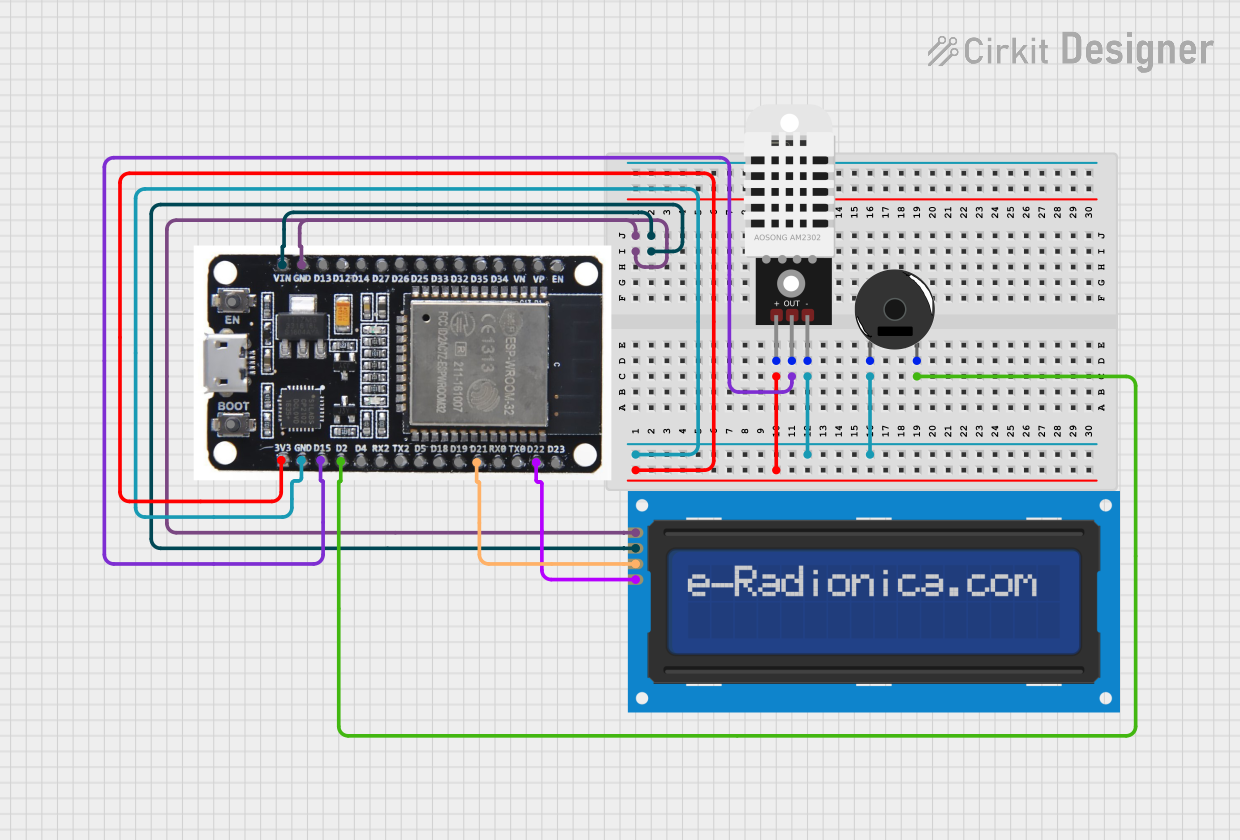
Circuit Documentation
Summary
This circuit is designed to monitor temperature using a DHT22 sensor and display the readings on a 16x2 I2C LCD screen. If the temperature goes outside the normal range (36.5°C to 37.5°C), a Piezo buzzer will sound an alert. The entire system is controlled by an ESP32 microcontroller.
Component List
ESP32
- Description: A powerful microcontroller with built-in Wi-Fi and Bluetooth capabilities.
- Pins: EN, VP, VN, D34, D35, D32, D33, D25, D26, D27, D14, D12, D13, GND, VIN, 3V3, D15, D2, D4, RX2, TX2, D5, D18, D19, D21, RX0, TX0, D22, D23, BOOT
LCD screen 16x2 I2C
- Description: A 16x2 character LCD display with I2C interface.
- Pins: SCL, SDA, VCC, GND
DHT22
- Description: A digital temperature and humidity sensor.
- Pins: +, Out, -
Piezo Buzzer
- Description: An electronic device that produces a tone when a voltage is applied.
- Pins: pin 1, pin 2
Wiring Details
ESP32
GND is connected to:
- GND of LCD screen 16x2 I2C
-
- of DHT22
- pin 1 of Piezo Buzzer
VIN is connected to VCC of LCD screen 16x2 I2C
3V3 is connected to + of DHT22
D15 is connected to Out of DHT22
D2 is connected to pin 2 of Piezo Buzzer
D21 is connected to SDA of LCD screen 16x2 I2C
D22 is connected to SCL of LCD screen 16x2 I2C
LCD screen 16x2 I2C
GND is connected to GND of ESP32
VCC is connected to VIN of ESP32
SDA is connected to D21 of ESP32
SCL is connected to D22 of ESP32
DHT22
+ is connected to 3V3 of ESP32
Out is connected to D15 of ESP32
- is connected to GND of ESP32 and pin 1 of Piezo Buzzer
Piezo Buzzer
pin 1 is connected to GND of ESP32 and - of DHT22
pin 2 is connected to D2 of ESP32
Code Documentation
#include <DHT.h>             // مكتبة مستشعر DHT
#include <LiquidCrystal.h>   // مكتبة شاشة LCD

// إعدادات المستشعر والشاشة
#define DHTPIN 15            // رقم الـ PIN الموصول مع DHT
#define DHTTYPE DHT22        // نوع المستشعر
DHT dht(DHTPIN, DHTTYPE);

// إعداد الـ LCD (تعديل حسب التوصيل)
LiquidCrystal lcd(4, 5, 6, 7, 8, 9);

// إعداد الـ Piezo
#define PIEZO_PIN 10         // رقم الـ PIN الموصول مع Piezo

void setup() {
  // إعداد شاشة الـ LCD
  lcd.begin(16, 2); // شاشة 16x2
  lcd.print("Initializing...");

  // إعداد المستشعر
  dht.begin();

  // إعداد Piezo كـ OUTPUT
  pinMode(PIEZO_PIN, OUTPUT);

  // تأكيد البداية
  lcd.clear();
  lcd.print("Ready...");
  delay(2000);
}

void loop() {
  // قراءة درجة الحرارة
  float temp = dht.readTemperature();

  // فحص القراءة
  if (isnan(temp)) {
    lcd.clear();
    lcd.print("Sensor Error");
    delay(2000);
    return;
  }

  // عرض درجة الحرارة
  lcd.clear();
  lcd.print("Temp: ");
  lcd.print(temp);
  lcd.print(" C");

  // التحقق من درجة الحرارة الطبيعية
  if (temp < 36.5 || temp > 37.5) {
    digitalWrite(PIEZO_PIN, HIGH); // تشغيل Piezo
    lcd.setCursor(0, 1);
    lcd.print("ALERT! Temp High");
  } else {
    digitalWrite(PIEZO_PIN, LOW); // إيقاف Piezo
  }

  delay(2000); // تحديث كل ثانيتين
}
This code initializes the DHT22 sensor and the LCD screen, reads the temperature from the sensor, and displays it on the LCD. If the temperature is outside the normal range, the Piezo buzzer is activated to alert the user. The loop runs every 2 seconds to update the temperature reading and check the conditions.