
Arduino Nano Controlled Multi-Servo System with Bluetooth Interface
View and Edit Project In Cirkit Designer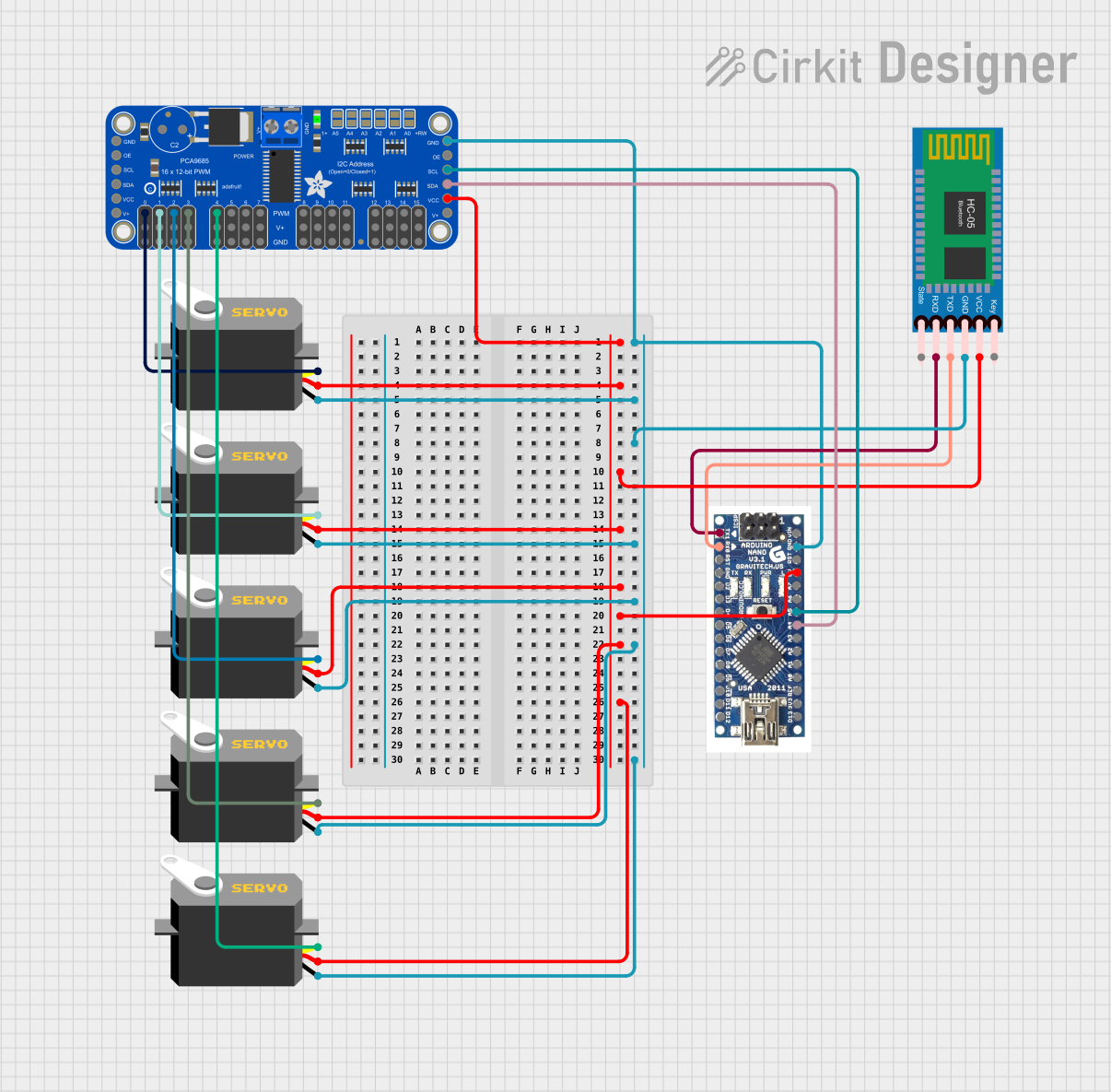
Circuit Documentation
Summary of the Circuit
This circuit is designed to control multiple servo motors using an Arduino Nano microcontroller in conjunction with an Adafruit 16-Channel 12-bit PWM Servo Driver. The Arduino Nano communicates with the servo driver over I2C and sends PWM signals to control the position of the servos. Additionally, an HC-05 Bluetooth module is interfaced with the Arduino Nano to receive control commands wirelessly. The circuit is powered through the Arduino Nano's 5V output, which is distributed to the servo driver, the Bluetooth module, and the servos.
Component List
Arduino Nano
- Microcontroller board based on the ATmega328P
- Provides I2C communication via A4 (SDA) and A5 (SCL) pins
- Serial communication through RX0 and TX1 pins for Bluetooth module interfacing
- Digital pins D2-D13 and analog pins A0-A7 for various I/O functions
- 5V and GND pins for power distribution
Servo Motors
- Five identical servo motors
- Each servo has three pins: GND, VCC, and Pulse
- Controlled by PWM signals to set the angle of the servo arm
HC-05 Bluetooth Module
- Wireless communication module for Bluetooth interfacing
- TXD and RXD pins for serial communication with the Arduino Nano
- VCC and GND pins for power supply
Adafruit 16-Channel 12-bit PWM Servo Driver - I2C
- I2C-based PWM driver capable of controlling up to 16 servos
- SDA and SCL pins for I2C communication with the Arduino Nano
- PWM0-PWM15 pins for outputting PWM signals to servos
- 5V and GND pins for power supply
Wiring Details
Arduino Nano
- 5V connected to VCC of the servo driver, Bluetooth module, and all servos
- GND connected to GND of the servo driver, Bluetooth module, and all servos
- A4 (SDA) connected to SDA of the servo driver
- A5 (SCL) connected to SCL of the servo driver
- RX0 connected to TXD of the Bluetooth module
- TX1 connected to RXD of the Bluetooth module
Servo Motors
- GND connected to common ground
- VCC connected to common 5V supply
- Pulse connected to individual PWM channels on the servo driver (PWM0-PWM4)
HC-05 Bluetooth Module
- VCC connected to 5V supply
- GND connected to common ground
- TXD connected to RX0 on the Arduino Nano
- RXD connected to TX1 on the Arduino Nano
Adafruit 16-Channel 12-bit PWM Servo Driver - I2C
- VCC connected to 5V supply
- GND connected to common ground
- SDA connected to A4 on the Arduino Nano
- SCL connected to A5 on the Arduino Nano
- PWM0-PWM4 connected to pulse pins of the five servos
Documented Code
#include <Wire.h>
#include <Adafruit_PWMServoDriver.h>

Adafruit_PWMServoDriver pwm = Adafruit_PWMServoDriver();

int servoPins[] = {0, 1, 2, 3, 4}; // PWM driver channels for 5 servos
int servoAngles[5]; // Array to store angles for servos
String inputString = ""; // To store incoming serial data

void setup()
{
  Serial.begin(9600); // Initialize serial communication (Bluetooth via HC-06)
  pwm.begin(); // Start PWM driver
  pwm.setPWMFreq(60); // Set frequency to 60 Hz for servos
}

void loop()
{
  // Check if data is available from the transmitter
  if (Serial.available())
  {
    inputString = Serial.readStringUntil('\n'); // Read incoming data until newline
    parseData(inputString); // Process the received data
    moveServos(); // Move the servos based on the received data
  }
}

void parseData(String data)
{
  // Split the incoming data by commas
  int index = 0;
  int lastCommaIndex = 0;
  for (int i = 0; i < data.length(); i++)
  {
    if (data[i] == ',')
    {
      servoAngles[index] = data.substring(lastCommaIndex, i).toInt(); // Convert substring to int
      lastCommaIndex = i + 1;
      index++;
    }
  }
  servoAngles[index] = data.substring(lastCommaIndex).toInt(); // Last value after the final comma
}

void moveServos()
{
  // Move each servo to its corresponding angle
  for (int i = 0; i < 5; i++)
  {
    int pulseLength = map(servoAngles[i], 0, 180, 150, 600); // Map angle to pulse width for the driver
    pwm.setPWM(servoPins[i], 0, pulseLength); // Set servo position
  }
}
This code is designed to run on the Arduino Nano and controls the servos through the Adafruit PWM Servo Driver. It listens for serial input via the HC-05 Bluetooth module, parses the received data to extract servo angles, and then commands the servos to move to the desired positions.