
Circuit Documentation
Summary of the Circuit
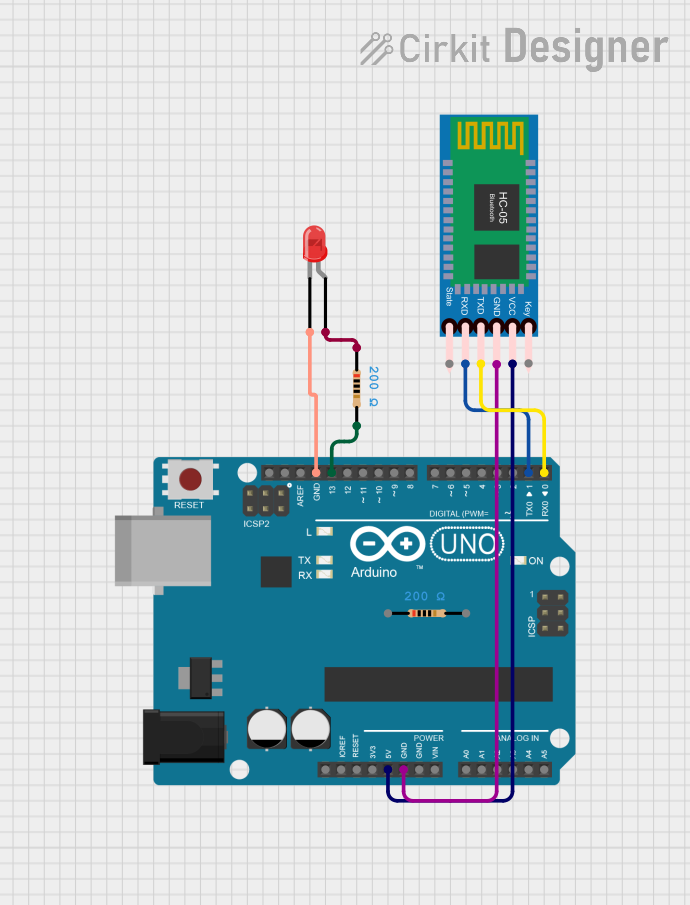
This circuit integrates an Arduino UNO microcontroller with an HC-05 Bluetooth Module and a red LED. The Arduino UNO is used as the central processing unit, controlling the LED and communicating with the HC-05 Bluetooth Module. The Bluetooth module allows for wireless communication, potentially with a smartphone or computer. The LED serves as an indicator, which can be controlled by the Arduino to signal various statuses. The circuit includes resistors to limit current to the LED and to ensure proper voltage levels for the Bluetooth module's communication lines.
Component List
Arduino UNO
- Description: A microcontroller board based on the ATmega328P.
- Pins Used: UNUSED, IOREF, Reset, 3.3V, 5V, GND, Vin, A0-A5, SCL, SDA, AREF, D0-D13.
HC-05 Bluetooth Module
- Description: A Bluetooth module for wireless communication.
- Pins Used: Key, VCC, TXD, RXD, State, GND.
LED: Two Pin (red)
- Description: A basic red LED.
- Pins Used: cathode, anode.
Resistor (200 Ohms)
- Description: A resistor with a resistance of 200 Ohms.
- Pins Used: pin1, pin2.
Wiring Details
Arduino UNO
- 5V connected to HC-05 Bluetooth Module VCC.
- GND connected to HC-05 Bluetooth Module GND and LED cathode.
- D13 connected to one end of a 200 Ohm resistor.
- D1 (TX) connected to HC-05 Bluetooth Module RXD.
- D0 (RX) connected to HC-05 Bluetooth Module TXD.
HC-05 Bluetooth Module
- VCC connected to Arduino UNO 5V.
- GND connected to Arduino UNO GND.
- TXD connected to Arduino UNO D0 (RX).
- RXD connected to Arduino UNO D1 (TX).
LED: Two Pin (red)
- cathode connected to Arduino UNO GND.
- anode connected to the other end of a 200 Ohm resistor.
Resistor (200 Ohms)
- pin1 connected to LED anode.
- pin2 connected to Arduino UNO D13.
Documented Code
Arduino UNO Code (sketch.ino)
void setup() {
  // put your setup code here, to run once:

}

void loop() {
  // put your main code here, to run repeatedly:

}
Additional Notes (documentation.txt)
No additional code documentation was provided.
This documentation provides an overview of the circuit's components, their connections, and the initial code for the Arduino UNO. Further details, such as the specific functionality of the code and the operation of the Bluetooth module, would be added as the design progresses and the code is developed.