
Arduino UNO-Based Smart Water Pump System with RFID and LCD Display
View and Edit Project In Cirkit Designer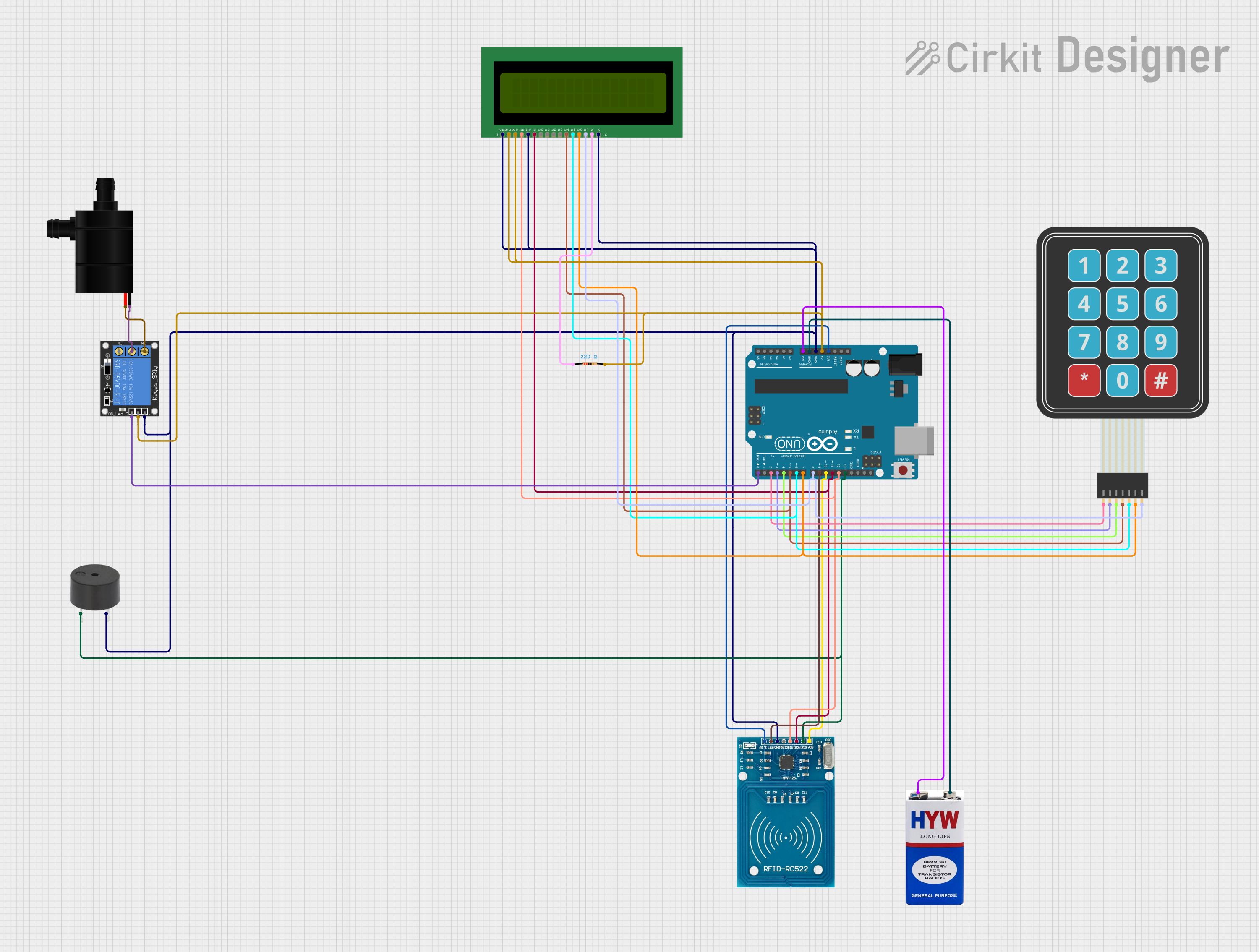
Circuit Documentation
Summary
This circuit is designed to control a water pump using an RFID card for authorization. It features an LCD display for user interaction, a membrane keypad for input, a buzzer for audio feedback, and a relay to control the water pump. The circuit is powered by a 9V battery and is controlled by an Arduino UNO microcontroller.
Component List
LCD 16x2 (Wokwi Compatible)
- Description: A 16x2 character LCD display.
- Pins: VSS, VDD, V0, RS, RW, E, D0, D1, D2, D3, D4, D5, D6, D7, A, K
Water Pump
- Description: A small water pump.
- Pins: VCC, GND
Arduino UNO
- Description: A microcontroller board based on the ATmega328P.
- Pins: UNUSED, IOREF, Reset, 3.3V, 5V, GND, Vin, A0, A1, A2, A3, A4, A5, SCL, SDA, AREF, D13, D12, D11, D10, D9, D8, D7, D6, D5, D4, D3, D2, D1, D0
RFID-RC522
- Description: An RFID reader module.
- Pins: VCC (3.3V), RST, GND, IRQ, MISO, MOSI, SCK, SDA
9V Battery
- Description: A 9V battery for powering the circuit.
- Pins: +, -
Membrane Matrix Keypad
- Description: A 4x3 membrane keypad.
- Pins: Row 1, Row 2, Row 3, Row 4, Column 1, Column 2, Column 3
1-Channel Relay (5V 10A)
- Description: A relay module for switching the water pump.
- Pins: NC, signal, C, power, NO, ground
Buzzer
- Description: A small piezoelectric buzzer.
- Pins: PIN, GND
Resistor
- Description: A 220 Ohm resistor.
- Pins: pin1, pin2
- Properties: Resistance: 220 Ohms
Wiring Details
LCD 16x2 (Wokwi Compatible)
- VSS: Connected to Arduino UNO GND
- VDD: Connected to Arduino UNO 5V
- V0: Connected to Arduino UNO 5V
- RS: Connected to Arduino UNO D12
- RW: Connected to Arduino UNO GND
- E: Connected to Arduino UNO D11
- D4: Connected to Arduino UNO D5
- D5: Connected to Arduino UNO D6
- D6: Connected to Arduino UNO D7
- D7: Connected to Arduino UNO D8
- A: Connected to Resistor pin1
- K: Connected to Arduino UNO GND
Water Pump
- VCC: Connected to 1-Channel Relay NO
- GND: Connected to 1-Channel Relay C
Arduino UNO
- GND: Connected to Buzzer GND, RFID-RC522 GND, LCD 16x2 VSS, LCD 16x2 K, LCD 16x2 RW, 1-Channel Relay ground, 9V Battery -
- 5V: Connected to Resistor pin2, LCD 16x2 VDD, LCD 16x2 V0, 1-Channel Relay power
- 3.3V: Connected to RFID-RC522 VCC (3.3V)
- Vin: Connected to 9V Battery +
- D0: Connected to 1-Channel Relay signal
- D2: Connected to Membrane Matrix Keypad Row 1
- D3: Connected to Membrane Matrix Keypad Row 2
- D4: Connected to Membrane Matrix Keypad Row 3
- D5: Connected to Membrane Matrix Keypad Row 4, LCD 16x2 D4
- D6: Connected to Membrane Matrix Keypad Column 1, LCD 16x2 D5
- D7: Connected to Membrane Matrix Keypad Column 2, LCD 16x2 D6
- D8: Connected to Membrane Matrix Keypad Column 3, LCD 16x2 D7
- D9: Connected to RFID-RC522 RST
- D10: Connected to RFID-RC522 SDA
- D11: Connected to RFID-RC522 MOSI, LCD 16x2 E
- D12: Connected to RFID-RC522 MISO, LCD 16x2 RS
- D13: Connected to Buzzer PIN, RFID-RC522 SCK
RFID-RC522
- VCC (3.3V): Connected to Arduino UNO 3.3V
- RST: Connected to Arduino UNO D9
- GND: Connected to Arduino UNO GND
- MISO: Connected to Arduino UNO D12
- MOSI: Connected to Arduino UNO D11
- SCK: Connected to Arduino UNO D13
- SDA: Connected to Arduino UNO D10
9V Battery
- -: Connected to Arduino UNO GND
- +: Connected to Arduino UNO Vin
Membrane Matrix Keypad
- Row 1: Connected to Arduino UNO D2
- Row 2: Connected to Arduino UNO D3
- Row 3: Connected to Arduino UNO D4
- Row 4: Connected to Arduino UNO D5
- Column 1: Connected to Arduino UNO D6
- Column 2: Connected to Arduino UNO D7
- Column 3: Connected to Arduino UNO D8
1-Channel Relay (5V 10A)
- NC: Not connected
- signal: Connected to Arduino UNO D0
- C: Connected to Water Pump GND
- power: Connected to Arduino UNO 5V
- NO: Connected to Water Pump VCC
- ground: Connected to Arduino UNO GND
Buzzer
- PIN: Connected to Arduino UNO D13
- GND: Connected to Arduino UNO GND
Resistor
- pin1: Connected to LCD 16x2 A
- pin2: Connected to Arduino UNO 5V
Code Documentation
#include <SPI.h>
#include <MFRC522.h>
#include <LiquidCrystal.h>

// RFID pins
#define RST_PIN 9
#define SS_PIN 10

MFRC522 mfrc522(SS_PIN, RST_PIN);  // Create MFRC522 instance.

// LCD pins
const int rs = 12, en = 11, d4 = 5, d5 = 6, d6 = 7, d7 = 8;
LiquidCrystal lcd(rs, en, d4, d5, d6, d7);

// Buzzer pin
const int buzzerPin = 13;

// Relay pin
const int relayPin = A0;

// Variables for password and amount
String password = "";
String amount = "";

void setup() {
  Serial.begin(9600);   // Initialize serial communications with the PC
  SPI.begin();          // Init SPI bus
  mfrc522.PCD_Init();   // Init MFRC522 card
  Serial.println("Approximate your card to the reader...");
  Serial.println();

  // Initialize LCD
  lcd.begin(16, 2);
  lcd.print("Enter Password:");

  // Initialize pins
  pinMode(relayPin, OUTPUT);
  pinMode(buzzerPin, OUTPUT);
}

void loop() {
  // Look for new cards
  if (!mfrc522.PICC_IsNewCardPresent()) {
    return;
  }
  // Select one of the cards
  if (!mfrc522.PICC_ReadCardSerial()) {
    return;
  }
  // Show UID on serial monitor
  Serial.print("UID tag :");
  String content = "";
  byte letter;
  for (byte i = 0; i < mfrc522.uid.size; i++) {
    Serial.print(mfrc522.uid.uidByte[i] < 0x10 ? " 0" : " ");
    Serial.print(mfrc522.uid.uidByte[i], HEX);
    content.concat(String(mfrc522.uid.uidByte[i] < 0x10 ? " 0" : " "));
    content.concat(String(mfrc522.uid.uidByte[i], HEX));
  }
  Serial.println();
  Serial.print("Message : ");
  content.toUpperCase();

  // Check if the card is authorized
  if (content.substring(1) == "6A A1 2B 83") { // Change to your card's UID
    Serial.println("Authorized access");
    Serial.println();
    lcd.clear();
    lcd.print("Enter Amount:");
    //