
Arduino UNO-based Smart Energy Monitoring System with GSM Reporting and Environmental Sensing
View and Edit Project In Cirkit Designer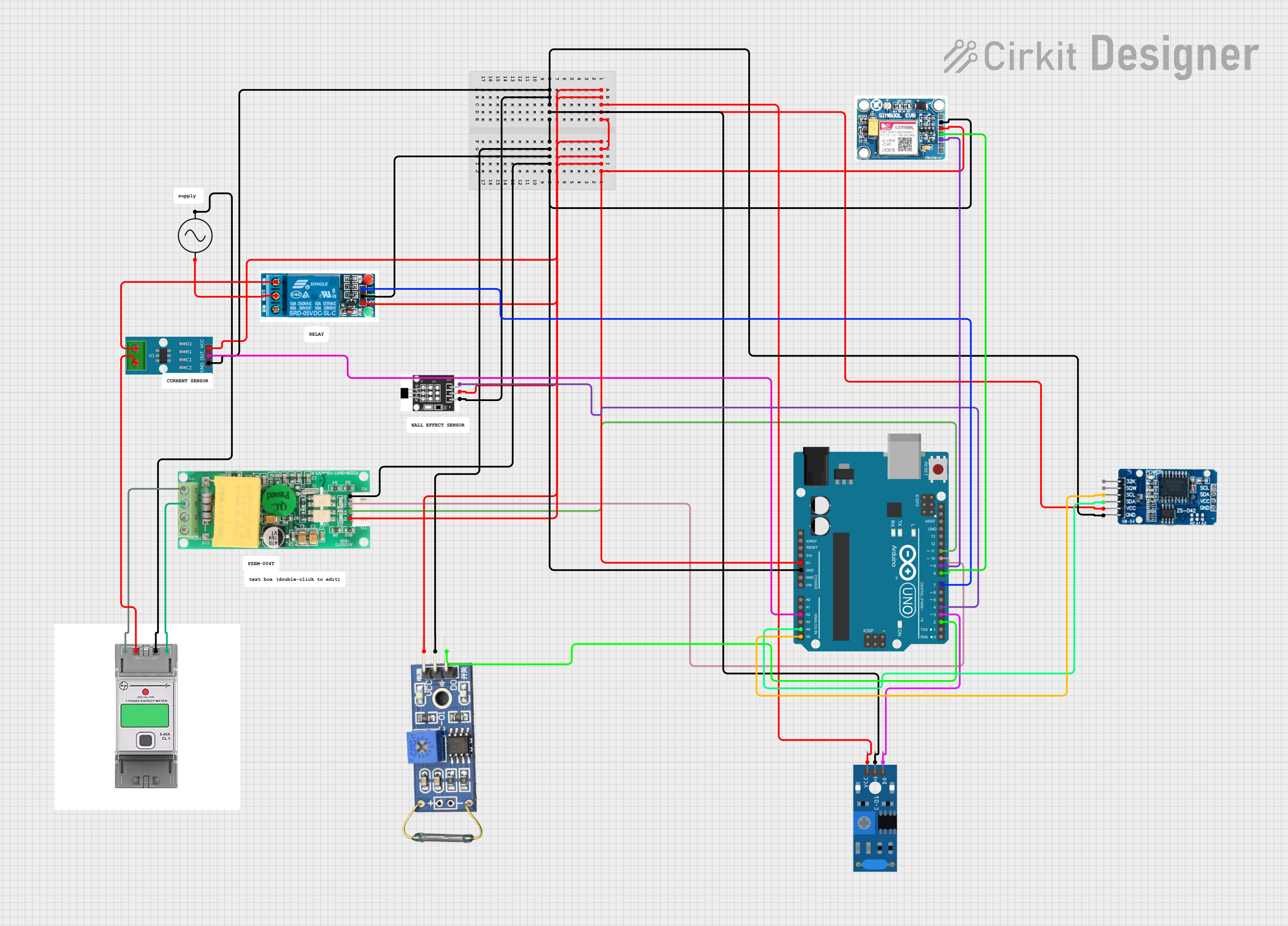
Circuit Documentation
Summary
This circuit integrates various components to perform a range of functions, including GSM communication, real-time clock tracking, vibration sensing, current measurement, and power monitoring. An Arduino UNO serves as the central microcontroller, interfacing with sensors and modules to process and exchange data. The circuit also includes a relay for controlling AC loads, a GSM module for cellular connectivity, a real-time clock for timekeeping, current and energy sensors for monitoring electrical parameters, and a vibration sensor for detecting motion or vibration.
Component List
SIM 800L V2.0 GSM
- GSM communication module for cellular connectivity.
- Pins: SIM_TXD, VDD, SIM.RXD, 5V/4V, GND, RST
RTC DS3231
- Real-time clock module for timekeeping.
- Pins: 32K, SQW, SCL, SDA, VCC, GND
Arduino UNO
- Microcontroller board based on the ATmega328P.
- Pins: UNUSED, IOREF, Reset, 3.3V, 5V, GND, Vin, A0-A5, SCL, SDA, AREF, D0-D13
SW-420 Vibration Sensor
- Sensor for detecting vibrations and movements.
- Pins: vcc, Ground, Digital output
Single phase Energy Meter
- Device for measuring electrical energy consumed by a load.
- Pins: L-In, Phase, L-out, Neutral, B, A
AC Supply
- Source of alternating current for the circuit.
- Pins: +ve, -ve
Hall Sensor
- Sensor for detecting magnetic fields.
- Pins: -, +, S
5v Relay
- Electromechanical switch for controlling high power devices.
- Pins: Normally Open, Common terminal, Normally Closed, In, GND, VCC
ACS712 Current Sensor 5A 20A 30A
- Sensor for non-invasive current measurement.
- Pins: 1, 2, GND, OUT, VCC
PZEM004t
- Module for monitoring voltage, current, power, and energy.
- Pins: VCC, RX, TX, GND, IN, OUT
Reed Switch
- Magnetic switch used for detecting magnetic fields and switching circuits.
- Pins: VCC, GND, DO
Wiring Details
SIM 800L V2.0 GSM
- VDD connected to 5V power supply.
- GND connected to ground.
- SIM.RXD connected to Arduino UNO D9.
- SIM_TXD connected to Arduino UNO D8.
RTC DS3231
- VCC connected to 5V power supply.
- GND connected to ground.
- SDA connected to Arduino UNO A4.
- SCL connected to Arduino UNO A5.
Arduino UNO
- 5V and GND pins used to distribute power and ground to other components.
- A2 connected to ACS712 Current Sensor OUT.
- A4 connected to RTC DS3231 SDA.
- A5 connected to RTC DS3231 SCL.
- D11 connected to PZEM004t RX.
- D10 connected to PZEM004t TX.
- D9 connected to SIM 800L V2.0 GSM SIM.RXD.
- D8 connected to SIM 800L V2.0 GSM SIM_TXD.
- D7 connected to 5v relay In.
- D4 connected to Hall Sensor S.
- D3 connected to SW-420 Vibration Sensor Digital output.
- D2 connected to Reed Switch DO.
SW-420 Vibration Sensor
- vcc connected to 5V power supply.
- Ground connected to ground.
- Digital output connected to Arduino UNO D3.
Single phase Energy Meter
- L-In connected to ACS712 Current Sensor 2.
- Phase connected to PZEM004t OUT.
- L-out connected to AC Supply -ve.
- Neutral connected to PZEM004t IN.
AC Supply
- +ve connected to 5v relay Common terminal.
- -ve connected to Single phase Energy Meter L-out.
Hall Sensor
-
- connected to 5V power supply.
-
- connected to ground.
- S connected to Arduino UNO D4.
5v Relay
- VCC connected to 5V power supply.
- GND connected to ground.
- In connected to Arduino UNO D7.
- Normally Open connected to ACS712 Current Sensor 1.
- Common terminal connected to AC Supply +ve.
ACS712 Current Sensor 5A 20A 30A
- VCC connected to 5V power supply.
- GND connected to ground.
- OUT connected to Arduino UNO A2.
- 1 connected to 5v relay Normally Open.
- 2 connected to Single phase Energy Meter L-In.
PZEM004t
- VCC connected to 5V power supply.
- GND connected to ground.
- RX connected to Arduino UNO D11.
- TX connected to Arduino UNO D10.
- IN connected to Single phase Energy Meter Neutral.
- OUT connected to Single phase Energy Meter Phase.
Reed Switch
- VCC connected to 5V power supply.
- GND connected to ground.
- DO connected to Arduino UNO D2.
Documented Code
Arduino UNO Code (sketch.ino)
void setup() {
  // put your setup code here, to run once:

}

void loop() {
  // put your main code here, to run repeatedly:

}
Note: The provided code is a template and does not include specific functionality. It needs to be populated with the logic to interact with the connected components based on the circuit's requirements.