
Circuit Documentation
Summary
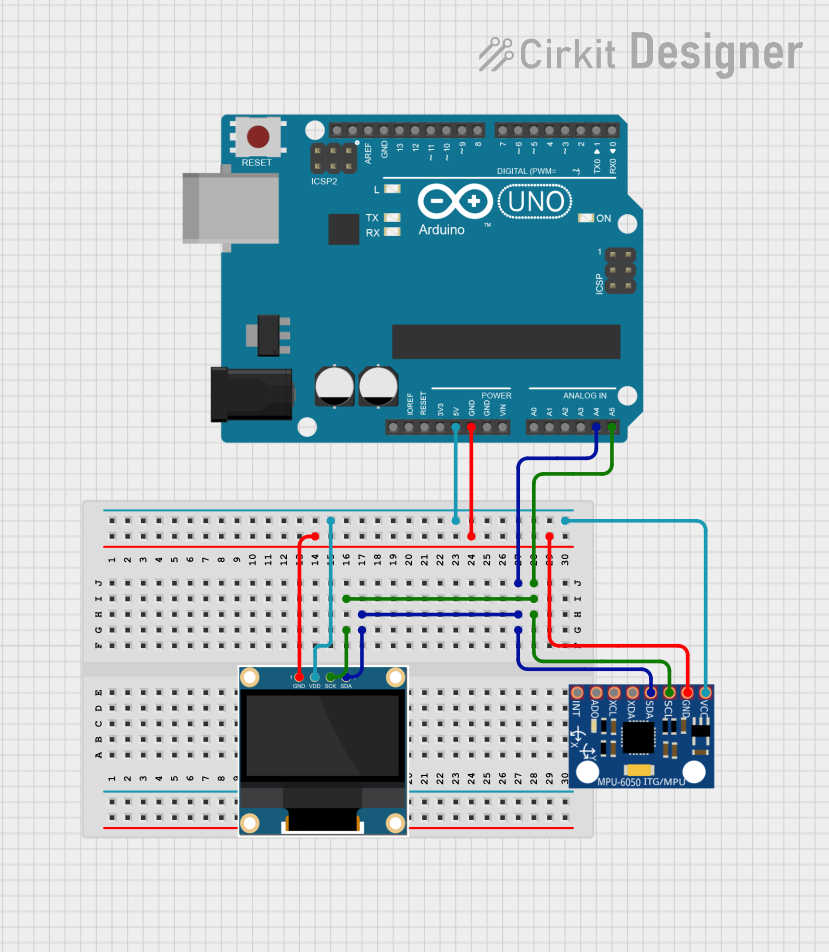
This circuit involves an Arduino UNO microcontroller interfacing with an MPU-6050 accelerometer and gyroscope sensor, and a 0.96" OLED display. The Arduino UNO reads data from the MPU-6050 sensor and displays the accelerometer and gyroscope readings on the OLED display.
Component List
Arduino UNO
- Description: A microcontroller board based on the ATmega328P.
- Pins: UNUSED, IOREF, Reset, 3.3V, 5V, GND, Vin, A0, A1, A2, A3, A4, A5, SCL, SDA, AREF, D13, D12, D11, D10, D9, D8, D7, D6, D5, D4, D3, D2, D1, D0
MPU-6050
- Description: A 3-axis accelerometer and 3-axis gyroscope sensor.
- Pins: VCC, GND, SCL, SDA, XDA, XCL, AD0, INT
0.96" OLED
- Description: A small OLED display module.
- Pins: GND, VDD, SCK, SDA
Wiring Details
Arduino UNO
- 5V: Connected to VDD of the 0.96" OLED and VCC of the MPU-6050.
- GND: Connected to GND of the 0.96" OLED and GND of the MPU-6050.
- A4: Connected to SDA of the 0.96" OLED and SDA of the MPU-6050.
- A5: Connected to SCK of the 0.96" OLED and SCL of the MPU-6050.
MPU-6050
- VCC: Connected to 5V of the Arduino UNO.
- GND: Connected to GND of the Arduino UNO.
- SCL: Connected to A5 of the Arduino UNO.
- SDA: Connected to A4 of the Arduino UNO.
0.96" OLED
- VDD: Connected to 5V of the Arduino UNO.
- GND: Connected to GND of the Arduino UNO.
- SCK: Connected to A5 of the Arduino UNO.
- SDA: Connected to A4 of the Arduino UNO.
Code Documentation
Arduino UNO Code
#include <Adafruit_MPU6050.h>
#include <Adafruit_SSD1306.h>
#include <Adafruit_Sensor.h>

Adafruit_MPU6050 mpu;
Adafruit_SSD1306 display = Adafruit_SSD1306(128, 64, &Wire);

void setup() {
  Serial.begin(115200);
  // while (!Serial);
  Serial.println("MPU6050 OLED demo");

  if (!mpu.begin()) {
    Serial.println("Sensor init failed");
    while (1)
      yield();
  }
  Serial.println("Found a MPU6050 sensor");

  // SSD1306_SWITCHCAPVCC = generate display voltage from 3.3V internally
  if (!display.begin(SSD1306_SWITCHCAPVCC, 0x3C)) { // Address 0x3C for 128x64
    Serial.println(F("SSD1306 allocation failed"));
    for (;;)
      ; // Don't proceed, loop forever
  }
  display.display();
  delay(500); // Pause for 2 seconds
  display.setTextSize(1);
  display.setTextColor(WHITE);
  display.setRotation(0);
}

void loop() {
  sensors_event_t a, g, temp;
  mpu.getEvent(&a, &g, &temp);

  display.clearDisplay();
  display.setCursor(0, 0);

  Serial.print("Accelerometer ");
  Serial.print("X: ");
  Serial.print(a.acceleration.x, 1);
  Serial.print(" m/s^2, ");
  Serial.print("Y: ");
  Serial.print(a.acceleration.y, 1);
  Serial.print(" m/s^2, ");
  Serial.print("Z: ");
  Serial.print(a.acceleration.z, 1);
  Serial.println(" m/s^2");

  display.println("Accelerometer - m/s^2");
  display.print(a.acceleration.x, 1);
  display.print(", ");
  display.print(a.acceleration.y, 1);
  display.print(", ");
  display.print(a.acceleration.z, 1);
  display.println("");

  Serial.print("Gyroscope ");
  Serial.print("X: ");
  Serial.print(g.gyro.x, 1);
  Serial.print(" rps, ");
  Serial.print("Y: ");
  Serial.print(g.gyro.y, 1);
  Serial.print(" rps, ");
  Serial.print("Z: ");
  Serial.print(g.gyro.z, 1);
  Serial.println(" rps");

  display.println("Gyroscope - rps");
  display.print(g.gyro.x, 1);
  display.print(", ");
  display.print(g.gyro.y, 1);
  display.print(", ");
  display.print(g.gyro.z, 1);
  display.println("");

  display.display();
  delay(100);
}
This code initializes the MPU-6050 sensor and the OLED display. It reads accelerometer and gyroscope data from the MPU-6050 and displays the readings on the OLED display. The data is also printed to the serial monitor for debugging purposes.