
Arduino Mega 2560 Environmental Monitoring System with Multiple Sensors
View and Edit Project In Cirkit Designer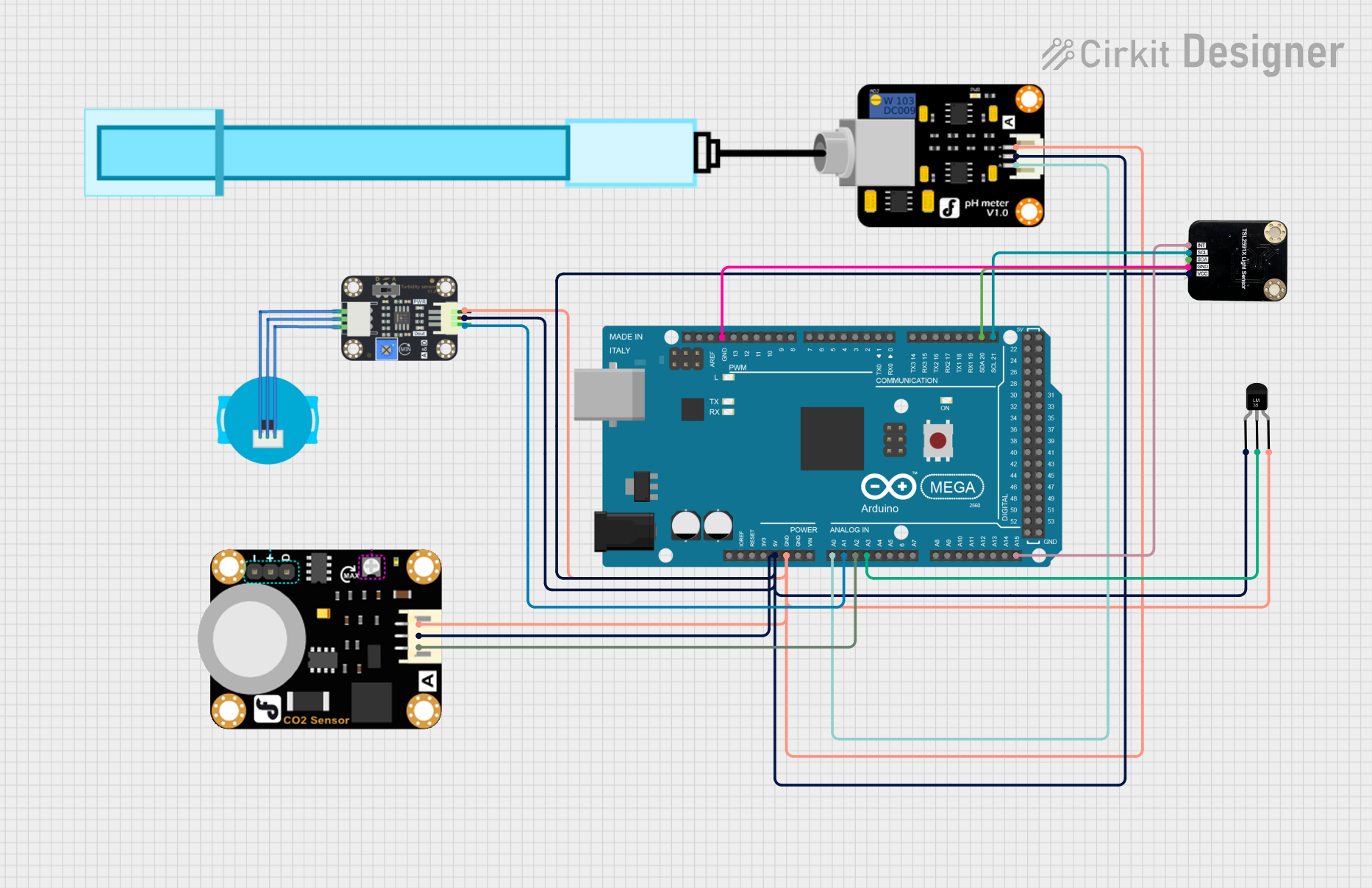
Circuit Documentation
Summary
This circuit is designed to interface various environmental sensors with an Arduino Mega 2560 microcontroller. The sensors include a turbidity sensor, pH meter, temperature sensor (LM35), ambient light sensor, and carbon dioxide sensor. The Arduino Mega 2560 reads data from these sensors and can be programmed to process and utilize this data for various applications.
Component List
Turbidity Sensor
- Description: Measures the turbidity (cloudiness) of water.
- Pins: OUT, VCC, GND
PH Meter
- Description: Measures the pH level of a solution.
- Pins: Signal, VCC, GND
Temperature Sensor (LM35)
- Description: Measures temperature.
- Pins: +Vs, Vout, GND
Ambient Light Sensor
- Description: Measures ambient light intensity.
- Pins: INT, SCL, SDA, GND, VCC
Carbon Dioxide Sensor
- Description: Measures the concentration of carbon dioxide in the air.
- Pins: A, VCC, GND
Arduino Mega 2560
- Description: A microcontroller board based on the ATmega2560.
- Pins: IOREF, RESET, 3V3, 5V, GND, VIN, A0-A15, D0-D53, AREF, SDA, SCL
Wiring Details
Turbidity Sensor
- OUT connected to A1 on Arduino Mega 2560
- VCC connected to 5V on Arduino Mega 2560
- GND connected to GND on Arduino Mega 2560
PH Meter
- Signal connected to A0 on Arduino Mega 2560
- VCC connected to 5V on Arduino Mega 2560
- GND connected to GND on Arduino Mega 2560
Temperature Sensor (LM35)
- Vout connected to A3 on Arduino Mega 2560
- +Vs connected to 5V on Arduino Mega 2560
- GND connected to GND on Arduino Mega 2560
Ambient Light Sensor
- INT connected to A15 on Arduino Mega 2560
- SCL connected to D21/SCL on Arduino Mega 2560
- SDA connected to D20/SDA on Arduino Mega 2560
- VCC connected to 5V on Arduino Mega 2560
- GND connected to GND on Arduino Mega 2560
Carbon Dioxide Sensor
- A connected to A2 on Arduino Mega 2560
- VCC connected to 5V on Arduino Mega 2560
- GND connected to GND on Arduino Mega 2560
Documented Code
Arduino Mega 2560 Code
sketch.ino
void setup() {
  // put your setup code here, to run once:

}

void loop() {
  // put your main code here, to run repeatedly:

}
documentation.txt
This documentation provides a comprehensive overview of the circuit, including a summary, detailed component list, wiring details, and the code used for the Arduino Mega 2560.