
Wi-Fi Controlled Robotic Car with ESP32 and L298N Motor Drivers
View and Edit Project In Cirkit Designer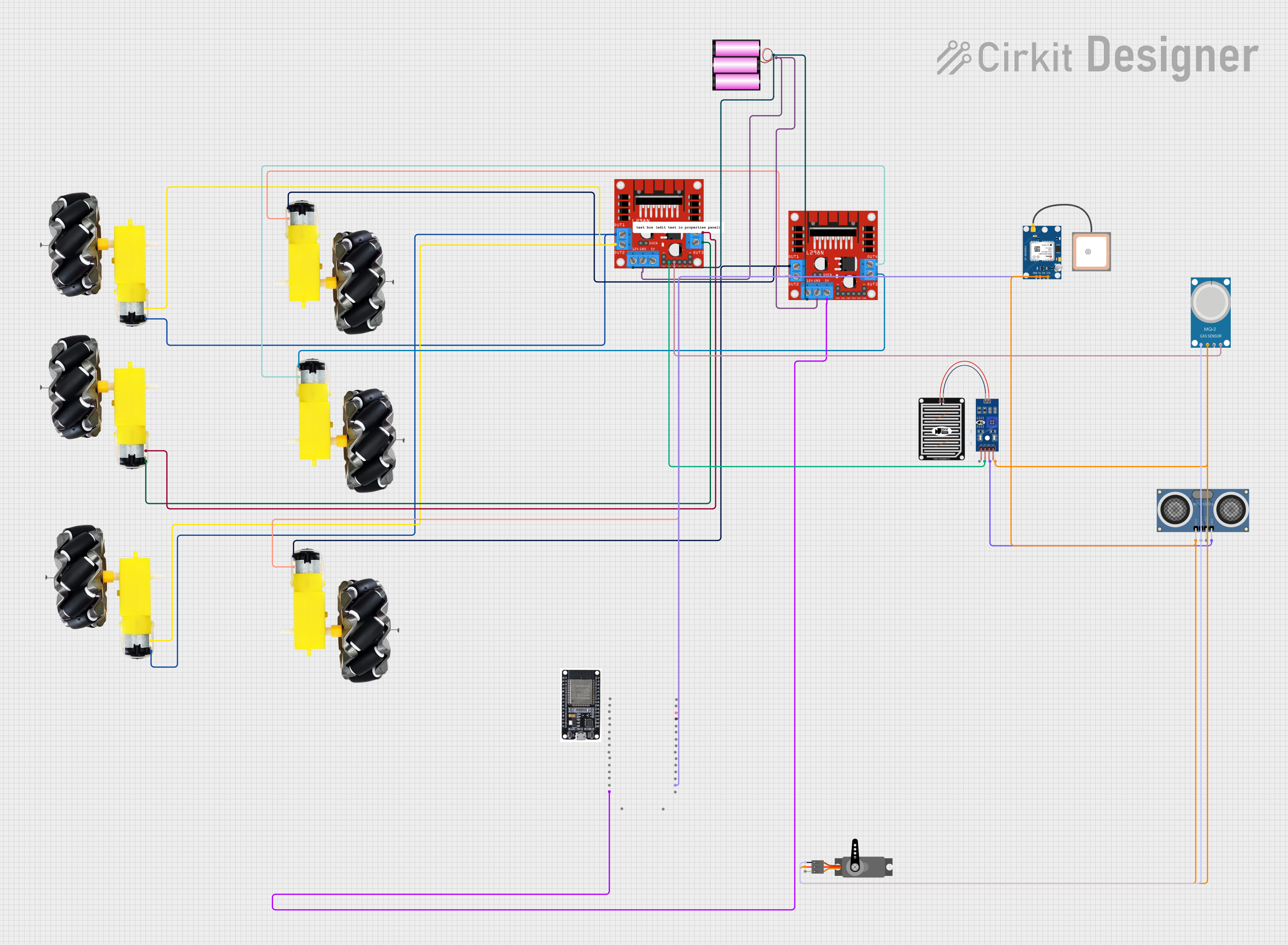
Circuit Documentation
Summary
This document provides a detailed overview of a circuit designed to control multiple motors and sensors using an ESP32 microcontroller. The circuit includes motor drivers, various sensors, and a GPS module. The ESP32 is programmed to communicate with Firebase for remote control and monitoring.
Component List
Motor and Wheels
- Description: DC motor with attached wheels.
- Pins: VCC, GND
L298N DC Motor Driver
- Description: Dual H-Bridge motor driver.
- Pins: OUT1, OUT2, 12V, GND, 5V, OUT3, OUT4, 5V-ENA-JMP-I, 5V-ENA-JMP-O, +5V-J1, +5V-J2, ENA, IN1, IN2, IN3, IN4, ENB
ESP32
- Description: Wi-Fi and Bluetooth microcontroller.
- Pins: EN, VP, VN, D34, D35, D32, D33, D25, D26, D27, D14, D12, D13, GND, VIN, 3V3, D15, D2, D4, RX2, TX2, D5, D18, D19, D21, RX0, TX0, D22, D23, BOOT
Battery 12V
- Description: 12V power supply.
- Pins: +, -
HC-SR04 Ultrasonic Distance Sensor
- Description: Ultrasonic sensor for distance measurement.
- Pins: VCC, TRIG, ECHO, GND
Servo
- Description: Servo motor.
- Pins: GND, VCC, PWM
Rain Sensor
- Description: Sensor to detect rain.
- Pins: AO, DO, GRD, VCC
MQ-2
- Description: Gas sensor.
- Pins: GND, VCC, ANALOG, Digital
GPS NEO 6M
- Description: GPS module.
- Pins: VCC, RX, TX, GND
Wiring Details
Motor and Wheels
Motor 1:
- VCC connected to OUT3 of L298N DC Motor Driver 1
- GND connected to OUT4 of L298N DC Motor Driver 1
Motor 2:
- VCC connected to OUT1 of L298N DC Motor Driver 1
- GND connected to OUT2 of L298N DC Motor Driver 1
Motor 3:
- VCC connected to OUT3 of L298N DC Motor Driver 2
- GND connected to OUT4 of L298N DC Motor Driver 2
Motor 4:
- VCC connected to OUT1 of L298N DC Motor Driver 2
- GND connected to OUT2 of L298N DC Motor Driver 2
L298N DC Motor Driver
Driver 1:
- 12V connected to + of Battery 12V
- GND connected to - of Battery 12V
- IN1 connected to DO of Rain Sensor
- IN2 connected to Digital of MQ-2
- 5V connected to VIN of ESP32
Driver 2:
- 12V connected to + of Battery 12V
- GND connected to - of Battery 12V
ESP32
- VIN connected to 5V of L298N DC Motor Driver 1
- GND connected to GND of GPS NEO 6M
- RX0 connected to RX of GPS NEO 6M
- TX0 connected to TX of GPS NEO 6M
Battery 12V
-
- connected to 12V of both L298N DC Motor Drivers
-
- connected to GND of both L298N DC Motor Drivers
HC-SR04 Ultrasonic Distance Sensor
- VCC connected to VCC of MQ-2, GPS NEO 6M, Rain Sensor, and Servo
- GND connected to GRD of Rain Sensor
Servo
- VCC connected to VCC of HC-SR04 Ultrasonic Distance Sensor
- GND connected to GND of MQ-2
Rain Sensor
- DO connected to IN1 of L298N DC Motor Driver 1
- GRD connected to GND of HC-SR04 Ultrasonic Distance Sensor
MQ-2
- Digital connected to IN2 of L298N DC Motor Driver 1
- VCC connected to VCC of HC-SR04 Ultrasonic Distance Sensor
- GND connected to GND of Servo
GPS NEO 6M
- VCC connected to VCC of HC-SR04 Ultrasonic Distance Sensor
- GND connected to GND of ESP32
- RX connected to RX0 of ESP32
- TX connected to TX0 of ESP32
Documented Code
ESP32 Code
#include <FirebaseESP32.h>
#include <WiFi.h>

#define FIREBASE_HOST "https://console.firebase.google.com/u/0/project/acar-ec140/database/acar-ec140-default-rtdb/data/~2F"
#define FIREBASE_AUTH "AIzaSyB9oe-hKiQZIaRjAoKtSYzPcfa61ICXLoY"
#define WIFI_SSID "space"
#define WIFI_PASSWORD "cosmic07"

#define RX_PIN 16
#define TX_PIN 17

FirebaseData firebaseData;
String controlMode;

void setup() {
  Serial.begin(115200); // ESP32 UART for debugging
  Serial2.begin(9600, SERIAL_8N1, RX_PIN, TX_PIN); // ESP32 UART for communication with Arduino

  WiFi.begin(WIFI_SSID, WIFI_PASSWORD);
  while (WiFi.status() != WL_CONNECTED) {
    delay(1000);
    Serial.println("Connecting to Wi-Fi...");
  }
  Serial.println("Connected to Wi-Fi");

  Firebase.begin(FIREBASE_HOST, FIREBASE_AUTH);
}

void loop() {
  if (Firebase.getString(firebaseData, "/controlMode")) {
    controlMode = firebaseData.stringData();
    Serial.println("Control Mode: " + controlMode);
    Serial2.println(controlMode); // Send control mode to Arduino
  }

  if (controlMode == "manual") {
    if (Firebase.getString(firebaseData, "/commands")) {
      String command = firebaseData.stringData();
      Serial.println("Command: " + command);
      Serial2.println(command); // Send command to Arduino
    }
  }

  delay(100); // Reduce Firebase polling rate
}
Battery 12V Code
void setup() {
  // put your setup code here, to run once:
}

void loop() {
  // put your main code here, to run repeatedly:
}
This documentation provides a comprehensive overview of the circuit, including component descriptions, wiring details, and the code used for the ESP32 microcontroller.