
Arduino UNO-Based Object Counter with Dual 7-Segment Display and IR Sensor
View and Edit Project In Cirkit Designer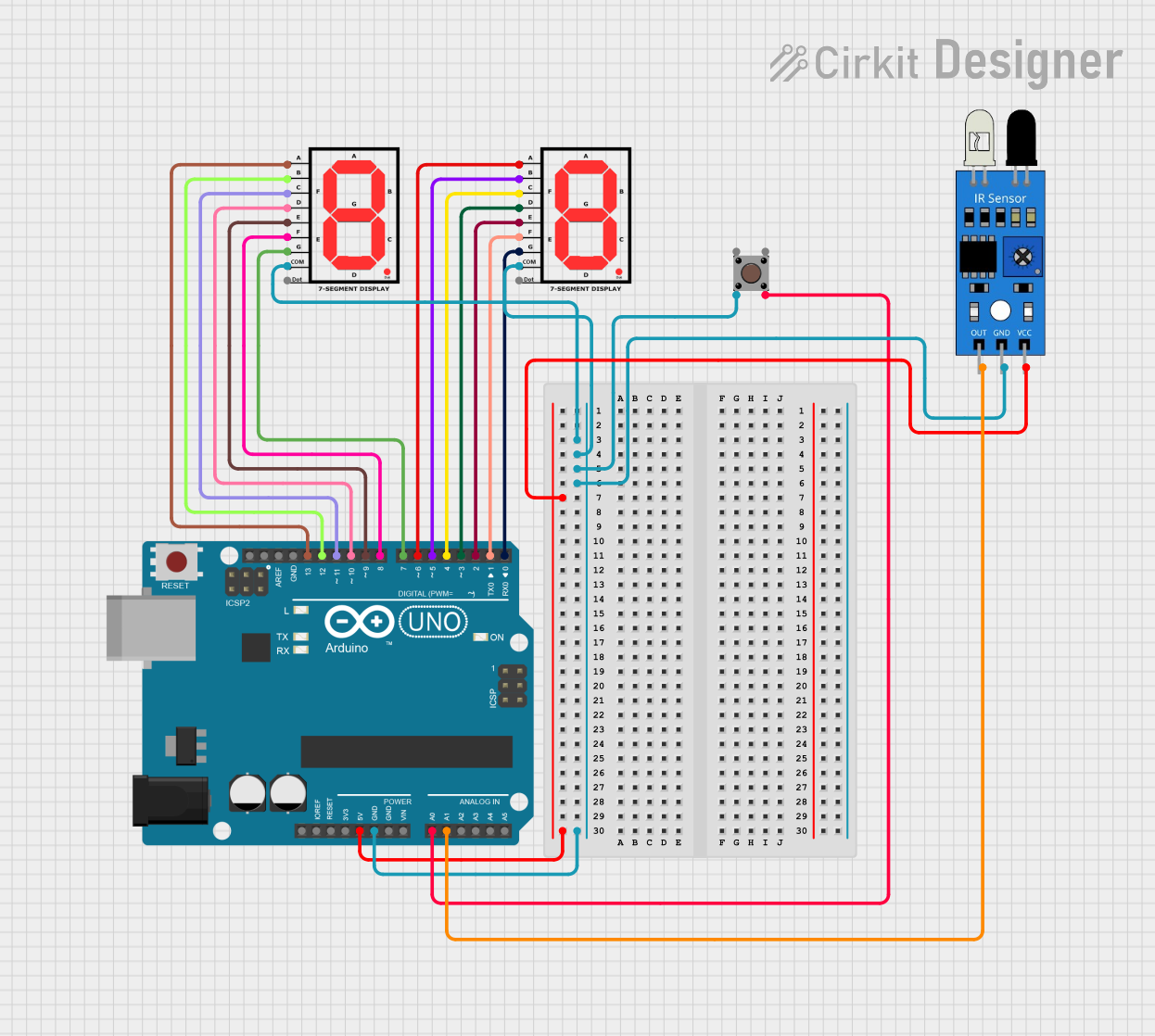
Circuit Documentation
Summary
This circuit is designed to count objects detected by an IR sensor and display the count on two 7-segment displays. The count can be reset using a pushbutton. The circuit is controlled by an Arduino UNO microcontroller.
Component List
IR Sensor
- Pins: out, gnd, vcc
- Description: Detects objects and sends a signal to the microcontroller.
- Purpose in Circuit: To detect objects and increment the count.
7-Segment Display (Display 1)
- Pins: A, B, C, D, E, F, G, COM, dot
- Description: Displays digits from 0 to 9.
- Purpose in Circuit: To display the tens digit of the count.
7-Segment Display (Display 2)
- Pins: A, B, C, D, E, F, G, COM, dot
- Description: Displays digits from 0 to 9.
- Purpose in Circuit: To display the ones digit of the count.
Arduino UNO
- Pins: UNUSED, IOREF, Reset, 3.3V, 5V, GND, Vin, A0, A1, A2, A3, A4, A5, SCL, SDA, AREF, D13, D12, D11, D10, D9, D8, D7, D6, D5, D4, D3, D2, D1, D0
- Description: Microcontroller board.
- Purpose in Circuit: To control the IR sensor, pushbutton, and 7-segment displays.
Pushbutton
- Pins: Pin 3 (out), Pin 4 (out), Pin 1 (in), Pin 2 (in)
- Description: A simple pushbutton.
- Purpose in Circuit: To reset the count.
Wiring Details
IR Sensor
- out connected to A1 on Arduino UNO
- gnd connected to GND on Arduino UNO, COM on Display 1, COM on Display 2, and Pin 2 (in) on Pushbutton
- vcc connected to 5V on Arduino UNO
7-Segment Display (Display 1)
- A connected to D6 on Arduino UNO
- B connected to D5 on Arduino UNO
- C connected to D4 on Arduino UNO
- D connected to D3 on Arduino UNO
- E connected to D2 on Arduino UNO
- F connected to D1 on Arduino UNO
- G connected to D0 on Arduino UNO
- COM connected to GND on Arduino UNO
7-Segment Display (Display 2)
- A connected to D13 on Arduino UNO
- B connected to D12 on Arduino UNO
- C connected to D11 on Arduino UNO
- D connected to D10 on Arduino UNO
- E connected to D9 on Arduino UNO
- F connected to D8 on Arduino UNO
- G connected to D7 on Arduino UNO
- COM connected to GND on Arduino UNO
Arduino UNO
- A1 connected to out on IR Sensor
- GND connected to gnd on IR Sensor, COM on Display 1, COM on Display 2, and Pin 2 (in) on Pushbutton
- 5V connected to vcc on IR Sensor
- A0 connected to Pin 4 (out) on Pushbutton
- D6 connected to A on Display 1
- D5 connected to B on Display 1
- D4 connected to C on Display 1
- D3 connected to D on Display 1
- D2 connected to E on Display 1
- D1 connected to F on Display 1
- D0 connected to G on Display 1
- D13 connected to A on Display 2
- D12 connected to B on Display 2
- D11 connected to C on Display 2
- D10 connected to D on Display 2
- D9 connected to E on Display 2
- D8 connected to F on Display 2
- D7 connected to G on Display 2
Pushbutton
- Pin 4 (out) connected to A0 on Arduino UNO
- Pin 2 (in) connected to GND on Arduino UNO
Documented Code
// Declare pins for the two 7-segment displays
int seg_a1 = 13, seg_b1 = 12, seg_c1 = 11, seg_d1 = 10, seg_e1 = 9, seg_f1 = 8, seg_g1 = 7;
int seg_a = 6, seg_b = 5, seg_c = 4, seg_d = 3, seg_e = 2, seg_f = 1, seg_g = 0;

int buttonPin = A0; // Reset button connected to pin A0
int irSensorPin = A1; // IR sensor connected to pin A1
int count = 0; // Counter value

bool buttonState = false, lastButtonState = false; // For reset button
bool objectDetected = false, lastObjectDetected = false; // For IR sensor

const int threshold = 300; // Threshold value for detecting objects
const int debounceDelay = 50; // Debounce delay for stable IR readings

// Digits from 0 to 9 for 7-segment display
byte digits[10][7] = {
  {1, 1, 1, 1, 1, 1, 0}, {0, 1, 1, 0, 0, 0, 0}, {1, 1, 0, 1, 1, 0, 1},
  {1, 1, 1, 1, 0, 0, 1}, {0, 1, 1, 0, 0, 1, 1}, {1, 0, 1, 1, 0, 1, 1},
  {1, 0, 1, 1, 1, 1, 1}, {1, 1, 1, 0, 0, 0, 0}, {1, 1, 1, 1, 1, 1, 1},
  {1, 1, 1, 1, 0, 1, 1}
};

// Function to display a digit on a 7-segment display
void displayDigit(int digit, int displayPins[]) {
  for (int i = 0; i < 7; i++) {
    digitalWrite(displayPins[i], digits[digit][i]);
  }
}

void setup() {
  // Set up 7-segment pins as output
  int display1[] = {seg_a1, seg_b1, seg_c1, seg_d1, seg_e1, seg_f1, seg_g1};
  int display2[] = {seg_a, seg_b, seg_c, seg_d, seg_e, seg_f, seg_g};

  for (int i = 0; i < 7; i++) {
    pinMode(display1[i], OUTPUT);
    pinMode(display2[i], OUTPUT);
  }

  // Set up button and IR sensor pins
  pinMode(buttonPin, INPUT_PULLUP); // Reset button with internal pull-up resistor
  pinMode(irSensorPin, INPUT); // IR sensor for object detection
}

void loop() {
  // Read and filter the IR sensor value
  int irValue = analogRead(irSensorPin); // Use analogRead for better resolution
  objectDetected = irValue > threshold; // Check if value exceeds the detection threshold

  // Debounce logic for IR sensor
  static unsigned long lastDebounceTime = 0;
  if (objectDetected != lastObjectDetected) {
    lastDebounceTime = millis();
  }

  if ((millis() - lastDebounceTime) > debounceDelay) {
    if (objectDetected != lastObjectDetected) {
      lastObjectDetected = objectDetected;
      if (objectDetected) {
        count++;
        if (count > 99) count = 0; // Reset to 0 after 99
      }
    }
  }

  // Read the reset button state
  buttonState = !digitalRead(buttonPin); // Invert because of pull-up resistor
  if (buttonState && !lastButtonState) {
    count = 0; // Reset the count