
ESP32-Controlled Robotic Trolley with Obstacle Avoidance and Bluetooth Connectivity
View and Edit Project In Cirkit Designer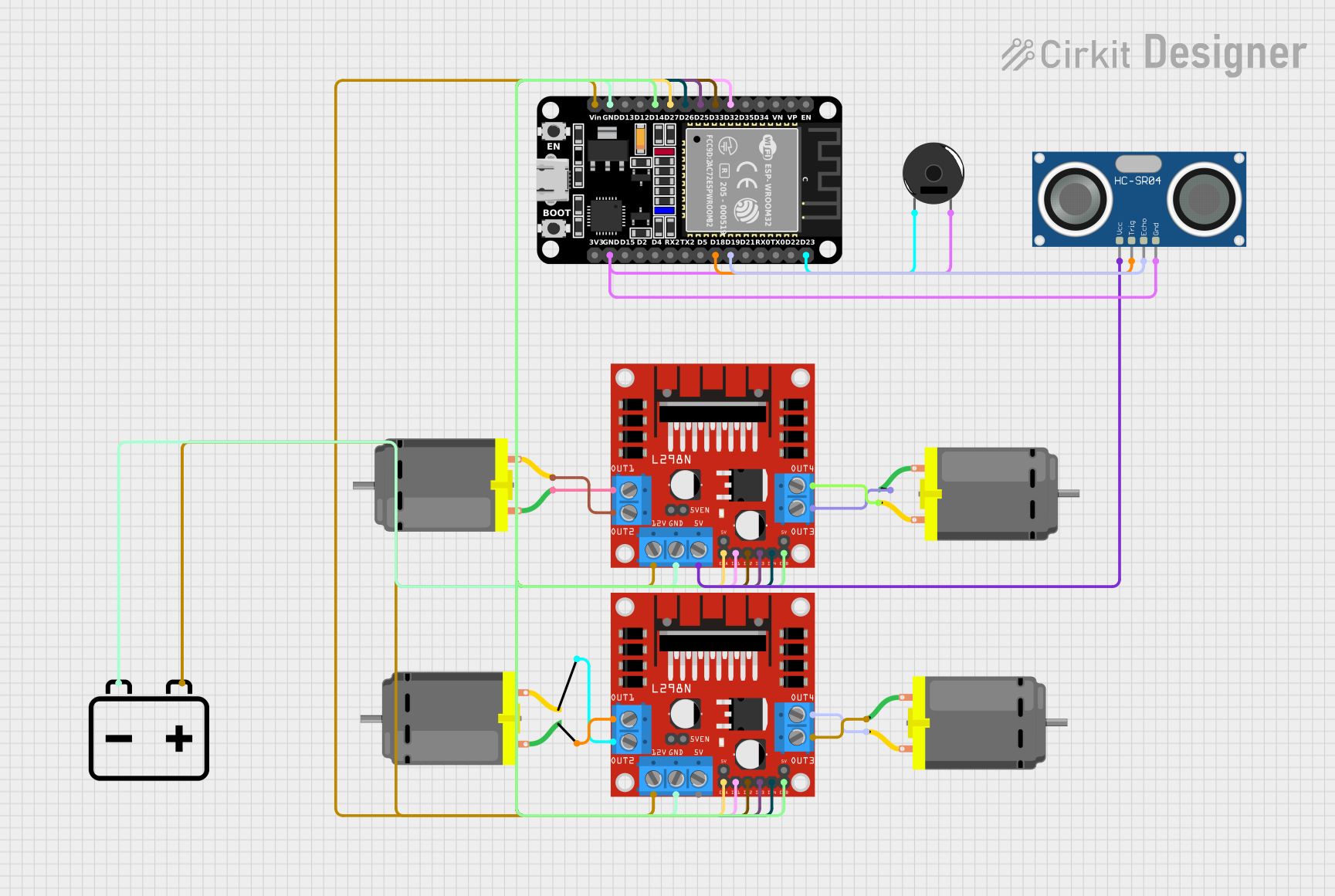
Circuit Documentation
Summary of the Circuit
The circuit in question is designed to control a trolley with four DC motors using an ESP32 microcontroller. The ESP32 is responsible for driving the motors through two L298N DC motor drivers, interfacing with an HC-SR04 ultrasonic sensor for distance measurement, and controlling a piezo buzzer for audible feedback. The system can be controlled via Bluetooth commands, allowing for wireless operation. The ESP32 is powered by a 12V battery, which also supplies power to the motor drivers.
Component List
ESP32 (30 pin)
- Microcontroller with WiFi and Bluetooth capabilities.
- It has a variety of digital I/O pins for interfacing with other components.
DC Motor (x4)
- Electric motors that convert DC electrical energy into mechanical energy.
- Used to propel the trolley.
L298N DC Motor Driver (x2)
- A motor driver module capable of driving up to four DC motors.
- It receives control signals from the ESP32 to operate the motors.
HC-SR04 Ultrasonic Sensor
- A sensor that uses ultrasonic waves to measure distance.
- It helps in obstacle detection and avoidance for the trolley.
Piezo Buzzer
- An electronic device that emits a tone when voltage is applied.
- Used for audible alerts or feedback.
12V Battery
- Provides the power source for the circuit.
- Supplies the ESP32, motor drivers, and other components with necessary voltage.
Wiring Details
ESP32 (30 pin)
D32,D33,D25,D26,D27,D14are connected to the control inputsIN1,IN2,IN3,IN4,ENA,ENBof both L298N motor drivers.Vinis connected to the 12V supply from the battery.GNDis connected to the ground of the battery and the ground pins of all other components.D23is connected to the Piezo Buzzer.D19is connected to theECHOpin of the HC-SR04 Ultrasonic Sensor.D18is connected to theTRIGpin of the HC-SR04 Ultrasonic Sensor.
DC Motors
- Each motor has two pins (
pin 1andpin 2) connected to the corresponding output pins (OUT1,OUT2,OUT3,OUT4) of the L298N motor drivers.
L298N DC Motor Driver
IN1,IN2,IN3,IN4are control inputs connected to the ESP32.ENA,ENBare enable pins also connected to the ESP32.GNDis connected to the battery's ground.12Vis connected to the battery's positive terminal.OUT1,OUT2,OUT3,OUT4are outputs connected to the DC motors.5Vfrom one of the motor drivers is used to power the HC-SR04 Ultrasonic Sensor.
HC-SR04 Ultrasonic Sensor
VCCis connected to the5Voutput of one of the L298N motor drivers.TRIGandECHOare connected to the ESP32.GNDis connected to the common ground.
Piezo Buzzer
- One pin is connected to
D23on the ESP32. - The other pin is connected to the common ground.
12V Battery
- The positive terminal (
+) is connected to the12Vinput of both L298N motor drivers and theVinof the ESP32. - The negative terminal (
-) is connected to the common ground.
Documented Code
// Include necessary libraries
#include <WiFi.h>
#include <BluetoothSerial.h>
#include <NewPing.h>

// Define motor driver pins
#define IN1 32  // Motor 1
#define IN2 33
#define IN3 25  // Motor 2
#define IN4 26
#define ENA 27  // Enable pin for Motor 1 and Motor 2
#define ENB 14  // Enable pin for Motor 3 and Motor 4

// Define Ultrasonic Sensor pins
#define TRIG_PIN 18
#define ECHO_PIN 19
#define MAX_DISTANCE 200  // Maximum distance we want to ping (in centimeters)

// Define Buzzer pin
#define BUZZER_PIN 23

// Initialize Bluetooth
BluetoothSerial SerialBT;

// Initialize Ultrasonic Sensor
NewPing sonar(TRIG_PIN, ECHO_PIN, MAX_DISTANCE);

// Function to control motor movement
void moveForward() {
  digitalWrite(IN1, HIGH);
  digitalWrite(IN2, LOW);
  digitalWrite(IN3, HIGH);
  digitalWrite(IN4, LOW);
  // ENA and ENB are used to enable/disable the motors and are assumed to be HIGH for movement
  digitalWrite(ENA, HIGH);
  digitalWrite(ENB, HIGH);
}

void moveBackward() {
  digitalWrite(IN1, LOW);
  digitalWrite(IN2, HIGH);
  digitalWrite(IN3, LOW);
  digitalWrite(IN4, HIGH);
  digitalWrite(ENA, HIGH);
  digitalWrite(ENB, HIGH);
}

void turnLeft() {
  digitalWrite(IN1, LOW);
  digitalWrite(IN2, HIGH);
  digitalWrite(IN3, HIGH);
  digitalWrite(IN4, LOW);
  digitalWrite(ENA, HIGH);
  digitalWrite(ENB, HIGH);
}

void turnRight() {
  digitalWrite(IN1, HIGH);
  digitalWrite(IN2, LOW);
  digitalWrite(IN3, LOW);
  digitalWrite(IN4, HIGH);
  digitalWrite(ENA, HIGH);
  digitalWrite(ENB, HIGH);
}

void stopTrolley() {
  digitalWrite(IN1, LOW);
  digitalWrite(IN2, LOW);
  digitalWrite(IN3, LOW);
  digitalWrite(IN4, LOW);
  digitalWrite(ENA, LOW);
  digitalWrite(ENB, LOW);
}

// Setup function
void setup() {
  // Initialize Serial Monitor
  Serial.begin(115200);
  SerialBT.begin("ESP32_Trolley");  // Bluetooth device name

  // Set motor driver pins as outputs
  pinMode(IN1, OUTPUT);
  pinMode(IN2, OUTPUT);
  pinMode(IN3, OUTPUT);
  pinMode(IN4, OUTPUT);
  pinMode(ENA, OUTPUT);  // ENA
  pinMode(ENB, OUTPUT);  // ENB

  // Set Buzzer pin as output
  pinMode(BUZZER_PIN, OUTPUT);

  // Set Ultrasonic Sensor pins as input/output
  pinMode(TRIG_PIN, OUTPUT);
  pinMode(ECHO_PIN, INPUT);
}

// Loop function
void loop() {
  // Measure distance using the Ultrasonic Sensor
  unsigned int distance = sonar.ping_cm();

  // If an obstacle is detected within 10 cm, stop the trolley and sound the buzzer
  if (distance > 0 && distance <= 10) {
    stopTrolley();
    digitalWrite(BUZZER_PIN, HIGH);
  } else {
    digitalWrite(BUZZER_PIN, LOW);
  }

  // Check if there are any Bluetooth commands received
  if (SerialBT.available()) {
    char command = SerialBT.read();

    // Control trolley movement based on received command
    if (command == 'F') {
      moveForward();
    } else if (command == 'B') {
      moveBackward();
    } else if (command == 'L') {
      turnLeft();
    } else if (command == 'R') {
      turnRight();
    } else if (command == 'S') {
      stopTrolley();
    }
  }
}
This code is responsible for the operation of the trolley. It initializes the necessary hardware components, defines the pin connections, and contains functions to control the movement of the trolley. The main loop listens for Bluetooth commands to control the trolley and uses the ultrasonic sensor to detect obstacles, stopping the trolley and activating the buzzer if an obstacle is too close.