
Arduino Mega 2560-Based Robotic System with Ultrasonic Sensors and Servo Motors
View and Edit Project In Cirkit Designer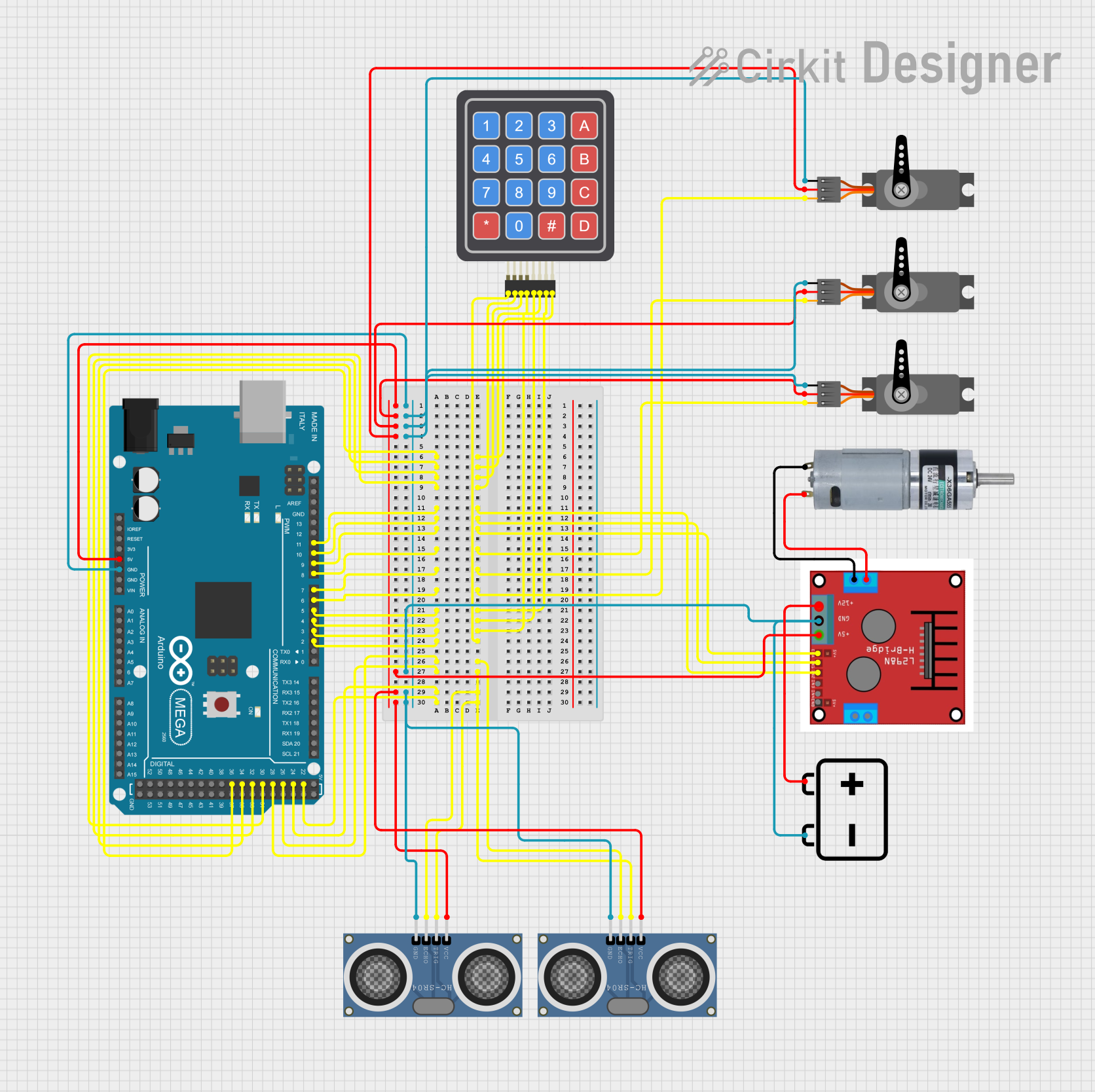
Circuit Documentation
Summary
This document provides a detailed overview of a circuit that includes an Arduino Mega 2560 microcontroller, multiple HC-SR04 ultrasonic distance sensors, servos, a motor driver, a planetary gearbox motor, a 12V battery, and a 4x4 keypad. The circuit is designed to interface these components for various control and sensing applications.
Component List
Arduino Mega 2560
- Description: A microcontroller board based on the ATmega2560.
- Pins: IOREF, RESET, 3V3, 5V, GND, VIN, A0-A15, D0-D53, AREF, SDA, SCL
HC-SR04 Ultrasonic Distance Sensor (Wokwi Compatible)
- Description: A sensor used to measure distance using ultrasonic waves.
- Pins: VCC, TRIG, ECHO, GND
Servo
- Description: A motor used for precise control of angular position.
- Pins: GND, VCC, PWM
MRB Planetary Gearbox Motor
- Description: A motor with a planetary gearbox for high torque applications.
- Pins: +, -
Motor Driver (L298N)
- Description: A dual H-bridge motor driver used to control the direction and speed of motors.
- Pins: OUT 1, OUT 2, OUT 3, OUT 4, +12V INPUT, GND, +5V OUTPUT, ENA, IN 1, IN 2, IN 3, IN 4, ENB
12V Battery
- Description: A power source for the circuit.
- Pins: -, +
4x4 Keypad (Simulator)
- Description: A keypad used for user input.
- Pins: R1, C4, R2, C2, R3, R4, C1, C3
Wiring Details
Arduino Mega 2560
5V connected to:
- Servo (VCC)
- Servo (VCC)
- Servo (VCC)
- Motor Driver (L298N) (+5V OUTPUT)
- HC-SR04 Ultrasonic Distance Sensor (VCC)
- HC-SR04 Ultrasonic Distance Sensor (VCC)
GND connected to:
- Servo (GND)
- Servo (GND)
- Servo (GND)
- Motor Driver (L298N) (GND)
- 12V Battery (-)
- HC-SR04 Ultrasonic Distance Sensor (GND)
- HC-SR04 Ultrasonic Distance Sensor (GND)
D36 connected to:
- 4x4 Keypad (C4)
D34 connected to:
- 4x4 Keypad (C2)
D32 connected to:
- 4x4 Keypad (R3)
D30 connected to:
- 4x4 Keypad (R2)
D11 PWM connected to:
- Motor Driver (L298N) (IN 2)
D10 PWM connected to:
- Motor Driver (L298N) (IN 1)
D9 PWM connected to:
- Motor Driver (L298N) (ENA)
D8 PWM connected to:
- Servo (PWM)
D7 PWM connected to:
- Servo (PWM)
D6 PWM connected to:
- Servo (PWM)
D5 PWM connected to:
- 4x4 Keypad (C3)
D4 PWM connected to:
- 4x4 Keypad (C1)
D3 PWM connected to:
- 4x4 Keypad (R4)
D2 PWM connected to:
- 4x4 Keypad (R1)
D28 connected to:
- HC-SR04 Ultrasonic Distance Sensor (ECHO)
D26 connected to:
- HC-SR04 Ultrasonic Distance Sensor (TRIG)
D24 connected to:
- HC-SR04 Ultrasonic Distance Sensor (ECHO)
D22 connected to:
- HC-SR04 Ultrasonic Distance Sensor (TRIG)
HC-SR04 Ultrasonic Distance Sensor (Wokwi Compatible)
VCC connected to:
- Arduino Mega 2560 (5V)
GND connected to:
- Arduino Mega 2560 (GND)
ECHO connected to:
- Arduino Mega 2560 (D28)
- Arduino Mega 2560 (D24)
TRIG connected to:
- Arduino Mega 2560 (D26)
- Arduino Mega 2560 (D22)
Servo
VCC connected to:
- Arduino Mega 2560 (5V)
GND connected to:
- Arduino Mega 2560 (GND)
PWM connected to:
- Arduino Mega 2560 (D8 PWM)
- Arduino Mega 2560 (D7 PWM)
- Arduino Mega 2560 (D6 PWM)
MRB Planetary Gearbox Motor
+ connected to:
- Motor Driver (L298N) (OUT 2)
- connected to:
- Motor Driver (L298N) (OUT 1)
Motor Driver (L298N)
+5V OUTPUT connected to:
- Arduino Mega 2560 (5V)
GND connected to:
- Arduino Mega 2560 (GND)
IN 2 connected to:
- Arduino Mega 2560 (D11 PWM)
IN 1 connected to:
- Arduino Mega 2560 (D10 PWM)
ENA connected to:
- Arduino Mega 2560 (D9 PWM)
OUT 2 connected to:
- MRB Planetary Gearbox Motor (+)
OUT 1 connected to:
- MRB Planetary Gearbox Motor (-)
+12V INPUT connected to:
- 12V Battery (+)
12V Battery
- connected to:
- Arduino Mega 2560 (GND)
+ connected to:
- Motor Driver (L298N) (+12V INPUT)
4x4 Keypad (Simulator)
C4 connected to:
- Arduino Mega 2560 (D36)
C2 connected to:
- Arduino Mega 2560 (D34)
R3 connected to:
- Arduino Mega 2560 (D32)
R2 connected to:
- Arduino Mega 2560 (D30)
C3 connected to:
- Arduino Mega 2560 (D5 PWM)
C1 connected to:
- Arduino Mega 2560 (D4 PWM)
R4 connected to:
- Arduino Mega 2560 (D3 PWM)
R1 connected to:
- Arduino Mega 2560 (D2 PWM)
Documented Code
Arduino Mega 2560 Code
void setup() {
  // put your setup code here, to run once:

}

void loop() {
  // put your main code here, to run repeatedly:

}
This code is a basic template for the Arduino Mega 2560. The setup() function is where you initialize your components and settings, and the loop() function is where you place the main code that runs repeatedly.