
Arduino UNO Bluetooth-Controlled Robot with L298N Motor Driver
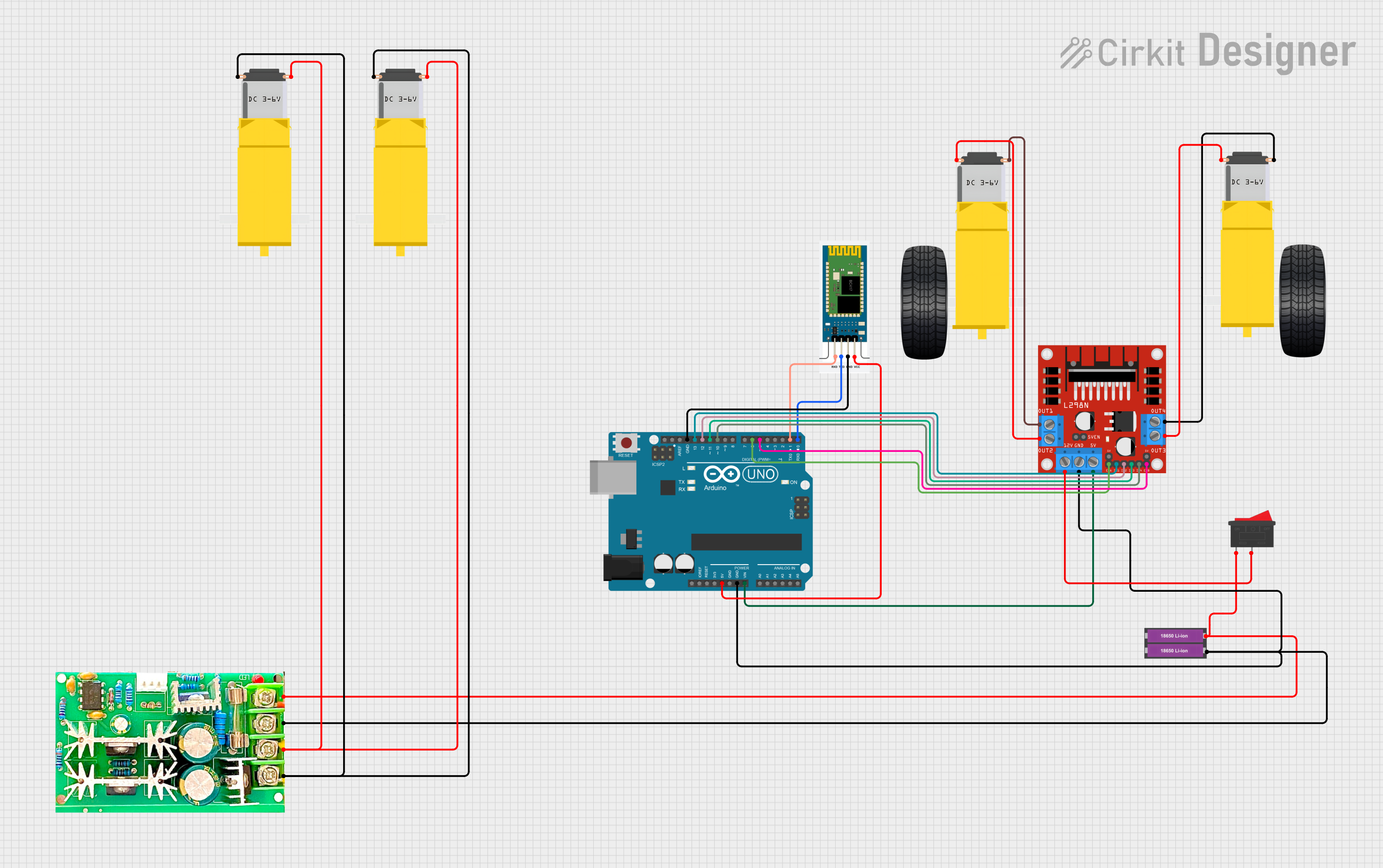
Circuit Documentation
Summary
This circuit is designed to control a robotic vehicle with two DC gearmotors for movement, which are driven by an L298N motor driver module. The Arduino UNO serves as the central microcontroller, interfacing with an HC-06 Bluetooth module for wireless communication. The system is powered by two 18650 Li-ion batteries, and a PWM motor speed controller is used to regulate the speed of additional DC gearmotors. A rocker switch is included to control the power supply to the motor driver.
Component List
Arduino UNO
- Microcontroller board based on the ATmega328P.
- It has 14 digital input/output pins, 6 analog inputs, a 16 MHz quartz crystal, a USB connection, a power jack, an ICSP header, and a reset button.
Gearmotor DC Wheels (Left and Right)
- DC gearmotors used for the left and right wheels of the robotic vehicle.
- Each motor has two connection pins.
PWM Motor Speed Controller
- A device that controls the speed of a DC motor by adjusting the pulse width of the voltage sent to the motor.
18650 Li-ion Battery x 2
- Two rechargeable lithium-ion batteries providing the power source for the circuit.
Gearmotor DC / Motorreductor
- Additional DC gearmotors that can be used for other functions in the robotic vehicle.
L298N DC Motor Driver
- A high-power motor driver module that can drive up to two DC motors.
- It has inputs for motor control signals and power supply connections.
HC-06
- A Bluetooth module that allows for wireless communication with the Arduino UNO.
Rocker Switch
- A switch used to control the power supply to the motor driver.
Wiring Details
Arduino UNO
5Vconnected to HC-06VCC.GNDconnected to 18650 Li-ion Battery-, PWM motor speed controllerPower-, and L298N motor driverGND.Vinconnected to L298N motor driver5V.D13connected to L298N motor driverIN1.D12connected to L298N motor driverIN2.D11connected to L298N motor driverIN3.D10connected to L298N motor driverIN4.D6connected to L298N motor driverENA.D5connected to L298N motor driverENB.D1connected to HC-06RXD.D0connected to HC-06TXD.
Gearmotor DC Wheels (Left and Right)
- Left
PIN1connected to L298N motor driverOUT1. - Left
PIN2connected to L298N motor driverOUT2. - Right
PIN1connected to L298N motor driverOUT4. - Right
PIN2connected to L298N motor driverOUT3.
PWM Motor Speed Controller
Motor+connected to both Gearmotor DC / MotorreductorPin1.Motor-connected to both Gearmotor DC / MotorreductorPin2.Power+connected to Rocker Switch1and 18650 Li-ion Battery+.
L298N DC Motor Driver
12Vconnected to Rocker Switch2.
HC-06
GNDconnected to Arduino UNOGND.
Rocker Switch
1connected to 18650 Li-ion Battery+and PWM motor speed controllerPower+.2connected to L298N motor driver12V.
Documented Code
int ENA = 6;
int IN1 = 13;
int IN2 = 12;
int ENB = 5;
int IN3 = 11;
int IN4 = 10;
int speedValue = 0;

void setup() {
  Serial.begin(9600);   // Start Bluetooth serial communication using default RX/TX

  pinMode(ENA, OUTPUT);
  pinMode(IN1, OUTPUT);
  pinMode(IN2, OUTPUT);
  pinMode(ENB, OUTPUT);
  pinMode(IN3, OUTPUT);
  pinMode(IN4, OUTPUT);
}

void loop() {
  if (Serial.available()) {
    char command = Serial.read();  // Read the command from Bluetooth

    Serial.print("Received command: ");
    Serial.println(command);

    // Movement Commands
    if (command == 'F') {
      // Move Forward
      digitalWrite(IN1, HIGH);
      digitalWrite(IN2, LOW);
      digitalWrite(IN3, HIGH);
      digitalWrite(IN4, LOW);
      analogWrite(ENA, speedValue); // Control speed
      analogWrite(ENB, speedValue);

    } else if (command == 'B') {
      // Move Backward
      digitalWrite(IN1, LOW);
      digitalWrite(IN2, HIGH);
      digitalWrite(IN3, LOW);
      digitalWrite(IN4, HIGH);
      analogWrite(ENA, speedValue);
      analogWrite(ENB, speedValue);

    } else if (command == 'L') {
      // Turn Left
      digitalWrite(IN1, LOW);
      digitalWrite(IN2, HIGH);
      digitalWrite(IN3, HIGH);
      digitalWrite(IN4, LOW);
      analogWrite(ENA, speedValue);
      analogWrite(ENB, speedValue);

    } else if (command == 'R') {
      // Turn Right
      digitalWrite(IN1, HIGH);
      digitalWrite(IN2, LOW);
      digitalWrite(IN3, LOW);
      digitalWrite(IN4, HIGH);
      analogWrite(ENA, speedValue);
      analogWrite(ENB, speedValue);

    } else if (command == 'S') {
      // Stop
      digitalWrite(IN1, LOW);
      digitalWrite(IN2, LOW);
      digitalWrite(IN3, LOW);
      digitalWrite(IN4, LOW);

    }
    // Speed control commands (0 to 9 for speed levels 0 to 100)
    else if (command >= '0' && command <= '9') {
      speedValue = map(command - '0', 0, 9, 0, 255);
      Serial.print("Speed set to: ");
      Serial.println(speedValue);
    }
  }
}
This code is designed to be uploaded to the Arduino UNO microcontroller. It sets up the necessary pins for motor control and listens for Bluetooth commands to control the movement and speed of the motors. The commands 'F', 'B', 'L', 'R', and 'S' correspond to forward, backward, left, right, and stop movements, respectively. Speed is adjusted with numeric commands '0' to '9'.