
Arduino UNO and ESP8266 WiFi-Enabled Smart Islamic Reminder Display
View and Edit Project In Cirkit Designer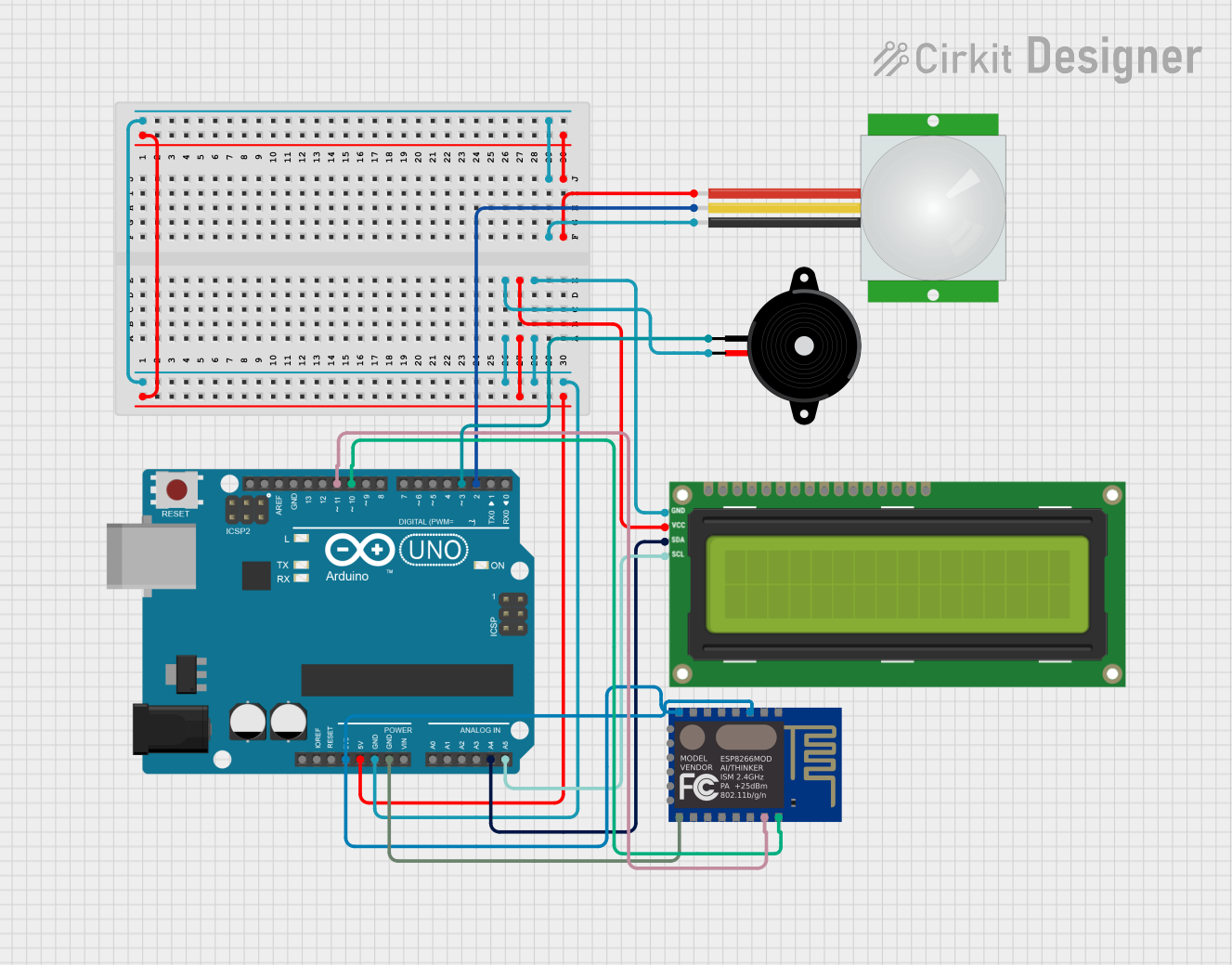
Circuit Documentation
Summary
The circuit in question is designed to integrate an Arduino UNO with a PIR sensor, a Piezo Speaker, an I2C LCD 16x2 Screen, and an ESP8266 ESP-12E WiFi Module. The Arduino UNO serves as the central microcontroller, interfacing with the PIR sensor to detect motion, outputting sound through the Piezo Speaker, displaying information on the LCD screen, and potentially communicating over WiFi using the ESP8266 module.
Component List
Arduino UNO
- Description: A microcontroller board based on the ATmega328P.
- Purpose: Acts as the central processing unit of the circuit, controlling the sensors, the display, and communication modules.
PIR Sensor
- Description: A passive infrared sensor that detects motion by measuring changes in the infrared levels emitted by surrounding objects.
- Purpose: To detect the presence of an individual or motion in the environment.
Piezo Speaker
- Description: An electronic device that can produce sound when an electrical signal is applied to it.
- Purpose: To provide audio feedback or alerts.
I2C LCD 16x2 Screen
- Description: A liquid crystal display capable of showing 16 characters per line on 2 lines, with an I2C interface.
- Purpose: To display textual information to the user.
ESP8266 ESP-12E WiFi Module
- Description: A WiFi module that offers a complete and self-contained Wi-Fi networking solution.
- Purpose: To enable wireless communication and Internet connectivity.
Wiring Details
Arduino UNO
- 3.3V connected to ESP8266 ESP-12E WiFi Module's CH_PD and VCC
- 5V connected to I2C LCD 16x2 Screen's VCC (5V) and PIR sensor's VDD
- GND connected to Piezo Speaker's pin2, I2C LCD 16x2 Screen's GND, PIR sensor's GND, and ESP8266 ESP-12E WiFi Module's GND
- A4 (SDA) connected to I2C LCD 16x2 Screen's SDA
- A5 (SCL) connected to I2C LCD 16x2 Screen's SCL
- D11 connected to ESP8266 ESP-12E WiFi Module's RXD
- D10 connected to ESP8266 ESP-12E WiFi Module's TXD
- D3 connected to Piezo Speaker's pin1
- D2 connected to PIR sensor's SIG
PIR Sensor
- VDD connected to Arduino UNO's 5V
- GND connected to Arduino UNO's GND
- SIG connected to Arduino UNO's D2
Piezo Speaker
- pin1 connected to Arduino UNO's D3
- pin2 connected to Arduino UNO's GND
I2C LCD 16x2 Screen
- VCC (5V) connected to Arduino UNO's 5V
- GND connected to Arduino UNO's GND
- SDA connected to Arduino UNO's A4
- SCL connected to Arduino UNO's A5
ESP8266 ESP-12E WiFi Module
- VCC connected to Arduino UNO's 3.3V
- CH_PD connected to Arduino UNO's 3.3V
- GND connected to Arduino UNO's GND
- RXD connected to Arduino UNO's D11
- TXD connected to Arduino UNO's D10
Documented Code
#include <Wire.h>
#include <LiquidCrystal_I2C.h>
#include <ESP8266WiFi.h>

LiquidCrystal_I2C lcd(0x27, 16, 2); // I2C address for the LCD
const int pirPin = D1; // Pin for the PIR sensor
const int speakerPin = D2; // Pin for the piezo speaker (use pin D2)

// List of Islamic information
const char* infoList[] = {
    "Sunnah: Shalat Dhuha",
    "Adab: Berdoa sebelum makan",
    "Jadwal Shalat: 05:00 Fajr",
    "Pengingat: Baca Al-Qur'an",
    "Amalan Harian: Sedekah",
    "Amalan Pekanan: Shalat Jumat",
    "Amalan Mingguan: Zikir",
    "Amalan Bulanan: Puasa Sunnah",
    "Amalan Tahunan: Haji"
};

int currentInfoIndex = 0; // Current index of the information

void setup() {
    Serial.begin(115200);
    lcd.begin();
    pinMode(pirPin, INPUT);
    pinMode(speakerPin, OUTPUT);
    lcd.print("Layar Pintar");
}

void loop() {
    int motionDetected = digitalRead(pirPin);
    if (motionDetected == HIGH) {
        lcd.clear();
        lcd.print(infoList[currentInfoIndex]); // Display current information
        tone(speakerPin, 1000, 500); // Notification sound
        delay(2000); // Display for 2 seconds

        // Move to the next piece of information
        currentInfoIndex++;
        if (currentInfoIndex >= sizeof(infoList) / sizeof(infoList[0])) {
            currentInfoIndex = 0; // Reset to the beginning if it reaches the end
        }
    }
}
The code is designed to display a list of Islamic information on the LCD screen when motion is detected by the PIR sensor. It also emits a notification sound through the Piezo Speaker. The information is cycled through each time motion is detected.