
Arduino UNO and ILI9341 TFT Display for Dynamic Visual Patterns
View and Edit Project In Cirkit Designer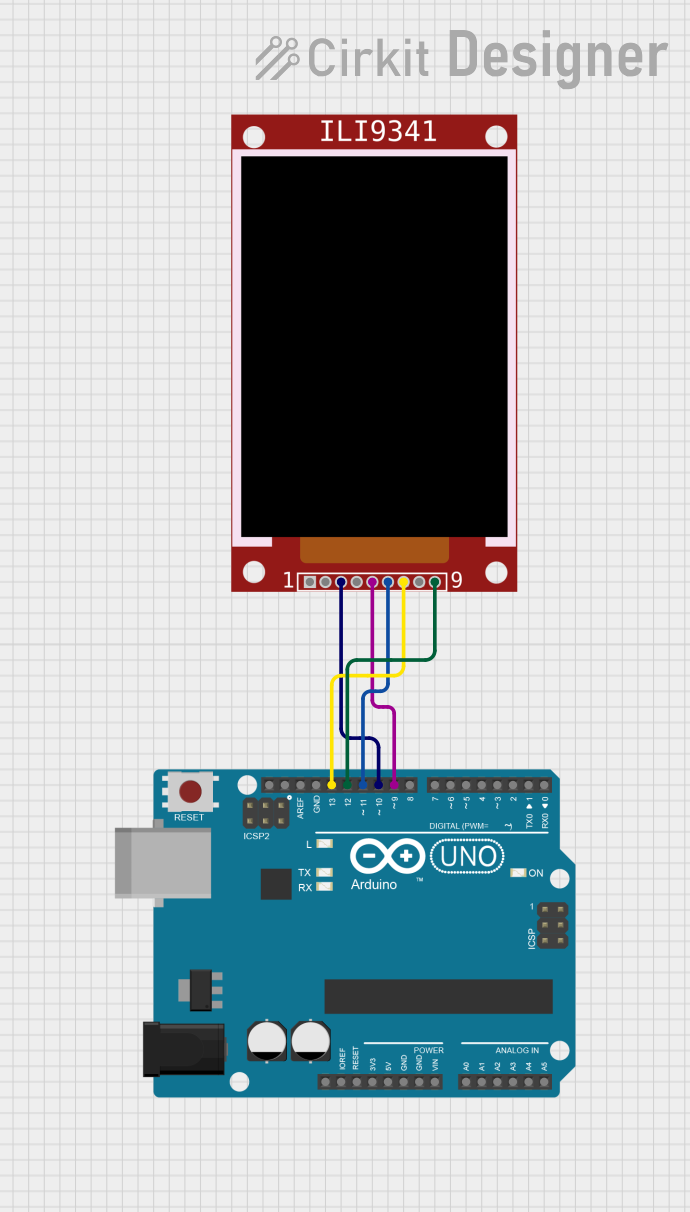
Circuit Documentation
Summary
This circuit involves an Arduino UNO microcontroller interfacing with an ILI9341 TFT display. The Arduino UNO is used to control the display, which is connected via SPI communication. The provided code initializes the display and generates a dynamic pattern on the screen.
Component List
Arduino UNO
- Description: A microcontroller board based on the ATmega328P.
- Pins: UNUSED, IOREF, Reset, 3.3V, 5V, GND, Vin, A0, A1, A2, A3, A4, A5, SCL, SDA, AREF, D13, D12, D11, D10, D9, D8, D7, D6, D5, D4, D3, D2, D1, D0
ILI9341
- Description: A 2.8" TFT LCD display with a resolution of 240x320 pixels, controlled via SPI.
- Pins: VCC, GND, CS, RST, D/C, MOSI, SCK, LED, MISO
Wiring Details
Arduino UNO
- D10: Connected to ILI9341 CS
- D9: Connected to ILI9341 D/C
- D11: Connected to ILI9341 MOSI
- D13: Connected to ILI9341 SCK
- D12: Connected to ILI9341 MISO
ILI9341
- CS: Connected to Arduino UNO D10
- D/C: Connected to Arduino UNO D9
- MOSI: Connected to Arduino UNO D11
- SCK: Connected to Arduino UNO D13
- MISO: Connected to Arduino UNO D12
Code Documentation
Arduino UNO Code
#include <Adafruit_ILI9341.h>

#define TFT_CS   10
#define TFT_DC   9
Adafruit_ILI9341 tft = Adafruit_ILI9341(TFT_CS, TFT_DC);

#define WIDTH 320
#define HEIGHT 240

void setup(void) {
  tft.begin();
  tft.setRotation(1);
}

void loop() {
  float scale[6];
  for (byte i = 0; i < 6; i++)
    scale[i] = (float)rand() / RAND_MAX / 4;

  for (int y = 0; y < HEIGHT; y++) {
    for (int x = 0; x < WIDTH; x++) {
      uint8_t r, g, b;
      r = 15.5 + 15.5 * sin(x * scale[0] + sin(y * scale[1]));
      g = 31.5 + 31.5 * cos(y * scale[2] + sin(x * scale[3]));
      b = 15.5 + 15.5 * sin((x+y) * scale[4] + sin(y * scale[5]));
      uint16_t rgb565 = b | (g << 5) | (r << 11);
      tft.drawPixel(x, y, rgb565);
    }
  }
}
This code initializes the ILI9341 TFT display and sets its rotation. In the loop function, it generates a dynamic pattern by calculating RGB values for each pixel based on sine and cosine functions, and then draws the pixel on the display.