
Raspberry Pi Pico-Based Temperature and Humidity Monitoring System
View and Edit Project In Cirkit Designer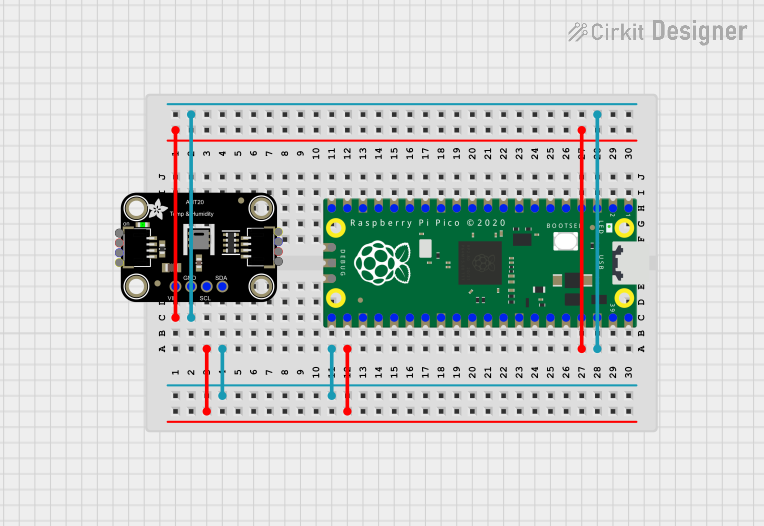
Circuit Documentation
Summary of the Circuit
This circuit integrates an Adafruit AHT20 Temperature and Humidity Sensor with a Raspberry Pi Pico microcontroller. The purpose of the circuit is to measure ambient temperature and humidity levels and process this data using the Raspberry Pi Pico. The sensor communicates with the microcontroller via the I2C protocol, utilizing the SCL and SDA lines for clock and data transmission, respectively. The circuit is powered through the microcontroller, which supplies voltage to the sensor.
Component List
Adafruit AHT20 Temperature and Humidity Sensor
- Description: A precision temperature and humidity sensor that communicates over I2C.
- Pins:
- SCL: Serial Clock Line for I2C communication.
- SDA: Serial Data Line for I2C communication.
- VCC: Power supply input.
- GND: Ground connection.
Raspberry Pi Pico
- Description: A microcontroller board based on the RP2040 microcontroller chip.
- Pins: A total of 43 GPIO pins, including dedicated pins for power (VCC), ground (GND), and various communication protocols.
Wiring Details
Adafruit AHT20 Temperature and Humidity Sensor
- VCC: Connected to Raspberry Pi Pico pin 37 (Power supply).
- GND: Connected to Raspberry Pi Pico pin 38 (Ground).
- SCL: Connected to Raspberry Pi Pico pin 22 (I2C clock).
- SDA: Connected to Raspberry Pi Pico pin 21 (I2C data).
Raspberry Pi Pico
- Pin 37: Supplies power to the Adafruit AHT20 sensor.
- Pin 38: Provides ground for the Adafruit AHT20 sensor.
- Pin 22: Serves as the I2C clock line connected to the SCL pin of the Adafruit AHT20 sensor.
- Pin 21: Serves as the I2C data line connected to the SDA pin of the Adafruit AHT20 sensor.
Documented Code
The following code is intended for the Raspberry Pi Pico microcontroller to interface with the Adafruit AHT20 Temperature and Humidity Sensor. The code is written in C++ and is designed to be compiled and uploaded using the Arduino IDE.
// sketch.ino
void setup() {
  // Initialization code here, to run once:
  // Setup I2C communication
  // Initialize the AHT20 sensor
}

void loop() {
  // Main code here, to run repeatedly:
  // Read temperature and humidity from the AHT20 sensor
  // Process the data as needed
}
The code provided is a template and requires further implementation for initializing the I2C communication, reading data from the AHT20 sensor, and processing the data. Additional functions and libraries may be necessary to fully utilize the capabilities of the Raspberry Pi Pico and the AHT20 sensor.