
Heltec LoRa V2 and AD8232 Gravity Sensor-Based Health Monitoring System with GPS
View and Edit Project In Cirkit Designer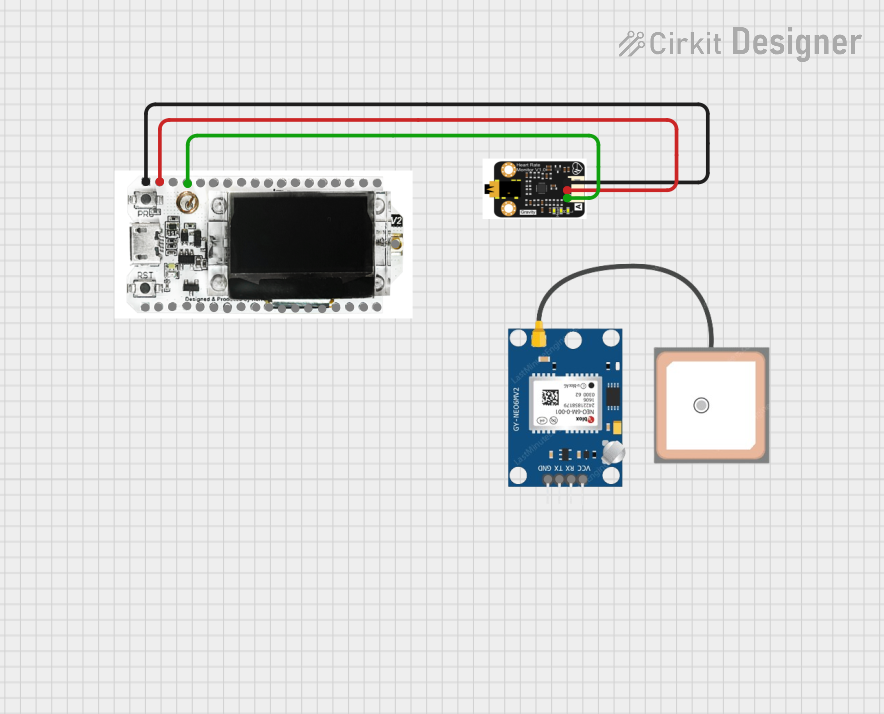
Circuit Documentation
Summary
This document provides a detailed overview of a circuit that integrates a Heltec LoRa V2 microcontroller, a GPS NEO 6M module, and an AD8232 Gravity Sensor. The Heltec LoRa V2 microcontroller reads analog signals from the AD8232 Gravity Sensor and processes the data. The GPS NEO 6M module is included in the parts list but is not connected in the provided net list.
Component List
Heltec LoRa V2
- Description: A microcontroller with integrated LoRa communication capabilities.
- Pins: GND, 5V, Vext, RX, TX, RST, 0, 22, 19, 23, 18, 5, 15, 2, 4, 17, 16, 21, 13, 12, 14, 27, 26, 25, 33, 32, 35, 34, 39, 38, 37, 36, 3.3V, ANT
GPS NEO 6M
- Description: A GPS module for obtaining location data.
- Pins: VCC, RX, TX, GND
AD8232 Gravity Sensor
- Description: A sensor module for measuring heart rate and other bioelectrical signals.
- Pins: GND, Analog Out, VCC
Wiring Details
Heltec LoRa V2
- Pin 36 is connected to Analog Out of the AD8232 Gravity Sensor.
- Pin 3.3V is connected to VCC of the AD8232 Gravity Sensor.
- Pin GND is connected to GND of the AD8232 Gravity Sensor.
GPS NEO 6M
- No connections specified in the provided net list.
AD8232 Gravity Sensor
- Analog Out is connected to Pin 36 of the Heltec LoRa V2.
- VCC is connected to Pin 3.3V of the Heltec LoRa V2.
- GND is connected to Pin GND of the Heltec LoRa V2.
Documented Code
Heltec LoRa V2 Code
void setup() {
  // put your setup code here, to run once:

}

void loop() {
  // put your main code here, to run repeatedly:

}
AD8232 Gravity Sensor Code
/*
 * This Arduino Sketch reads the analog signal from the AD8232 Gravity Sensor
 * connected to the Heltec WiFi LoRa V2 microcontroller. The sensor's output
 * is read from pin 36 and the value is printed to the Serial Monitor.
 */

void setup() {
  // Initialize serial communication at 115200 baud rate
  Serial.begin(115200);
  // Configure pin 36 as an input
  pinMode(36, INPUT);
}

void loop() {
  // Read the analog value from the AD8232 sensor
  int sensorValue = analogRead(36);
  // Print the sensor value to the Serial Monitor
  Serial.print("AD8232 Sensor Value: ");
  Serial.println(sensorValue);
  // Add a small delay to avoid flooding the Serial Monitor
  delay(500);
}
This documentation provides a comprehensive overview of the circuit, including the components used, their connections, and the code running on the microcontrollers.