
Circuit Documentation
Summary
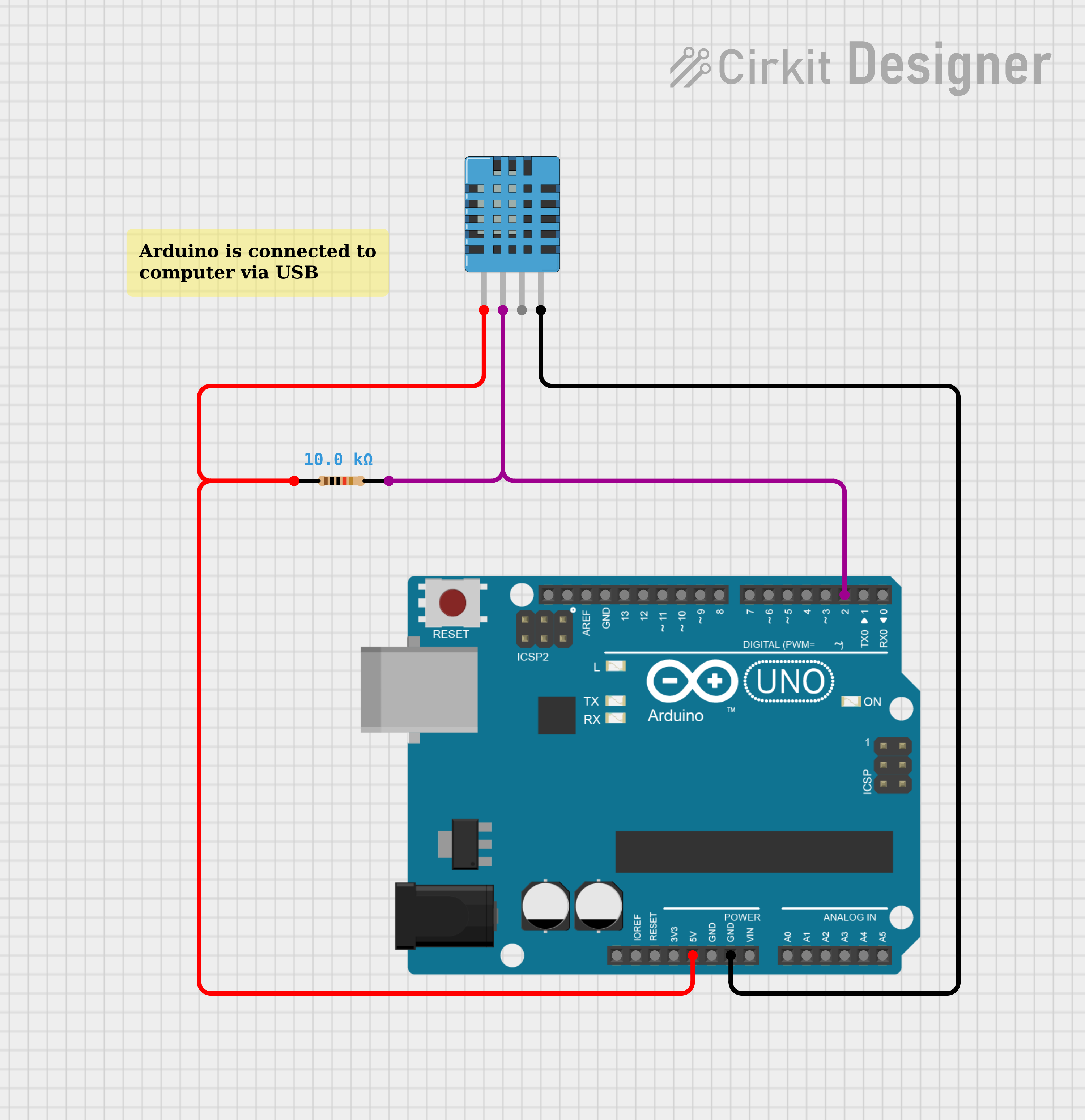
This circuit is designed to collect temperature and humidity measurements using a DHT11 Humidity and Temperature Sensor interfaced with an Arduino UNO microcontroller. The sensor's data pin is connected to the Arduino through a 10k Ohm pull-up resistor. The Arduino is programmed to read the sensor data and output the temperature and humidity readings to the serial monitor.
Component List
DHT11 Humidity and Temperature Sensor
- Pins: VDD, DATA, NULL, GND
- Description: A sensor that measures ambient temperature and humidity.
Arduino UNO
- Pins: UNUSED, IOREF, Reset, 3.3V, 5V, GND, Vin, A0-A5, SCL, SDA, AREF, D0-D13
- Description: A microcontroller board based on the ATmega328P, widely used for building digital devices and interactive objects.
Resistor
- Pins: pin1, pin2
- Description: A passive two-terminal electrical component that implements electrical resistance as a circuit element.
- Resistance: 10,000 Ohms
Comment
- Pins: N/A
- Description: A placeholder or annotation within the circuit design, not a physical component.
Wiring Details
DHT11 Humidity and Temperature Sensor
- VDD: Connected to the 5V pin on the Arduino UNO.
- DATA: Connected to the D2 pin on the Arduino UNO through a 10k Ohm resistor.
- GND: Connected to the GND pin on the Arduino UNO.
Arduino UNO
- 5V: Provides power to the DHT11 sensor.
- D2: Receives the data signal from the DHT11 sensor through a 10k Ohm resistor.
- GND: Common ground for the circuit.
Resistor
- pin1: Connected to the 5V pin on the Arduino UNO and VDD pin on the DHT11 sensor.
- pin2: Connected to the DATA pin on the DHT11 sensor and D2 pin on the Arduino UNO.
Documented Code
sketch.ino
/**
 * This example demonstrates how to collect temperature and humidity measurements
 * from the Adafruit DHT11 sensor. Measurements are printed out to the serial monitor.
 *
 * - Make sure to first install the following libraries through the Arduino Library Manager:
 *   - DHT Sensor Library (by Adafruit)
 *   - Adafruit Unified Sensor (by Adafruit)
 * - When you open the serial monitor to view measurements from the DHT11, make sure
 * that you select 9600 baud so that the serial monitor can receive data from the Arduino.
 *
 * This example was originally written by Adafruit Industries LLC.
 */

#include <Adafruit_Sensor.h>
#include <DHT.h>
#include <DHT_U.h>

#define DHTPIN 2     // Digital pin connected to the DHT sensor

// Uncomment the type of sensor in use:
#define DHTTYPE    DHT11     // DHT 11

DHT_Unified dht(DHTPIN, DHTTYPE);

uint32_t delayMS;

void setup() {
  Serial.begin(9600);
  // Initialize device.
  dht.begin();
  Serial.println(F("DHTxx Unified Sensor Example"));
  // Print temperature sensor details.
  sensor_t sensor;
  dht.temperature().getSensor(&sensor);
  Serial.println(F("------------------------------------"));
  Serial.println(F("Temperature Sensor"));
  Serial.print  (F("Sensor Type: ")); Serial.println(sensor.name);
  Serial.print  (F("Driver Ver:  ")); Serial.println(sensor.version);
  Serial.print  (F("Unique ID:   ")); Serial.println(sensor.sensor_id);
  Serial.print  (F("Max Value:   ")); Serial.print(sensor.max_value); Serial.println(F("°C"));
  Serial.print  (F("Min Value:   ")); Serial.print(sensor.min_value); Serial.println(F("°C"));
  Serial.print  (F("Resolution:  ")); Serial.print(sensor.resolution); Serial.println(F("°C"));
  Serial.println(F("------------------------------------"));
  // Print humidity sensor details.
  dht.humidity().getSensor(&sensor);
  Serial.println(F("Humidity Sensor"));
  Serial.print  (F("Sensor Type: ")); Serial.println(sensor.name);
  Serial.print  (F("Driver Ver:  ")); Serial.println(sensor.version);
  Serial.print  (F("Unique ID:   ")); Serial.println(sensor.sensor_id);
  Serial.print  (F("Max Value:   ")); Serial.print(sensor.max_value); Serial.println(F("%"));
  Serial.print  (F("Min Value:   ")); Serial.print(sensor.min_value); Serial.println(F("%"));
  Serial.print  (F("Resolution:  ")); Serial.print(sensor.resolution); Serial.println(F("%"));
  Serial.println(F("------------------------------------"));
  // Set delay between sensor readings based on sensor details.
  delayMS = sensor.min_delay / 1000;
}

void loop() {
  // Delay between measurements.
  delay(delayMS);
  // Get temperature event and print its value.
  sensors_event_t event;
  dht.temperature().getEvent(&event);
  if (isnan(event.temperature)) {
    Serial.println(F("Error reading temperature!"));
  }
  else {
    Serial.print(F("Temperature: "));
    Serial.print(event.temperature);
    Serial.println(F("°C"));
  }
  // Get humidity event and print its value.
  dht.humidity().getEvent(&event);
  if (isnan(event.relative_humidity)) {
    Serial.println(F("Error reading humidity!"));
  }
  else {
    Serial.print(F("Humidity: "));
    Serial.print(event.relative_humidity);
    Serial.println(F("%"));
  }
}
documentation.txt
This file is intended for additional documentation and notes related to the code. It is currently empty.