
Arduino UNO Based Ultrasonic Distance Measurement with Buzzer Alert
View and Edit Project In Cirkit Designer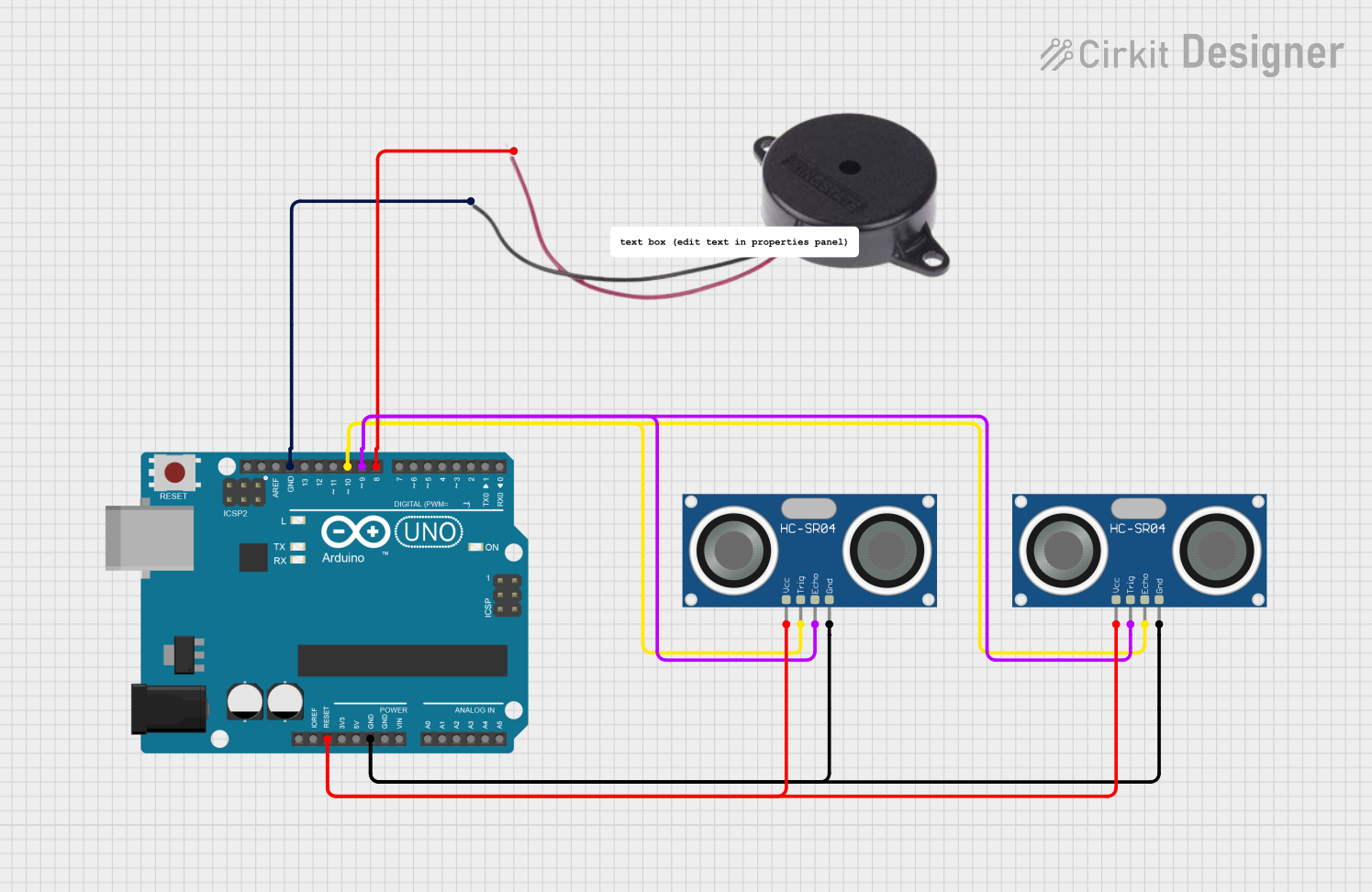
Circuit Documentation
Summary
This circuit integrates an Arduino UNO microcontroller with two HC-SR04 Ultrasonic Sensors and a Buzzer. The purpose of the circuit is to measure distances using the ultrasonic sensors and provide an audible alert through the buzzer when a certain distance threshold is met. The Arduino UNO is programmed to control the sensors and the buzzer, and it outputs the measured distance to the serial monitor.
Component List
Arduino UNO
- Microcontroller board based on the ATmega328P
- It has 14 digital input/output pins, 6 analog inputs, a 16 MHz quartz crystal, a USB connection, a power jack, an ICSP header, and a reset button.
HC-SR04 Ultrasonic Sensor (x2)
- Ultrasonic distance measuring module
- It has 4 pins: VCC (power), TRIG (trigger), ECHO (echo), and GND (ground).
Buzzer
- An electromechanical component that produces sound
- It has 2 pins: POSITIVE and NEGATIVE.
Wiring Details
Arduino UNO
- Reset is connected to the VCC of both HC-SR04 Ultrasonic Sensors.
- GND is connected to the GND of both HC-SR04 Ultrasonic Sensors and the NEGATIVE pin of the Buzzer.
- D10 is connected to the ECHO pin of one HC-SR04 Ultrasonic Sensor and the TRIG pin of the other HC-SR04 Ultrasonic Sensor.
- D9 is connected to the TRIG pin of one HC-SR04 Ultrasonic Sensor and the ECHO pin of the other HC-SR04 Ultrasonic Sensor.
- D8 is connected to the POSITIVE pin of the Buzzer.
HC-SR04 Ultrasonic Sensor
- VCC is connected to the Reset pin of the Arduino UNO.
- GND is connected to the GND pin of the Arduino UNO.
- TRIG and ECHO pins are connected to the digital pins D9 and D10 of the Arduino UNO, respectively, for one sensor and vice versa for the other sensor.
Buzzer
- POSITIVE is connected to the D8 pin of the Arduino UNO.
- NEGATIVE is connected to the GND pin of the Arduino UNO.
Documented Code
// Define the pins for the buzzer and ultrasonic sensors
const int buzzer = 8;
const int trig_pin = 9;
const int echo_pin = 10;

// Variables to store the timing and distance
float timing = 10;
float distance = 20;

void setup() {
  // Initialize the sensor pins
  pinMode(echo_pin, INPUT);
  pinMode(trig_pin, OUTPUT);
  pinMode(buzzer, OUTPUT);

  // Ensure the trigger pin is set low
  digitalWrite(trig_pin, LOW);
  digitalWrite(buzzer, LOW);

  // Start the serial communication
  Serial.begin(9600);
}

void loop() {
  // Trigger the ultrasonic pulse
  digitalWrite(trig_pin, LOW);
  delay(2);

  digitalWrite(trig_pin, HIGH);
  delay(10);
  digitalWrite(trig_pin, LOW);

  // Read the echo pin and calculate the distance
  timing = pulseIn(echo_pin, HIGH);
  distance = (timing * 0.034) / 2;

  // Print the distance in cm and inches
  Serial.print("Distance: ");
  Serial.print(distance);
  Serial.print("cm | ");
  Serial.print(distance / 2.54);
  Serial.println("in");

  // If the distance is less than or equal to 50 cm, sound the buzzer
  if (distance <= 50) {
    tone(buzzer, 600);
  } else {
    noTone(buzzer);
  }

  // Wait before the next loop iteration
  delay(100);
}
This code is designed to be uploaded to the Arduino UNO microcontroller. It sets up the ultrasonic sensors and the buzzer, then continuously measures the distance and sounds the buzzer if the distance is less than or equal to 50 cm. The measured distance is also printed to the serial monitor in both centimeters and inches.