
Multi-Gas Detection System with ESP8266, Raspberry Pi Pico W, and MQ Sensors
View and Edit Project In Cirkit Designer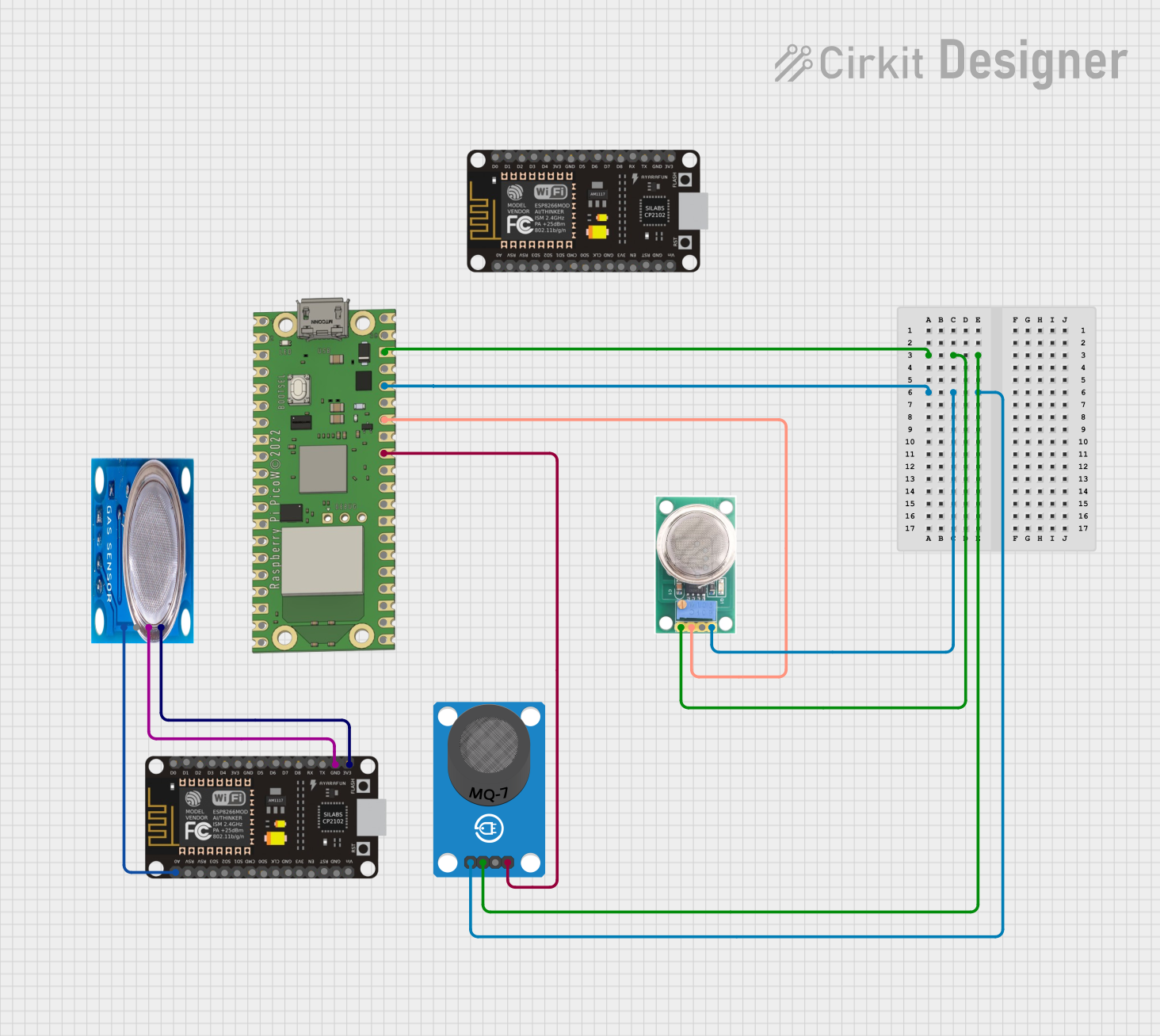
Circuit Documentation
Summary
The circuit in question is designed to monitor various gases using a set of gas sensors and microcontrollers. It includes two ESP8266 NodeMCU units and a Raspberry Pi Pico W, each interfaced with different gas sensors (MQ-5, MQ-7, and MQ-136) to detect gases like LPG, CO, and H2S respectively. The ESP8266 NodeMCU is responsible for reading the MQ-5 sensor data and transmitting it wirelessly using ESP-NOW protocol. The Raspberry Pi Pico W reads the MQ-7 and MQ-136 sensor data and sends it to a central server via HTTP POST requests. Another ESP8266 NodeMCU acts as a central unit to receive data from both the other NodeMCU and the Raspberry Pi Pico W, and it also hosts a web server to handle incoming HTTP requests.
Component List
ESP8266 NodeMCU
- Microcontroller with Wi-Fi capability.
- Pins: D0-D8, RX, TX, A0, RSV, SD3, SD2, SD1, CMD, SD0, CLK, EN, RST, VIN, 3V3, GND.
Raspberry Pi Pico W
- Microcontroller with Wi-Fi capability.
- Pins: VBUS, VSYS, GP0-GP28, ADC_VREF, 3V3 OUT, 3V3_EN, RUN, GND.
MQ-5 Gas Sensor
- Gas sensor for detecting LPG, natural gas, and coal gas.
- Pins: VCC, GND, Digi Out, Analog out.
MQ-7 Gas Sensor Breakout
- Carbon monoxide (CO) gas sensor.
- Pins: VCC, GND, DO, AO.
MQ-136 Gas Sensor
- Hydrogen sulfide (H2S) gas sensor.
- Pins: VCC, GND, OUT1, OUT2.
Wiring Details
ESP8266 NodeMCU (First Instance)
- GND connected to MQ-5 GND.
- 3V3 connected to MQ-5 VCC.
- A0 connected to MQ-5 Analog out.
Raspberry Pi Pico W
- GND connected to MQ-136 GND and MQ-7 GND.
- 3V3 OUT connected to MQ-136 VCC and MQ-7 VCC.
- GP27 connected to MQ-7 AO.
- GP28 connected to MQ-136 OUT1.
MQ-5 Gas Sensor
- GND connected to ESP8266 NodeMCU GND.
- VCC connected to ESP8266 NodeMCU 3V3.
- Analog out connected to ESP8266 NodeMCU A0.
MQ-7 Gas Sensor Breakout
- GND connected to Raspberry Pi Pico W GND.
- VCC connected to Raspberry Pi Pico W 3V3 OUT.
- AO connected to Raspberry Pi Pico W GP27.
MQ-136 Gas Sensor
- GND connected to Raspberry Pi Pico W GND.
- VCC connected to Raspberry Pi Pico W 3V3 OUT.
- OUT1 connected to Raspberry Pi Pico W GP28.
Documented Code
ESP8266 NodeMCU (First Instance) Code
#include <esp_now.h>
#include <WiFi.h>

#define MQ5_PIN A0 // Pin for MQ5

// Structure to hold sensor data
typedef struct struct_message {
  int mq5Value;
} struct_message;

struct_message mq5Data;

void setup() {
  // Initialize serial communication
  Serial.begin(115200);

  // Initialize MQ5 pin
  pinMode(MQ5_PIN, INPUT);

  // Initialize Wi-Fi in station mode
  WiFi.mode(WIFI_STA);

  // Initialize ESP-NOW
  if (esp_now_init() != ESP_OK) {
    Serial.println("Error initializing ESP-NOW");
    return;
  }

  // Register the peer (Central NodeMCU's MAC Address)
  esp_now_peer_info_t peerInfo;
  memcpy(peerInfo.peer_addr, centralNodeMAC, 6); // Central NodeMCU MAC Address here
  peerInfo.channel = 0;
  peerInfo.encrypt = false;

  if (esp_now_add_peer(&peerInfo) != ESP_OK) {
    Serial.println("Failed to add peer");
    return;
  }
}

void loop() {
  // Read the MQ5 sensor value
  mq5Data.mq5Value = analogRead(MQ5_PIN);

  // Send data to Central NodeMCU via ESP-NOW
  esp_err_t result = esp_now_send(centralNodeMAC, (uint8_t *) &mq5Data, sizeof(mq5Data));

  if (result == ESP_OK) {
    Serial.println("MQ5 data sent successfully");
  } else {
    Serial.println("Error sending MQ5 data");
  }

  delay(2000); // Wait before the next reading
}
Raspberry Pi Pico W Code
#include <WiFi.h>
#include <HTTPClient.h>

#define MQ7_PIN A1 // CO
#define MQ136_PIN A2 // H2S

const char* ssid = "Your_SSID";  // Replace with your Wi-Fi SSID
const char* password = "Your_PASSWORD";  // Replace with your Wi-Fi password
const char* serverURL = "http://<central_nodemcu_ip>/data";  // Central NodeMCU IP Address

void setup() {
  // Initialize serial communication
  Serial.begin(115200);

  // Initialize pins for MQ7 and MQ136
  pinMode(MQ7_PIN, INPUT);
  pinMode(MQ136_PIN, INPUT);

  // Connect to Wi-Fi
  WiFi.begin(ssid, password);
  while (WiFi.status() != WL_CONNECTED) {
    delay(1000);
    Serial.println("Connecting to Wi-Fi...");
  }

  Serial.println("Connected to Wi-Fi");
}

void loop() {
  // Read sensor values
  int mq7Value = analogRead(MQ7_PIN);
  int mq136Value = analogRead(MQ136_PIN);

  // Create a JSON payload
  String postData = "{\"mq7Value\":" + String(mq7Value) + ",\"mq136Value\":" + String(mq136Value) + "}";

  // Send data to Central NodeMCU via HTTP POST request
  HTTPClient http;
  http.begin(serverURL);  // Specify destination
  http.addHeader("Content-Type", "application/json");  // Specify JSON format

  int httpResponseCode = http.POST(postData);  // Send the request

  if (httpResponseCode > 0) {
    String response = http.getString();  // Get the response
    Serial.println("Data sent: " + response);
  } else {
    Serial.println("Error sending data");
  }

  http.end();  // Close the connection

  delay(5000);  // Wait before sending the next reading
}
ESP8266 NodeMCU (Second Instance) Code
#include <esp_now.h>
#include <WiFi.h>
#include <WebServer.h>
#include <ArduinoJson.h>

#define lpgThreshold 300
#define coThreshold 400
#define h2sThreshold 350

// Structure to hold received data from NodeMCU 1
typedef struct struct_message {
  int mq5Value;
} struct_message;

struct_message mq5Data;
WebServer server(80);  // HTTP server

// Function to handle ESP-NOW data reception
void onDataRecv(const uint8_t * mac, const uint8_t *incomingData, int len) {
  memcpy(&mq5Data, incomingData, sizeof(mq5Data));
  Serial.print("MQ5 (LPG): ");
  Serial.println(mq5Data.mq5Value);

  if (mq5Data.mq5Value > lpgThreshold) {
    Serial.println("Alert: LPG Gas Detected!");
  }
}

// Function to handle HTTP requests from Raspberry Pi Pico H
void handleGasData() {
  if (server.hasArg("plain")) {
    String body = server.arg("plain");
    DynamicJsonDocument doc(200);
    deserializeJson(doc, body);

    int mq7Value = doc["mq7Value"];
    int mq136Value = doc["mq136Value"];

    Serial.print("MQ7 (CO): ");
    Serial.println(mq7Value);

    Serial.print("MQ136 (H2S): ");
    Serial.println(mq136Value);

    // Check thresholds for alert
    if (mq7Value > coThreshold) {
      Serial.println("Alert: Carbon Monoxide (CO) Detected!");
    }

    if (mq136Value > h2sThreshold) {
      Serial.println("Alert: Hydrogen Sulfide (H2S) Detected!");
    }

    server.send(200, "text/plain", "Data received");
  } else {
    server.send(400, "text/plain", "Invalid request");
  }
}

void setup() {
  // Initialize serial communication
  Serial.begin(115200);

  // Initialize Wi-Fi for HTTP requests
  WiFi.mode(WIFI_AP);
  WiFi.softAP("Central_NodeMCU", "password");  // Set up AP mode

  server.on("/data", HTTP_POST, handleGasData);  // Route for receiving data
  server.begin();

  // Initialize ESP-NOW
  WiFi.mode(WIFI_STA);
  if (esp_now_init() != ESP_OK) {
    Serial.println("Error