
Arduino UNO-Based Environmental Monitoring System with Bluetooth Connectivity
View and Edit Project In Cirkit Designer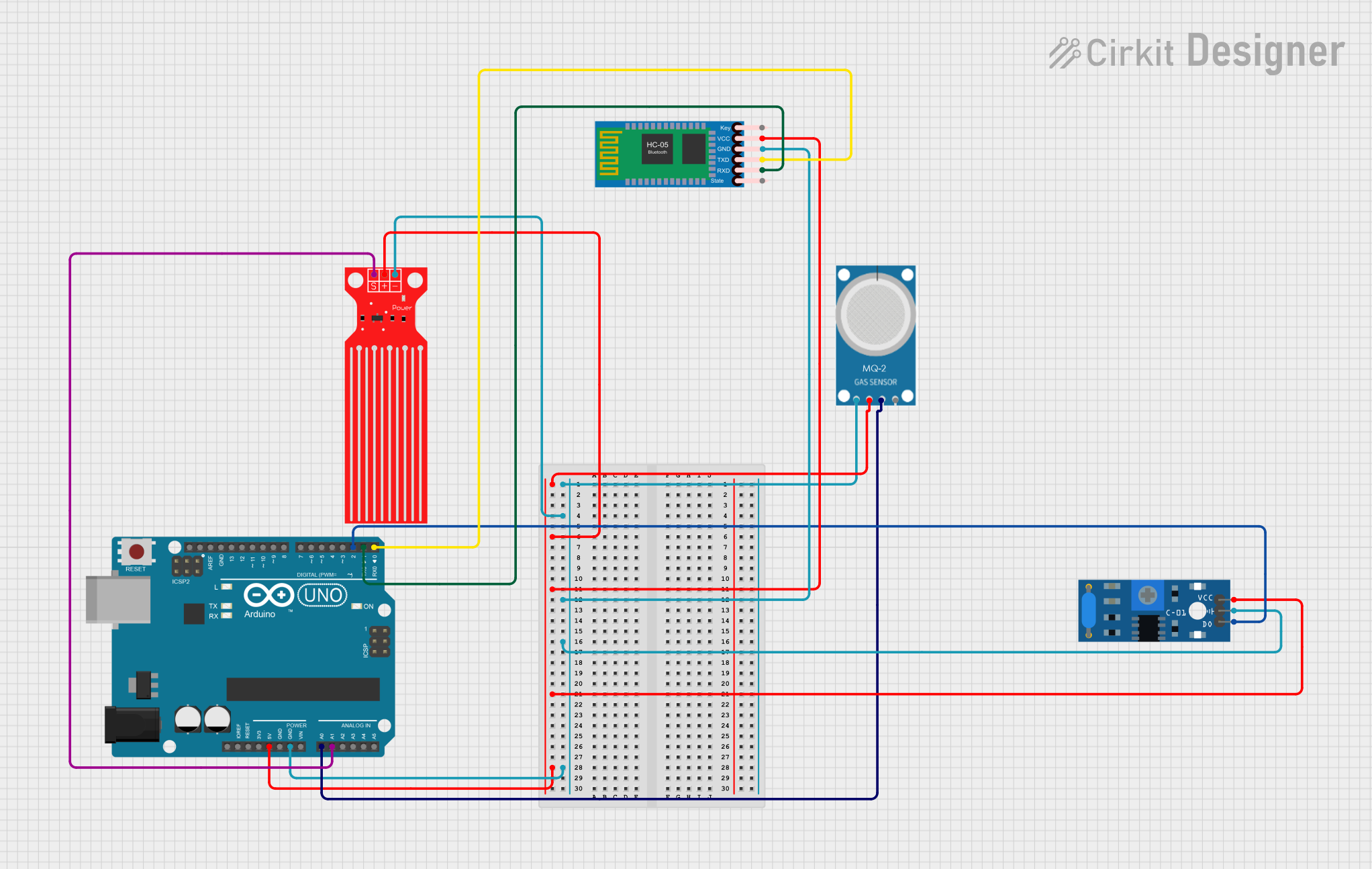
Circuit Documentation
Summary
This document provides a detailed overview of a circuit that includes an Arduino UNO microcontroller, an MQ-2 gas sensor, a water level sensor, an SW-420 vibration sensor, and an HC-05 Bluetooth module. The circuit is designed to interface these sensors with the Arduino UNO for data acquisition and communication.
Component List
Arduino UNO
- Description: A microcontroller board based on the ATmega328P.
- Pins: UNUSED, IOREF, Reset, 3.3V, 5V, GND, Vin, A0, A1, A2, A3, A4, A5, SCL, SDA, AREF, D13, D12, D11, D10, D9, D8, D7, D6, D5, D4, D3, D2, D1, D0
MQ-2 Gas Sensor
- Description: A sensor for detecting gas leaks (e.g., LPG, i-butane, propane, methane, alcohol, hydrogen, smoke).
- Pins: GND, VCC, ANALOG, Digital
Water Level Sensor
- Description: A sensor used to detect the level of water.
- Pins: SIG, VCC, GND
SW-420 Vibration Sensor
- Description: A sensor used to detect vibrations.
- Pins: vcc, Ground, Digital output
HC-05 Bluetooth Module
- Description: A module used for wireless communication via Bluetooth.
- Pins: Key, VCC, TXD, RXD, State, GND
Wiring Details
Arduino UNO
- 5V: Connected to VCC of MQ-2, Water Level Sensor, HC-05 Bluetooth Module, and SW-420 Vibration Sensor.
- GND: Connected to GND of MQ-2, Water Level Sensor, HC-05 Bluetooth Module, and Ground of SW-420 Vibration Sensor.
- A0: Connected to ANALOG of MQ-2.
- A1: Connected to SIG of Water Level Sensor.
- D2: Connected to Digital output of SW-420 Vibration Sensor.
- D1: Connected to RXD of HC-05 Bluetooth Module.
- D0: Connected to TXD of HC-05 Bluetooth Module.
MQ-2 Gas Sensor
- VCC: Connected to 5V of Arduino UNO.
- GND: Connected to GND of Arduino UNO.
- ANALOG: Connected to A0 of Arduino UNO.
Water Level Sensor
- VCC: Connected to 5V of Arduino UNO.
- GND: Connected to GND of Arduino UNO.
- SIG: Connected to A1 of Arduino UNO.
SW-420 Vibration Sensor
- vcc: Connected to 5V of Arduino UNO.
- Ground: Connected to GND of Arduino UNO.
- Digital output: Connected to D2 of Arduino UNO.
HC-05 Bluetooth Module
- VCC: Connected to 5V of Arduino UNO.
- GND: Connected to GND of Arduino UNO.
- RXD: Connected to D1 of Arduino UNO.
- TXD: Connected to D0 of Arduino UNO.
Documented Code
Arduino UNO Code
void setup() {
  // put your setup code here, to run once:

}

void loop() {
  // put your main code here, to run repeatedly:

}
This code is a basic template for the Arduino UNO. The setup() function is where you initialize your sensors and communication protocols, and the loop() function is where you continuously read sensor data and perform actions based on that data.
This concludes the documentation for the circuit. If you have any questions or need further assistance, please refer to the respective datasheets of the components or contact the circuit designer.