
ESP32-Based Gas Detection and Alert System with Servo Control and Push Button Interaction
View and Edit Project In Cirkit Designer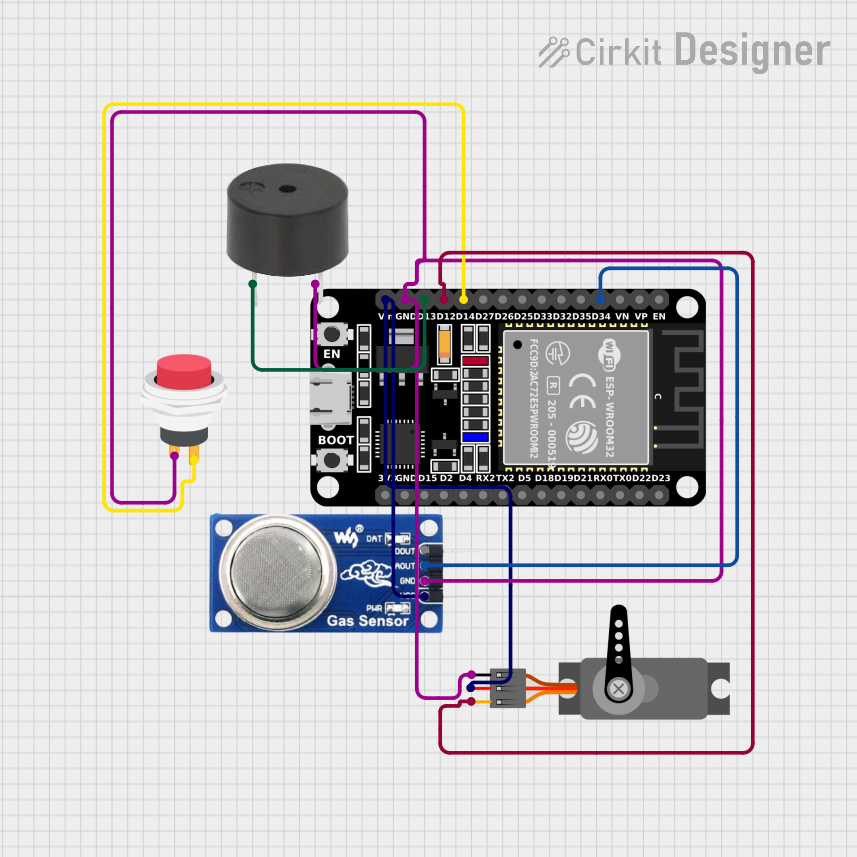
Circuit Documentation
Summary of the Circuit
This circuit integrates an ESP32 microcontroller with a servo motor, an MQ6 gas sensor, a 2-pin push switch, and a buzzer. The ESP32 serves as the central processing unit, controlling the servo motor and buzzer, and reading data from the MQ6 gas sensor. The push switch is used to provide input to the ESP32. The ground connections are shared among all components, and the power supply is distributed from the ESP32 to the servo and MQ6 sensor.
Component List
ESP32 (30 pin)
- Description: A microcontroller with Wi-Fi and Bluetooth capabilities, featuring a wide range of GPIO pins.
- Pins: EN, VP, VN, D34, D35, D32, D33, D25, D26, D27, D14, D12, D13, GND, Vin, D23, D22, TX0, RX0, D21, D19, D18, D5, TX2, RX2, D4, D2, D15, 3V3
Servo
- Description: An actuator that can be precisely controlled for angular position.
- Pins: GND, VCC, PWM
MQ6
- Description: A gas sensor used for detecting LPG, butane, propane, methane, alcohol, hydrogen, and smoke.
- Pins: VCC, GND, A0, DO
2Pin Push Switch
- Description: A simple push-to-make switch that closes the circuit when pressed.
- Pins: Input +, Output +
Buzzer
- Description: An electronic buzzer that produces sound when powered.
- Pins: PIN, GND
Wiring Details
ESP32 (30 pin)
- D34 connected to MQ6 A0
- D14 connected to 2Pin Push Switch Output +
- D12 connected to Servo PWM
- D13 connected to Buzzer PIN
- GND connected to Servo GND, MQ6 GND, Buzzer GND, and 2Pin Push Switch Input +
- Vin connected to Servo VCC and MQ6 VCC
Servo
- PWM connected to ESP32 D12
- GND connected to ESP32 GND
- VCC connected to ESP32 Vin
MQ6
- A0 connected to ESP32 D34
- GND connected to ESP32 GND
- VCC connected to ESP32 Vin
2Pin Push Switch
- Output + connected to ESP32 D14
- Input + connected to ESP32 GND
Buzzer
- PIN connected to ESP32 D13
- GND connected to ESP32 GND
Documented Code
No code has been provided for the microcontroller. The documentation of the code would typically include a description of the functionality, setup, and main loop, along with comments explaining the purpose of each section of the code. Since no code is available, this section remains empty.