
Arduino UNO-Based Ultrasonic Distance Measurement System with LCD Display and Servo Control
View and Edit Project In Cirkit Designer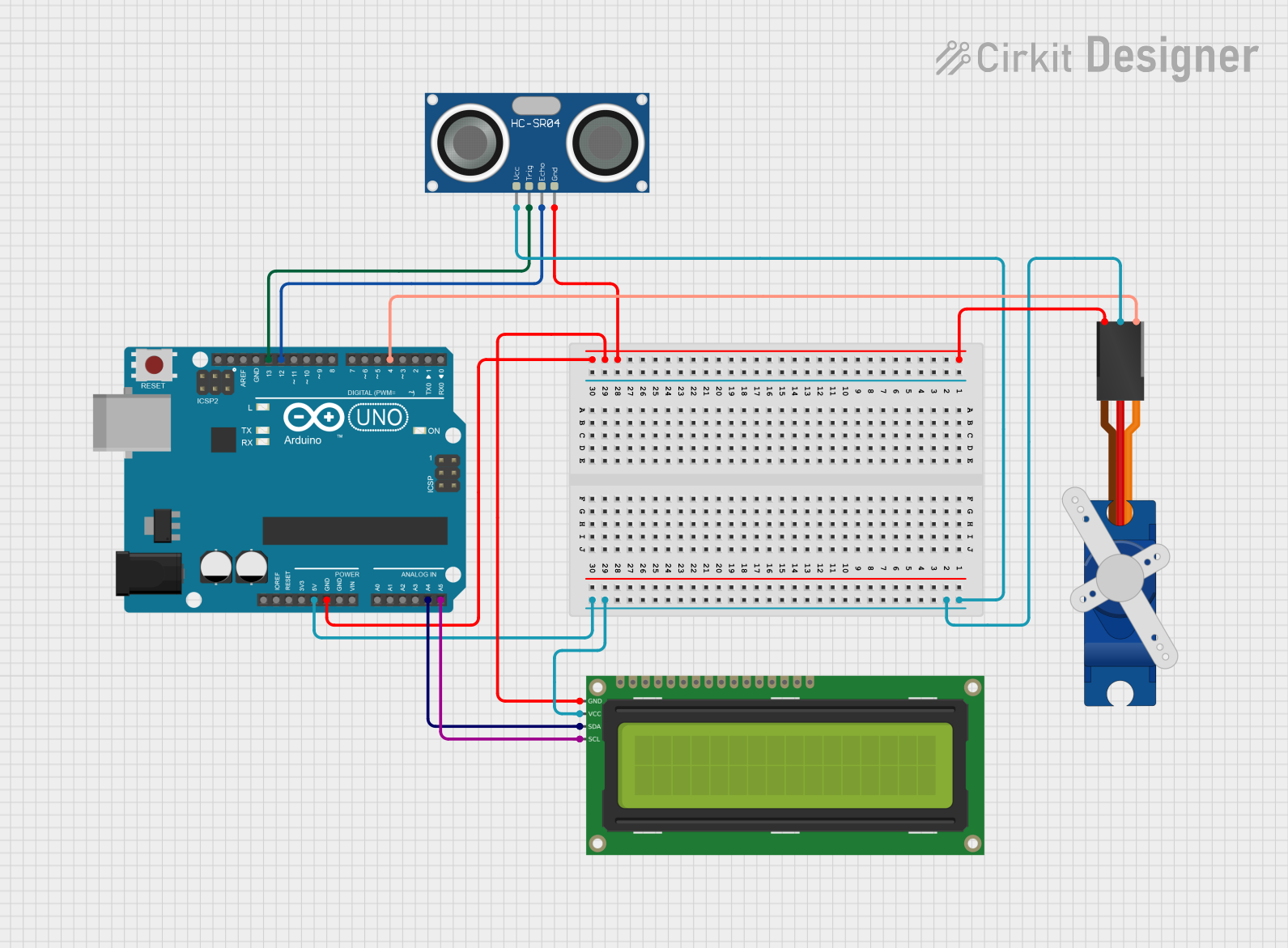
Circuit Documentation
Summary
This circuit involves an Arduino UNO microcontroller interfacing with an HC-SR04 Ultrasonic Sensor, a 16x2 I2C LCD, and a Tower Pro SG90 servo motor. The Arduino UNO serves as the central controller, providing power and control signals to the connected components. The ultrasonic sensor measures distance, the LCD displays information, and the servo motor performs mechanical movements.
Component List
Arduino UNO
- Description: A microcontroller board based on the ATmega328P.
- Pins: UNUSED, IOREF, Reset, 3.3V, 5V, GND, Vin, A0, A1, A2, A3, A4, A5, SCL, SDA, AREF, D13, D12, D11, D10, D9, D8, D7, D6, D5, D4, D3, D2, D1, D0
HC-SR04 Ultrasonic Sensor
- Description: A sensor used to measure distance by using ultrasonic waves.
- Pins: VCC, TRIG, ECHO, GND
16x2 I2C LCD
- Description: A 16x2 character LCD display with I2C interface.
- Pins: GND, VCC, SDA, SCL
Tower Pro SG90 Servo
- Description: A small servo motor used for precise control of angular position.
- Pins: Signal, +5V, GND
Wiring Details
Arduino UNO
5V connected to:
- HC-SR04 Ultrasonic Sensor (VCC)
- Tower Pro SG90 servo (+5V)
- 16x2 I2C LCD (VCC)
GND connected to:
- HC-SR04 Ultrasonic Sensor (GND)
- Tower Pro SG90 servo (GND)
- 16x2 I2C LCD (GND)
A4 connected to:
- 16x2 I2C LCD (SDA)
A5 connected to:
- 16x2 I2C LCD (SCL)
D13 connected to:
- HC-SR04 Ultrasonic Sensor (TRIG)
D12 connected to:
- HC-SR04 Ultrasonic Sensor (ECHO)
D4 connected to:
- Tower Pro SG90 servo (Signal)
HC-SR04 Ultrasonic Sensor
VCC connected to:
- Arduino UNO (5V)
GND connected to:
- Arduino UNO (GND)
TRIG connected to:
- Arduino UNO (D13)
ECHO connected to:
- Arduino UNO (D12)
16x2 I2C LCD
VCC connected to:
- Arduino UNO (5V)
GND connected to:
- Arduino UNO (GND)
SDA connected to:
- Arduino UNO (A4)
SCL connected to:
- Arduino UNO (A5)
Tower Pro SG90 Servo
+5V connected to:
- Arduino UNO (5V)
GND connected to:
- Arduino UNO (GND)
Signal connected to:
- Arduino UNO (D4)
Documented Code
Arduino UNO Code (sketch.ino)
void setup() {
  // put your setup code here, to run once:

}

void loop() {
  // put your main code here, to run repeatedly:

}
Additional Documentation (documentation.txt)
This documentation provides a comprehensive overview of the circuit, including a summary, detailed component list, wiring details, and the code used in the microcontroller.