
Arduino UNO-Based Environmental Monitoring System with I2C LCD Display
View and Edit Project In Cirkit Designer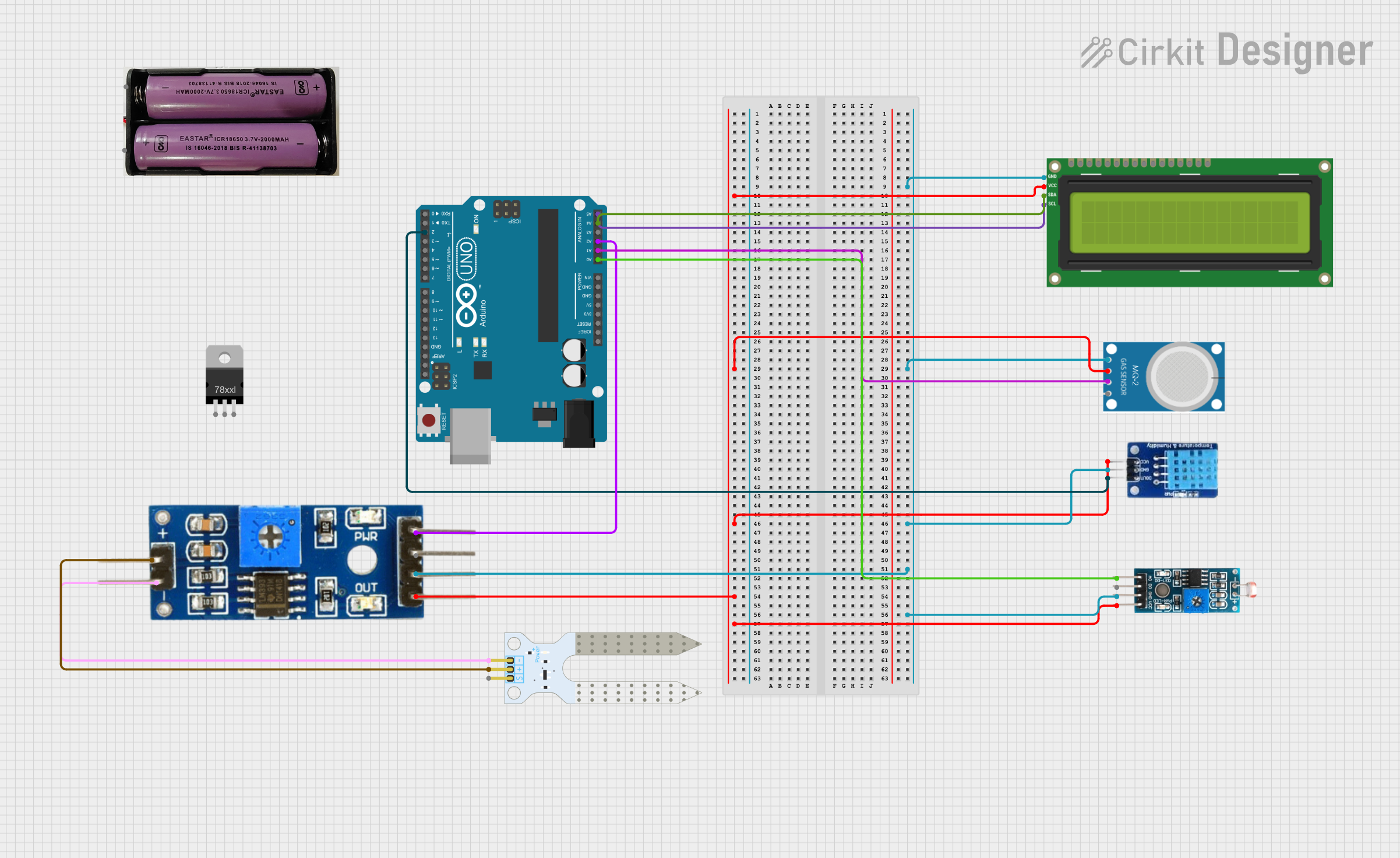
Circuit Documentation
Summary
This circuit is designed to interface various sensors and a display with an Arduino UNO microcontroller. The sensors include a soil moisture sensor, a DHT11 temperature and humidity sensor, an MQ-2 gas sensor, and an LDR module. The data from these sensors is processed by the Arduino UNO and displayed on a 16x2 I2C LCD screen.
Component List
I2C LCD 16x2 Screen
- Description: A 16x2 character LCD display with I2C interface.
- Pins: SCL, SDA, VCC (5V), GND, VDD, VO, RS, RW, E, D0, D1, D2, D3, D4, D5, D6, D7, BLA, BLK
Arduino UNO
- Description: A microcontroller board based on the ATmega328P.
- Pins: UNUSED, IOREF, Reset, 3.3V, 5V, GND, Vin, A0, A1, A2, A3, A4, A5, SCL, SDA, AREF, D13, D12, D11, D10, D9, D8, D7, D6, D5, D4, D3, D2, D1, D0
Soil Moisture Sensor
- Description: A sensor to measure the moisture level in the soil.
- Pins: VCC, GND, SIG
Soil Moisture Module
- Description: A module to interface the soil moisture sensor with the microcontroller.
- Pins: positive, negative, Analog, Digital, Ground, VCC
DHT11
- Description: A temperature and humidity sensor.
- Pins: DATA, GND, VCC
MQ-2
- Description: A gas sensor for detecting LPG, i-butane, propane, methane, alcohol, Hydrogen, and smoke.
- Pins: GND, VCC, ANALOG, Digital
Module LDR
- Description: A light-dependent resistor module for measuring light intensity.
- Pins: VCC, GND, DO, AO
Voltage Regulator
- Description: A component to regulate voltage.
- Pins: IN, GND, OUT
7.4v Battery
- Description: A 7.4V battery for powering the circuit.
- Pins: +, -
Wiring Details
I2C LCD 16x2 Screen
- GND connected to GND of MQ-2, DHT11, Soil Moisture Module, and Module LDR.
- VCC (5V) connected to VCC of MQ-2, DHT11, Soil Moisture Module, and Module LDR.
- SCL connected to A5 of Arduino UNO.
- SDA connected to A4 of Arduino UNO.
Arduino UNO
- A0 connected to AO of Module LDR.
- A1 connected to ANALOG of MQ-2.
- A2 connected to Analog of Soil Moisture Module.
- D2 connected to DATA of DHT11.
Soil Moisture Sensor
- VCC connected to positive of Soil Moisture Module.
- GND connected to negative of Soil Moisture Module.
Soil Moisture Module
- Ground connected to GND of I2C LCD 16x2 Screen, MQ-2, DHT11, and Module LDR.
- VCC connected to VCC (5V) of I2C LCD 16x2 Screen, MQ-2, DHT11, and Module LDR.
DHT11
- GND connected to GND of I2C LCD 16x2 Screen, MQ-2, Soil Moisture Module, and Module LDR.
- VCC connected to VCC (5V) of I2C LCD 16x2 Screen, MQ-2, Soil Moisture Module, and Module LDR.
- DATA connected to D2 of Arduino UNO.
MQ-2
- GND connected to GND of I2C LCD 16x2 Screen, DHT11, Soil Moisture Module, and Module LDR.
- VCC connected to VCC (5V) of I2C LCD 16x2 Screen, DHT11, Soil Moisture Module, and Module LDR.
- ANALOG connected to A1 of Arduino UNO.
Module LDR
- GND connected to GND of I2C LCD 16x2 Screen, MQ-2, DHT11, and Soil Moisture Module.
- VCC connected to VCC (5V) of I2C LCD 16x2 Screen, MQ-2, DHT11, and Soil Moisture Module.
- AO connected to A0 of Arduino UNO.
Voltage Regulator
- IN connected to + of 7.4v Battery.
- GND connected to - of 7.4v Battery.
- OUT connected to Vin of Arduino UNO.
7.4v Battery
- + connected to IN of Voltage Regulator.
- - connected to GND of Voltage Regulator.
Code Documentation
/*
 * This Arduino Sketch initializes I2C communication and displays a message
 * on a 16x2 LCD screen connected via I2C.
 */

#include <Wire.h>
#include <LiquidCrystal_I2C.h>

// Set the LCD address to 0x27 for a 16 chars and 2 line display
LiquidCrystal_I2C lcd(0x27, 16, 2);

void setup() {
  // Initialize I2C communication
  Wire.begin();
  // Initialize the LCD
  lcd.begin();
  // Turn on the backlight
  lcd.backlight();
  // Print a message to the LCD
  lcd.setCursor(0, 0);
  lcd.print("Hello, World!");
}

void loop() {
  // Main loop does nothing
}
This code initializes the I2C communication and displays a "Hello, World!" message on the 16x2 LCD screen. The setup() function sets up the I2C communication and initializes the LCD, while the loop() function remains empty as no continuous operation is required.