
Circuit Documentation
Summary
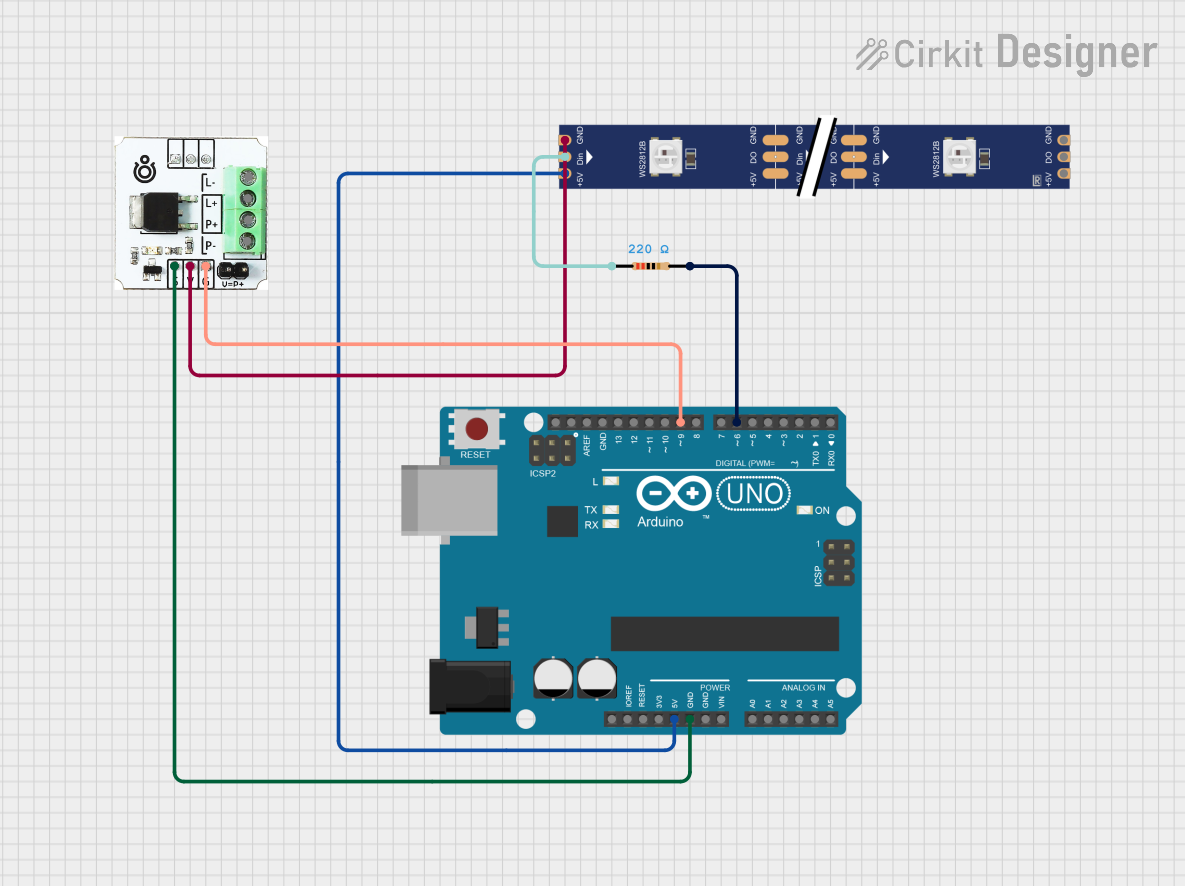
This circuit is designed to create a meteor rain effect with yellow light using an Arduino UNO, a WS2812 RGB LED strip, an N-channel Mosfet, and a 220 Ohm resistor. The Arduino UNO controls the LED strip through the Mosfet, and the resistor is used to limit the current to the LED strip's data input.
Component List
Arduino UNO
- Description: A microcontroller board based on the ATmega328P.
- Pins: UNUSED, IOREF, Reset, 3.3V, 5V, GND, Vin, A0, A1, A2, A3, A4, A5, SCL, SDA, AREF, D13, D12, D11, D10, D9, D8, D7, D6, D5, D4, D3, D2, D1, D0
WS2812 RGB LED strip
- Description: A 1-meter LED strip with 144 individually addressable RGB LEDs.
- Pins: DIN, 5V, GND, DO
Mosfet N-channel
- Description: A transistor used to switch the ground connection of the LED strip.
- Pins: S, V, G, P-, P+, L+, L-
Resistor
- Description: A 220 Ohm resistor used to limit the current to the LED strip's data input.
- Pins: pin1, pin2
- Properties:
- Resistance: 220 Ohms
Wiring Details
Arduino UNO
- 5V connected to 5V of the WS2812 RGB LED strip.
- GND connected to S of the Mosfet N-channel.
- D9 connected to G of the Mosfet N-channel.
- D6 connected to pin2 of the Resistor.
WS2812 RGB LED strip
- 5V connected to 5V of the Arduino UNO.
- GND connected to V of the Mosfet N-channel.
- DIN connected to pin1 of the Resistor.
Mosfet N-channel
- S connected to GND of the Arduino UNO.
- V connected to GND of the WS2812 RGB LED strip.
- G connected to D9 of the Arduino UNO.
Resistor
- pin2 connected to D6 of the Arduino UNO.
- pin1 connected to DIN of the WS2812 RGB LED strip.
Code Documentation
/*
 * Arduino Sketch for Meteor Rain effect with Yellow light
 * Components:
 * - Arduino UNO
 * - WS2812 RGB LED strip (1m, 144 pixels)
 * - N-channel Mosfet
 * - 220 Ohm Resistor
 * Connections:
 * - Arduino D6 -> Resistor -> WS2812 DIN
 * - Arduino 5V -> WS2812 5V
 * - Arduino GND -> Mosfet S
 * - Mosfet V -> WS2812 GND
 * - Mosfet G -> Arduino D9
 * Description:
 * This code creates a meteor rain effect with yellow light on a 1m WS2812 LED strip.
 */

#include <Adafruit_NeoPixel.h>

#define LED_PIN 6
#define LED_COUNT 144
#define MOSFET_PIN 9

Adafruit_NeoPixel strip = Adafruit_NeoPixel(LED_COUNT, LED_PIN, NEO_GRB + NEO_KHZ800);

void setup() {
  pinMode(MOSFET_PIN, OUTPUT);
  digitalWrite(MOSFET_PIN, HIGH); // Turn on the MOSFET
  strip.begin();
  strip.show(); // Initialize all pixels to 'off'
  randomSeed(analogRead(0));
}

void loop() {
  meteorRain(255, 255, 0, 10, 64, true);
}

void meteorRain(byte red, byte green, byte blue, int meteorSize, int meteorTrailDecay, bool meteorRandomDecay) {
  strip.clear();

  for (int i = 0; i < LED_COUNT + LED_COUNT; i++) {
    // Fade brightness all LEDs one step
    for (int j = 0; j < LED_COUNT; j++) {
      if ((!meteorRandomDecay) || (random(10) > 5)) {
        fadeToBlack(j, meteorTrailDecay);
      }
    }

    // Draw meteor
    for (int j = 0; j < meteorSize; j++) {
      if ((i - j < LED_COUNT) && (i - j >= 0)) {
        strip.setPixelColor(i - j, red, green, blue);
      }
    }

    strip.show();
    delay(30);
  }
}

void fadeToBlack(int ledNo, byte fadeValue) {
  uint32_t oldColor;
  uint8_t r, g, b;
  oldColor = strip.getPixelColor(ledNo);
  r = (oldColor >> 16) & 0xFF;
  g = (oldColor >> 8) & 0xFF;
  b = oldColor & 0xFF;

  r = (r <= 10) ? 0 : (int)r - (r * fadeValue / 256);
  g = (g <= 10) ? 0 : (int)g - (g * fadeValue / 256);
  b = (b <= 10) ? 0 : (int)b - (b * fadeValue / 256);

  strip.setPixelColor(ledNo, r, g, b);
}
This code initializes the WS2812 LED strip and creates a meteor rain effect with yellow light. The meteorRain function handles the animation, and the fadeToBlack function gradually dims the LEDs to create a trailing effect.