
Arduino Nano IR Sensor Activated Buzzer and Servo Motor System
View and Edit Project In Cirkit Designer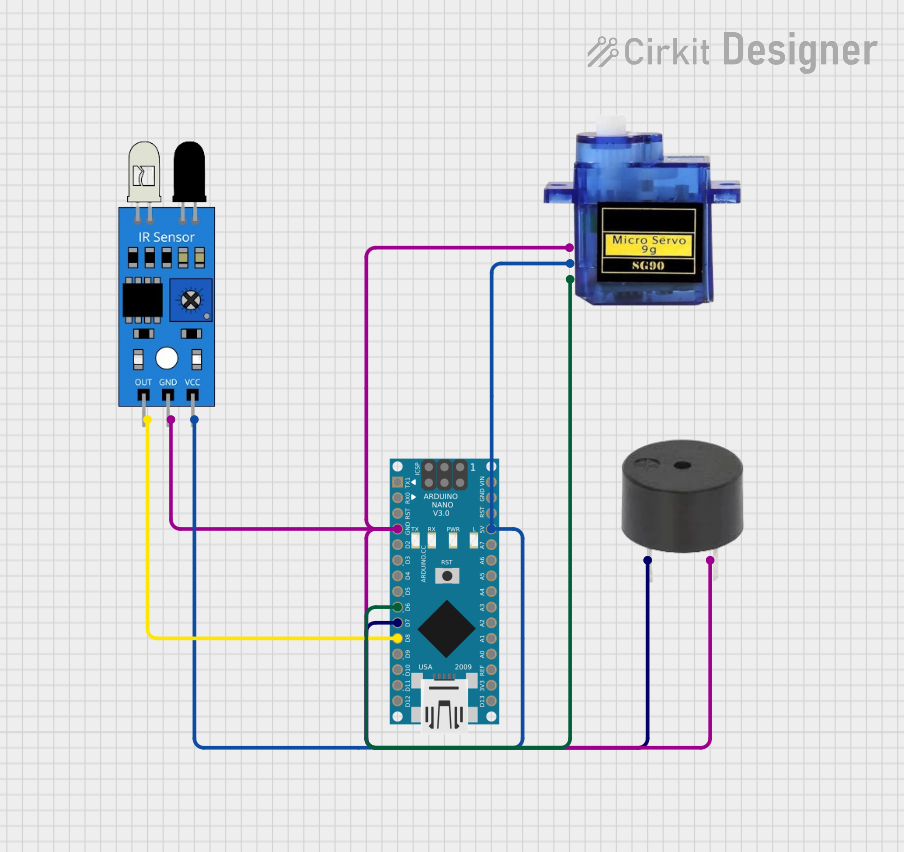
Circuit Documentation
Summary
This circuit is designed to control a buzzer and a servo motor using an Arduino Nano. The circuit also includes an IR sensor that detects objects. When the IR sensor detects an object, the buzzer is activated, and the servo motor moves to a specified position.
Component List
Buzzer
- Description: A simple piezoelectric buzzer used to produce sound.
- Pins: PIN, GND
Arduino Nano
- Description: A small, complete, and breadboard-friendly microcontroller board based on the ATmega328P.
- Pins: D1/TX, D0/RX, RESET, GND, D2, D3, D4, D5, D6, D7, D8, D9, D10, D11/MOSI, D12/MISO, VIN, 5V, A7, A6, A5, A4, A3, A2, A1, A0, AREF, 3V3, D13/SCK
IR Sensor
- Description: An infrared sensor used to detect objects.
- Pins: out, gnd, vcc
Micro Servo 9G
- Description: A small servo motor used for precise control of angular position.
- Pins: GND, +5V, PWM
Wiring Details
Buzzer
- PIN connected to Arduino Nano D7
- GND connected to Arduino Nano GND
Arduino Nano
- D7 connected to Buzzer PIN
- GND connected to Buzzer GND, IR Sensor gnd, Micro Servo 9G GND
- D6 connected to Micro Servo 9G PWM
- D8 connected to IR Sensor out
- 5V connected to IR Sensor vcc, Micro Servo 9G +5V
IR Sensor
- gnd connected to Arduino Nano GND
- out connected to Arduino Nano D8
- vcc connected to Arduino Nano 5V
Micro Servo 9G
- GND connected to Arduino Nano GND
- +5V connected to Arduino Nano 5V
- PWM connected to Arduino Nano D6
Code Documentation
/*
 * This Arduino sketch controls a buzzer and a servo motor connected to an
 * Arduino Nano. The buzzer and servo motor will be activated whenever the
 * IR sensor detects an object. The IR sensor is connected to pin D8 of the
 * Arduino Nano, the buzzer is connected to pin D7, and the servo motor is
 * connected to pin D6.
 */

#include <Servo.h>

const int buzzerPin = 7; // Pin connected to the buzzer
const int irSensorPin = 8; // Pin connected to the IR sensor
const int servoPin = 6; // Pin connected to the servo motor

Servo myServo; // Create a servo object

void setup() {
  pinMode(buzzerPin, OUTPUT); // Set the buzzer pin as an output
  pinMode(irSensorPin, INPUT); // Set the IR sensor pin as an input
  myServo.attach(servoPin); // Attach the servo to the pin
  myServo.write(90); // Initialize the servo to 90 degrees
}

void loop() {
  int irSensorValue = digitalRead(irSensorPin); // Read the IR sensor value
  if (irSensorValue == HIGH) { // If the IR sensor detects an object
    digitalWrite(buzzerPin, HIGH); // Turn the buzzer on
    myServo.write(0); // Turn the servo to 0 degrees
  } else {
    digitalWrite(buzzerPin, LOW); // Turn the buzzer off
    myServo.write(90); // Turn the servo to 90 degrees
  }
}
This code initializes the pins for the buzzer, IR sensor, and servo motor. In the setup function, the buzzer pin is set as an output, the IR sensor pin is set as an input, and the servo motor is attached to its pin and initialized to 90 degrees. In the loop function, the IR sensor value is read, and if an object is detected, the buzzer is turned on and the servo motor is moved to 0 degrees. If no object is detected, the buzzer is turned off and the servo motor is moved back to 90 degrees.