
ESP32C3 and RS485-Based Smart Modbus Energy Monitor with Wi-Fi Connectivity
View and Edit Project In Cirkit Designer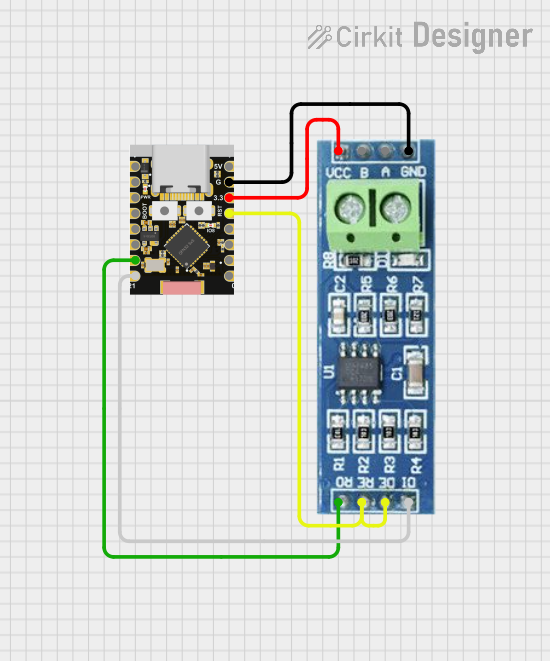
Circuit Documentation
Summary
This document provides a detailed overview of a circuit that integrates an ESP32C3 Supermini microcontroller with an RS485 communication module. The ESP32C3 Supermini is used to control and communicate with the RS485 module, enabling Modbus communication. The document includes a component list, wiring details, and the embedded code used in the microcontroller.
Component List
ESP32C3 Supermini
- Description: A compact microcontroller with Wi-Fi and Bluetooth capabilities.
- Pins: GPIO05, GPIO06, GPIO07, GPIO08, GPIO09, GPIO10, GPIO20, GPIO21, GPIO00, GPIO01, GPIO02, GPIO03, GPIO04, 3.3V, GND, +5V
RS485
- Description: A module used for RS485 communication, commonly used in industrial and automation applications.
- Pins: VCC, RO, RE, GND, B, A, DE, DI
Wiring Details
ESP32C3 Supermini
- GPIO20 is connected to RS485 RO
- GPIO21 is connected to RS485 DI
- GPIO04 is connected to RS485 RE and RS485 DE
- 3.3V is connected to RS485 VCC
- GND is connected to RS485 GND
RS485
- RO is connected to ESP32C3 Supermini GPIO20
- DI is connected to ESP32C3 Supermini GPIO21
- RE and DE are connected to ESP32C3 Supermini GPIO04
- VCC is connected to ESP32C3 Supermini 3.3V
- GND is connected to ESP32C3 Supermini GND
Embedded Code
ESPHome Configuration for ESP32C3 Supermini
esphome:
  name: modbus-billader
  friendly_name: Modbus billader

esp32:
  board: esp32-c3-devkitm-1
  framework:
    type: arduino

# Enable logging
logger:
  baud_rate: 0

# Enable Home Assistant API
api:
  encryption:
    key: "3TDLm3LbXTpDaz/27xnFzV6qZDkZhGY44+dyFDvKTFQ="

ota:
  - platform: esphome
    password: "a63effaf86b1db1c1cae158c44365821"

wifi:
  ssid: !secret wifi_ssid
  password: !secret wifi_password

  # Enable fallback hotspot (captive portal) in case wifi connection fails
  ap:
    ssid: "Modbus-Billader Fallback Hotspot"
    password: "MdjYAKoXC71B"
  manual_ip:
    static_ip: 192.168.10.21 # Replace xxx with the chosen static ip
    gateway: 192.168.10.1
    subnet: 255.255.255.0

captive_portal:

web_server:

# ++++++++++Conf MODBUS  RS485 ++++++++++++
uart:
  id: mod_bus
  tx_pin: GPIO21
  rx_pin: GPIO20
  baud_rate: 9600
  parity: NONE
  stop_bits: 1

modbus:
  flow_control_pin: GPIO4
  id: modbus1
  send_wait_time: 250ms  # Reduced from 500ms

modbus_controller:
  - id: Billader
    address: 0x1
    modbus_id: modbus1
    setup_priority: -10
    update_interval: 1s  # Increased from 1s

sensor:
# +++ Henter serienummer +++
#- platform: modbus_controller
#  modbus_controller_id: Billader
#  id: billader_serial_number
#  name: "Serienummer"
#  address: 0x4000
#  register_type: read
#  value_type: U_QWORD
#  skip_updates: 100

# +++ Henter firmware version +++
#- platform: modbus_controller
#  modbus_controller_id: Billader
#  id: billader_firmware_version
#  name: "Firmware"
#  address: 0x4004
#  register_type: read
#  value_type: U_DWORD
#  skip_updates: 100

# +++ Den maksimale strømstyrke som laderen må trække. Defineres via Terra Config app. +++
#- platform: modbus_controller
#  modbus_controller_id: Billader
#  id: billader_user_settable_max_current
#  name: "Maksimum ladestyrke"
#  address: 0x4006
#  unit_of_measurement: "A"
#  register_type: read
#  value_type: U_DWORD
#  accuracy_decimals: 0
#  filters:
#    - multiply: 0.001

# +++ Læser fejlkode +++
- platform: modbus_controller
  modbus_controller_id: Billader
  id: billader_error_code
  name: "Fejlkode"
  address: 0x4008
  register_type: read
  value_type: U_DWORD

# +++ Låsetilstand på ladekabel. Gælder kun på sokkel-versionen af laderen. +++
#- platform: modbus_controller
#  modbus_controller_id: Billader
#  id: billader_socket_lock_state
#  name: "Ladestik låsetilstand"
#  address: 0x400A
#  register_type: read
#  value_type: U_DWORD

# +++ Ladetilstande ifølge IEC 61851-1. +++
- platform: modbus_controller
  modbus_controller_id: Billader
  id: billader_charging_state
  name: "Ladetilstand"
  address: 0x400C
  register_type: read
  value_type: U_DWORD

# +++ Aflæser ladestyrken +++
- platform: modbus_controller
  modbus_controller_id: Billader
  id: billader_charging_current_limit
  name: "Ladestyrke"
  address: 0x400E
  unit_of_measurement: "A"
  register_type: read
  value_type: U_DWORD
  filters:
    - multiply: 0.001

# +++ Aflæser ladestyrken på L1 +++
#- platform: modbus_controller
#  modbus_controller_id: Billader
#  id: billader_charging_current_L1
#  name: "Ladestyrke L1"
#  address: 0x4010
#  register_type: read
#  value_type: U_DWORD
#  unit_of_measurement: "A"
#  accuracy_decimals: 1
#  filters:
#    - multiply: 0.001

# +++ Aflæser ladestyrken på L2 +++
#- platform: modbus_controller
#  modbus_controller_id: Billader
#  id: billader_charging_current_L2
#  name: "Ladestyrke L2"
#  address: 0x4012
#  register_type: read
#  value_type: U_DWORD

# +++ Aflæser ladestyrken på L3 +++
#- platform: modbus_controller
#  modbus_controller_id: Billader
#  id: billader_charging_current_L3
#  name: "Ladestyrke L3"
#  address: 0x4014
#  register_type: read
#  value_type: U_DWORD

# +++ Aflæser spændingen på L1 +++
- platform: modbus_controller
  modbus_controller_id: Billader
  id: billader_voltage_L1
  name: "Spænding L1"
  address: 0x4016
  unit_of_measurement: "V"
  register_type: read
  skip_updates: 2
  value_type: U_DWORD
  accuracy_decimals: 0
  filters:
    - multiply: 0.1

# +++ Aflæser spændingen på L2 +++
#- platform: modbus_controller
#  modbus_controller_id: Billader
#  id: billader_voltage_L2
#  name: "Spænding L2"
#  address: 0x4018
#  unit_of_measurement: "V"
#  register_type: read
#  skip_updates: 2
#  value_type: U_DWORD
#  accuracy_decimals: 0
#  filters:
#    - multiply: 0.1

# +++ Aflæser spændingen på L3 +++
#- platform: modbus_controller
#  modbus_controller_id: Billader
#  id: billader_voltage_L3
#  name: "Spænding