
ESP8266 WiFi Module Serial Interface with Pushbutton Control
View and Edit Project In Cirkit Designer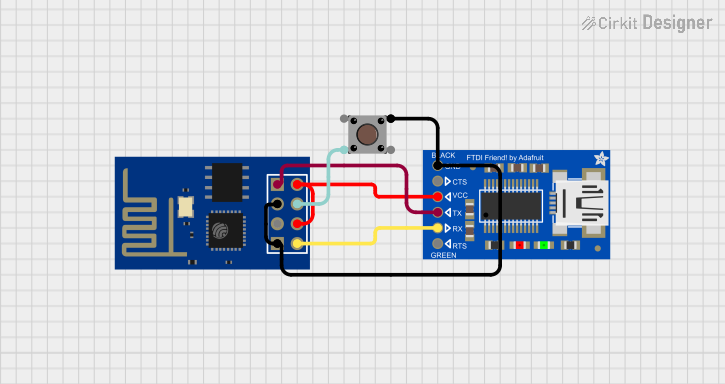
Circuit Documentation
Summary of the Circuit
This circuit integrates an ESP8266 ESP-01 WiFi module with an Adafruit FTDI Friend for serial communication and a pushbutton for user input. The ESP8266 module is a popular WiFi module that can be used for Internet of Things (IoT) applications, and the FTDI Friend is a USB-to-serial converter that allows for programming and communication with the ESP8266. The pushbutton is used to reset the ESP8266 or to put it into a different mode of operation depending on the connection.
Component List
ESP8266 ESP-01 WiFi Module
- Description: A compact WiFi module that can be used for wireless communication in IoT projects.
- Pins: TXD, CH_PD, RST, VCC, GND, GPIO_2, GPIO_0, RXD
Adafruit FTDI Friend
- Description: A USB-to-serial adapter that provides a connection between a computer's USB port and the serial pins on microcontrollers.
- Pins: GND, CTS, VCC, TX, RX, RTS/DTR
Pushbutton
- Description: A simple pushbutton switch that can be used to trigger actions in a circuit.
- Pins: Pin 3 (out), Pin 4 (out), Pin 1 (in), Pin 2 (in)
Wiring Details
ESP8266 ESP-01 WiFi Module
- TXD is connected to the RX pin of the Adafruit FTDI Friend.
- CH_PD is connected to its own VCC pin to enable the chip.
- RST is connected to Pin 4 (out) of the Pushbutton to allow for resetting the module.
- VCC is shared with the CH_PD pin and the VCC pin of the Adafruit FTDI Friend.
- GND is connected to the GND pin of the Adafruit FTDI Friend and Pin 1 (in) of the Pushbutton.
- GPIO_0 is connected to GND to enable flashing mode when the pushbutton is pressed.
- RXD is connected to the TX pin of the Adafruit FTDI Friend.
Adafruit FTDI Friend
- GND is connected to the GND pin of the ESP8266 ESP-01 WiFi Module and Pin 1 (in) of the Pushbutton.
- VCC is connected to the VCC pin of the ESP8266 ESP-01 WiFi Module.
- TX is connected to the RXD pin of the ESP8266 ESP-01 WiFi Module.
- RX is connected to the TXD pin of the ESP8266 ESP-01 WiFi Module.
Pushbutton
- Pin 4 (out) is connected to the RST pin of the ESP8266 ESP-01 WiFi Module to allow for resetting the module.
- Pin 1 (in) is connected to the GND pin of the ESP8266 ESP-01 WiFi Module and the GND pin of the Adafruit FTDI Friend.
Documented Code
There is no code provided for the microcontrollers in this circuit. If code is later provided, it should be documented in this section with appropriate comments and explanations for each part of the code.