
Arduino UNO and ESP8266 Based Wi-Fi Temperature and Humidity Monitor
View and Edit Project In Cirkit Designer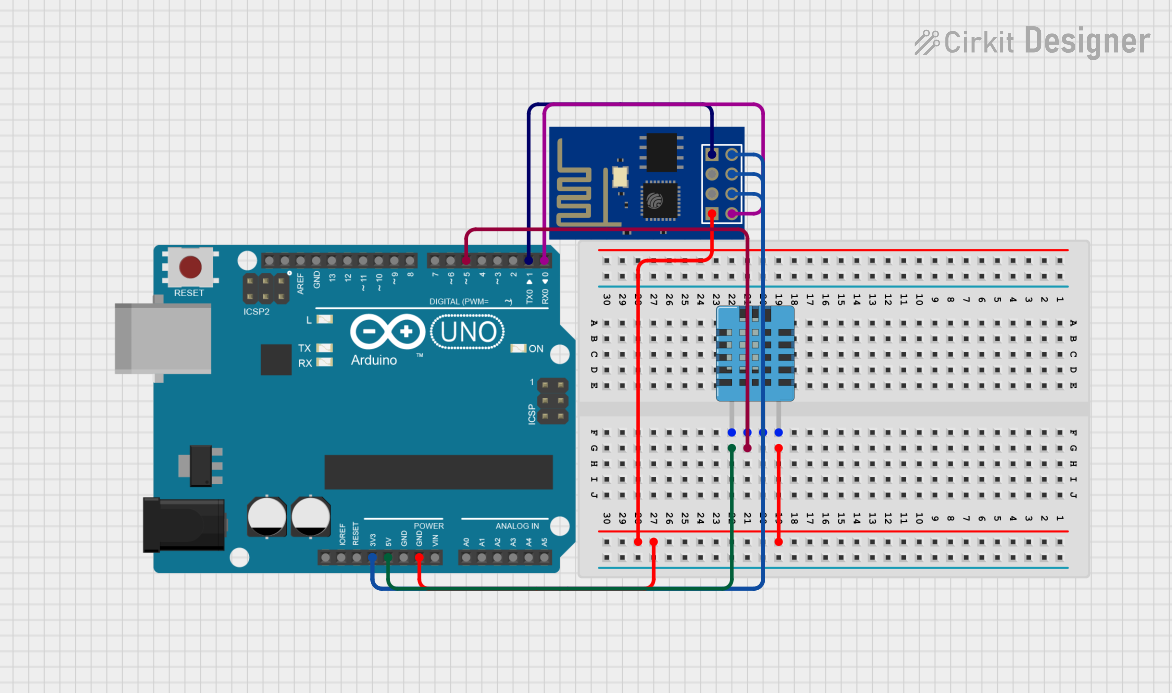
Circuit Documentation
Summary
The circuit in question is designed to collect temperature and humidity data using a DHT11 sensor, process the data with an Arduino UNO microcontroller, and transmit the data over WiFi using an ESP8266 ESP-01 WiFi module. The Arduino UNO serves as the central processing unit, interfacing with the DHT11 sensor and the ESP8266 module for data acquisition and wireless communication, respectively.
Component List
Arduino UNO
- Description: A microcontroller board based on the ATmega328P.
- Pins: UNUSED, IOREF, Reset, 3.3V, 5V, GND, Vin, A0-A5, SCL, SDA, AREF, D0-D13.
ESP8266 ESP-01 WiFi Module
- Description: A compact WiFi module that can be used for Internet connectivity.
- Pins: TXD, CH_PD, RST, VCC, GND, GPIO_2, GPIO_0, RXD.
DHT11 Humidity and Temperature Sensor
- Description: A basic, low-cost digital temperature and humidity sensor.
- Pins: VDD, DATA, NULL, GND.
Wiring Details
Arduino UNO
- GND connected to:
- GND of DHT11 Humidity and Temperature Sensor
- GND of ESP8266 ESP-01 WiFi Module
- 5V connected to VDD of DHT11 Humidity and Temperature Sensor
- 3.3V connected to VCC, CH_PD, and RST of ESP8266 ESP-01 WiFi Module
- D5 connected to DATA of DHT11 Humidity and Temperature Sensor
- D1 (TX) connected to RXD of ESP8266 ESP-01 WiFi Module
- D0 (RX) connected to TXD of ESP8266 ESP-01 WiFi Module
ESP8266 ESP-01 WiFi Module
- GND connected to GND of Arduino UNO
- VCC, CH_PD, RST connected to 3.3V of Arduino UNO
- RXD connected to D1 (TX) of Arduino UNO
- TXD connected to D0 (RX) of Arduino UNO
DHT11 Humidity and Temperature Sensor
- GND connected to GND of Arduino UNO
- DATA connected to D5 of Arduino UNO
- VDD connected to 5V of Arduino UNO
Documented Code
Arduino UNO Code
void setup() {
  // put your setup code here, to run once:

}

void loop() {
  // put your main code here, to run repeatedly:

}
ESP8266 ESP-01 WiFi Module Code
#include <ThingSpeak.h>
#include <DHT.h>

#define DHTPIN 5 // DHT data pin connected to Arduino pin 5
#define DHTTYPE DHT11 // DHT11 (DHT Sensor Type)
DHT dht(DHTPIN, DHTTYPE); // Initialize the DHT sensor
#define SSID "YourWiFiSSID" // "WiFi Name"
#define PASS "YourWiFiPassword" // "Password"
#define IP "184.106.153.149" // thingspeak.com IP
String msg = "GET /update?key=YourWriteAPIKey"; // Change it with your key...

float temp;
int hum;
String tempC;
int error;

void setup() {
  Serial.begin(115200); // Use default 115200 baud rate.
  Serial.println("AT");
  delay(5000);
  if (Serial.find("OK")) {
    connectWiFi();
  }
}

// Additional functions for WiFi connection would be here.
DHT11 Humidity and Temperature Sensor Code
#include <SimpleDHT.h>

// for DHT11,
// VCC: 5V or 3V
// GND: GND
// DATA: 5
int pinDHT11 = 5;
SimpleDHT11 dht11;

void setup() {
  // Start working...
  Serial.begin(9600);
  Serial.println("Temperature and Humidity Data");
}

void loop() {
  delay(250);

  // Read without samples.
  byte temperature = 0;
  byte humidity = 0;
  int err = SimpleDHTErrSuccess;
  if ((err = dht11.read(pinDHT11, &temperature, &humidity, NULL)) != SimpleDHTErrSuccess) {
    Serial.print("Read DHT11 failed, err=");
    Serial.println(err);
    delay(1000);
    return;
  }
  Serial.print((int)temperature);
  Serial.print(" *C, ");
  Serial.print((int)humidity);
  Serial.println(" *H");

  // DHT11 sampling rate is 1HZ.
  delay(1500);
}
Note: The actual implementation of the functions for connecting the ESP8266 to WiFi and sending data to ThingSpeak is not included in the provided code snippet. Additional code is required to complete the functionality.