
Circuit Documentation
Summary
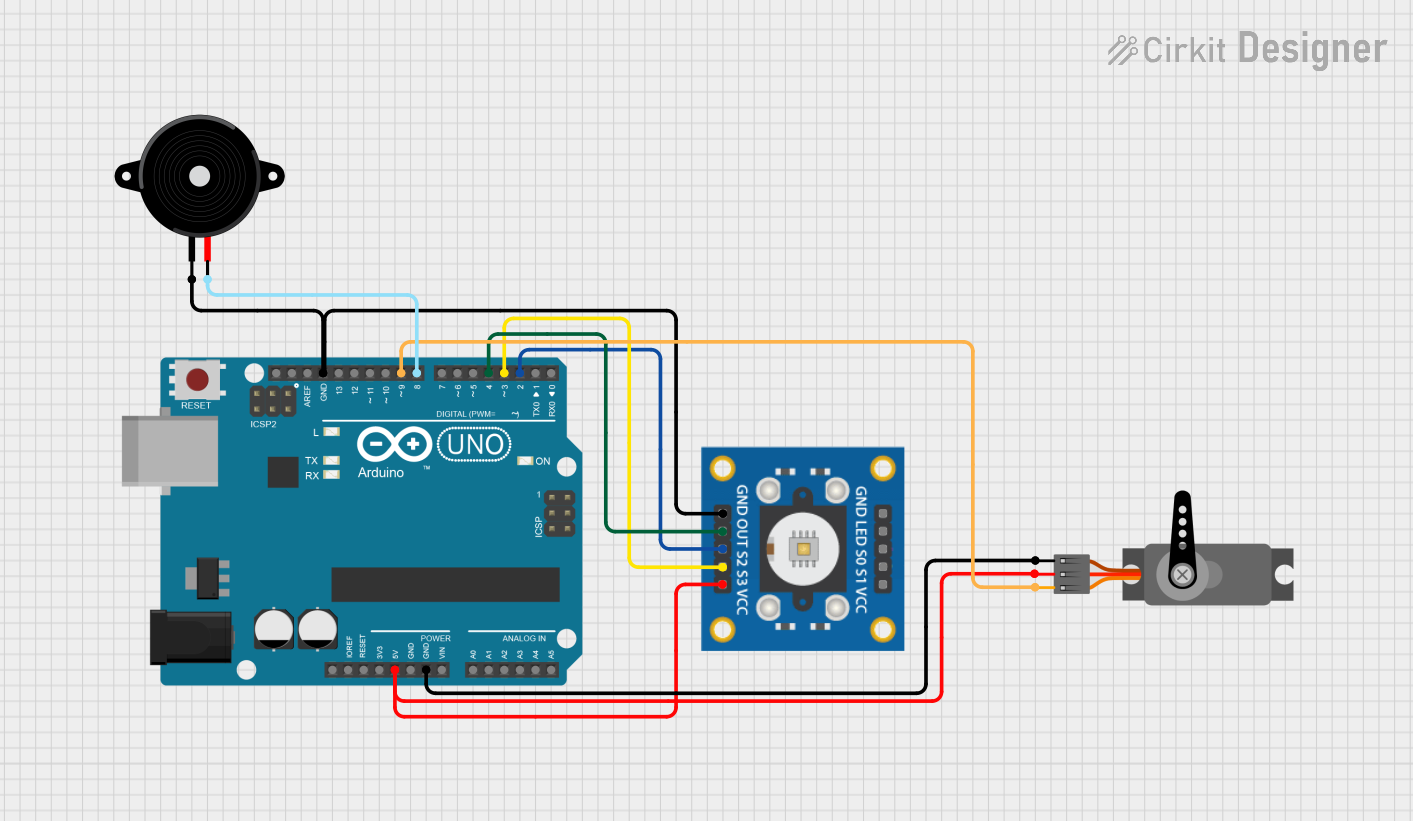
This document provides a detailed overview of a circuit that includes a TCS3200 color sensor, an Arduino UNO microcontroller, a Servo motor, and a Piezo Speaker. The circuit is designed to interface these components with the Arduino UNO, which controls their operation based on the provided embedded code.
Component List
TCS3200 Color Sensor
- Description: A color sensor that can detect and measure the intensity of red, green, and blue light.
- Pins: GND, OUT, S2, S3, VCC, LED, S0, S1
Arduino UNO
- Description: A microcontroller board based on the ATmega328P. It has 14 digital input/output pins, 6 analog inputs, and a USB connection.
- Pins: UNUSED, IOREF, Reset, 3.3V, 5V, GND, Vin, A0, A1, A2, A3, A4, A5, SCL, SDA, AREF, D13, D12, D11, D10, D9, D8, D7, D6, D5, D4, D3, D2, D1, D0
Servo Motor
- Description: A motor that can be precisely controlled in terms of angular position, velocity, and acceleration.
- Pins: GND, VCC, PWM
Piezo Speaker
- Description: A speaker that uses the piezoelectric effect to generate sound.
- Pins: pin1, pin2
Wiring Details
TCS3200 Color Sensor
- GND connected to Arduino UNO GND and Piezo Speaker pin1
- OUT connected to Arduino UNO D4
- S2 connected to Arduino UNO D2
- S3 connected to Arduino UNO D3
- VCC connected to Arduino UNO 5V and Servo Motor VCC
Arduino UNO
- GND connected to TCS3200 GND, Servo Motor GND, and Piezo Speaker pin1
- D4 connected to TCS3200 OUT
- D2 connected to TCS3200 S2
- D3 connected to TCS3200 S3
- 5V connected to TCS3200 VCC and Servo Motor VCC
- D9 connected to Servo Motor PWM
- D8 connected to Piezo Speaker pin2
Servo Motor
- VCC connected to Arduino UNO 5V and TCS3200 VCC
- GND connected to Arduino UNO GND
- PWM connected to Arduino UNO D9
Piezo Speaker
- pin1 connected to Arduino UNO GND and TCS3200 GND
- pin2 connected to Arduino UNO D8
Documented Code
Arduino UNO Code
void setup() {
  // put your setup code here, to run once:

}

void loop() {
  // put your main code here, to run repeatedly:

}
This code is a basic template for the Arduino UNO. The setup() function is where you initialize your components and settings, and the loop() function is where the main logic of your program runs repeatedly.
This documentation provides a comprehensive overview of the circuit, including the components used, their wiring details, and the embedded code for the Arduino UNO.