
Smart Fuel Dispenser with RFID and Keypad using Arduino Mega and ESP32
View and Edit Project In Cirkit Designer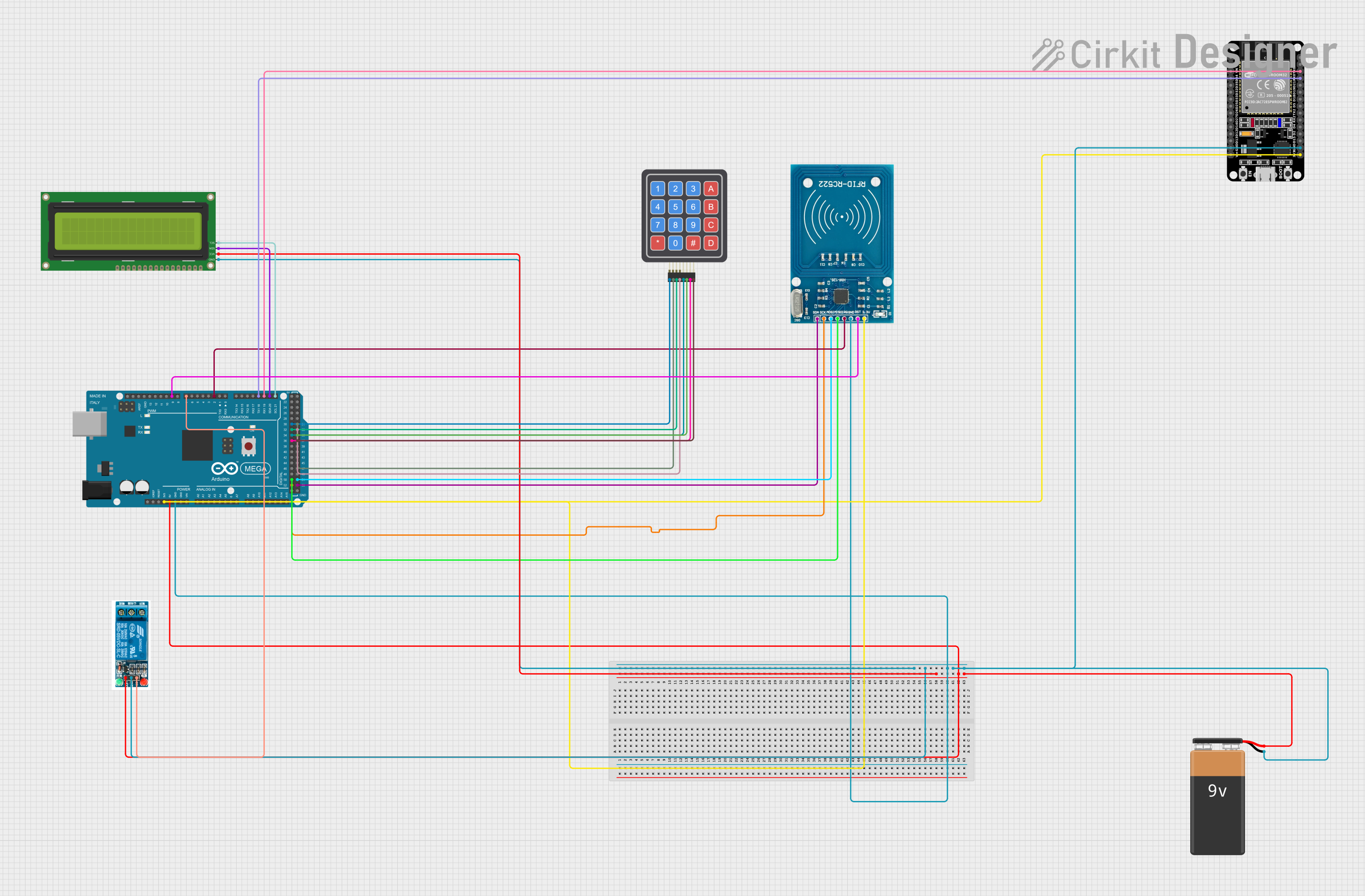
Circuit Documentation
Summary
This circuit is designed to create a smart petrol dispensing system. It utilizes an Arduino Mega 2560 microcontroller to interface with various components including an ESP32, a 16x2 I2C LCD, a 5V relay, an RFID-RC522 module, and a 4x4 keypad. The system reads RFID cards to authorize transactions, displays information on an LCD, and controls a relay to simulate fuel dispensing.
Component List
ESP32 (30 pin)
- Description: A powerful microcontroller with Wi-Fi and Bluetooth capabilities.
- Pins: EN, VP, VN, D34, D35, D32, D33, D25, D26, D27, D14, D12, D13, GND, Vin, D23, D22, TX0, RX0, D21, D19, D18, D5, TX2, RX2, D4, D2, D15, 3V3
9V Battery
- Description: Provides power to the circuit.
- Pins: -, +
Arduino Mega 2560
- Description: A microcontroller board based on the ATmega2560.
- Pins: IOREF, RESET, 3V3, 5V, GND, VIN, A0-A15, D21/SCL, D20/SDA, D19/RX1, D18/TX1, D17 PWM/RX2, D16 PWM/TX2, D15/RX3, D14/TX3, D0 RX0, D1 TX0, D2 PWM, D3 PWM, D4 PWM, D5 PWM, D6 PWM, D7 PWM, D8 PWM, D9 PWM, D10 PWM, D11 PWM, D12 PWM, D13 PWM, AREF, SDA, SCL, D52, D50, D48, D46, D44, D42, D40, D38, D36, D34, D32, D30, D28, D26, D24, D22, D53, D51, D49, D47, D45, D43, D41, D39, D37, D35, D33, D31, D29, D27, D25, D23
16x2 I2C LCD
- Description: A 16x2 character LCD display with I2C interface.
- Pins: GND, VCC, SDA, SCL
5V Relay
- Description: A relay module that can be controlled by a microcontroller to switch high voltage devices.
- Pins: Normally Open, Common terminal, Normally Closed, In, GND, VCC
RFID-RC522
- Description: An RFID reader module.
- Pins: VCC (3.3V), RST, GND, IRQ, MISO, MOSI, SCK, SDA
4x4 Keypad (Simulator)
- Description: A 4x4 matrix keypad for user input.
- Pins: R1, C4, R2, C2, R3, R4, C1, C3
Wiring Details
ESP32 (30 pin)
- GND: Connected to the common ground.
- TX0: Connected to Arduino Mega 2560 D19/RX1.
- RX0: Connected to Arduino Mega 2560 D18/TX1.
- 3V3: Connected to Arduino Mega 2560 3V3.
9V Battery
- -: Connected to the common ground.
- +: Connected to Arduino Mega 2560 5V.
Arduino Mega 2560
- GND: Connected to the common ground.
- 5V: Connected to 9V Battery +.
- 3V3: Connected to ESP32 3V3 and RFID-RC522 VCC (3.3V).
- D19/RX1: Connected to ESP32 TX0.
- D18/TX1: Connected to ESP32 RX0.
- D21/SCL: Connected to 16x2 I2C LCD SCL.
- D20/SDA: Connected to 16x2 I2C LCD SDA.
- D2 PWM: Connected to RFID-RC522 IRQ.
- D7 PWM: Connected to 5V Relay In.
- D9 PWM: Connected to RFID-RC522 RST.
- D52: Connected to RFID-RC522 SCK.
- D50: Connected to RFID-RC522 MISO.
- D53: Connected to RFID-RC522 SDA.
- D51: Connected to RFID-RC522 MOSI.
- D36: Connected to 4x4 Keypad C3.
- D34: Connected to 4x4 Keypad C1.
- D32: Connected to 4x4 Keypad R3.
- D30: Connected to 4x4 Keypad R1.
- D37: Connected to 4x4 Keypad C4.
- D35: Connected to 4x4 Keypad C2.
- D33: Connected to 4x4 Keypad R4.
- D31: Connected to 4x4 Keypad R2.
16x2 I2C LCD
- GND: Connected to the common ground.
- VCC: Connected to Arduino Mega 2560 5V.
- SDA: Connected to Arduino Mega 2560 D20/SDA.
- SCL: Connected to Arduino Mega 2560 D21/SCL.
5V Relay
- GND: Connected to the common ground.
- VCC: Connected to Arduino Mega 2560 5V.
- In: Connected to Arduino Mega 2560 D7 PWM.
RFID-RC522
- GND: Connected to the common ground.
- VCC (3.3V): Connected to Arduino Mega 2560 3V3.
- RST: Connected to Arduino Mega 2560 D9 PWM.
- IRQ: Connected to Arduino Mega 2560 D2 PWM.
- MISO: Connected to Arduino Mega 2560 D50.
- MOSI: Connected to Arduino Mega 2560 D51.
- SCK: Connected to Arduino Mega 2560 D52.
- SDA: Connected to Arduino Mega 2560 D53.
4x4 Keypad (Simulator)
- R1: Connected to Arduino Mega 2560 D30.
- C4: Connected to Arduino Mega 2560 D37.
- R2: Connected to Arduino Mega 2560 D31.
- C2: Connected to Arduino Mega 2560 D35.
- R3: Connected to Arduino Mega 2560 D32.
- R4: Connected to Arduino Mega 2560 D33.
- C1: Connected to Arduino Mega 2560 D34.
- C3: Connected to Arduino Mega 2560 D36.
Documented Code
#include <SPI.h>
#include <MFRC522.h>
#include <Wire.h>
#include <LiquidCrystal_I2C.h>
#include <Keypad.h>

// RFID Module Pins
#define RST_PIN 9
#define SS_PIN 53

// Relay Pin
#define RELAY_PIN 7

// Create RFID instance
MFRC522 rfid(SS_PIN, RST_PIN);

// Create LCD instance
LiquidCrystal_I2C lcd(0x27, 16, 2);

// Keypad setup
const byte ROWS = 4;
const byte COLS = 4;
char keys[ROWS][COLS] = {
    {'1', '2', '3', 'A'},
    {'4', '5', '6', 'B'},
    {'7', '8', '9', 'C'},
    {'*', '0', '#', 'D'}
};
byte rowPins[ROWS] = {30, 31, 32, 33};
byte colPins[COLS] = {34, 35, 36, 37};
Keypad keypad = Keypad(makeKeymap(keys), rowPins, colPins, ROWS, COLS);

void setup() {
    // Serial Monitor for Debugging
    Serial.begin(9600);

    // RFID initialization
    SPI.begin();
    rfid.PCD_Init();

    // LCD initialization
    lcd.begin(16,2);
    lcd.backlight();
    lcd.print("Smart Petrol");

    // Relay setup
    pinMode(RELAY_PIN, OUTPUT);
    digitalWrite(RELAY_PIN, LOW);

    delay(2000);
    lcd.clear();
}

void loop() {
    // Check for RFID card
    if (rfid.PICC_IsNewCardPresent() && rfid.PICC_ReadCardSerial()) {
        String cardID = "";
        for (byte i = 0; i < rfid.uid.size; i++) {
            cardID += String(rfid.uid.uidByte[i],