
Arduino Nano-Based Health Monitoring System with GPS and LoRa Connectivity
View and Edit Project In Cirkit Designer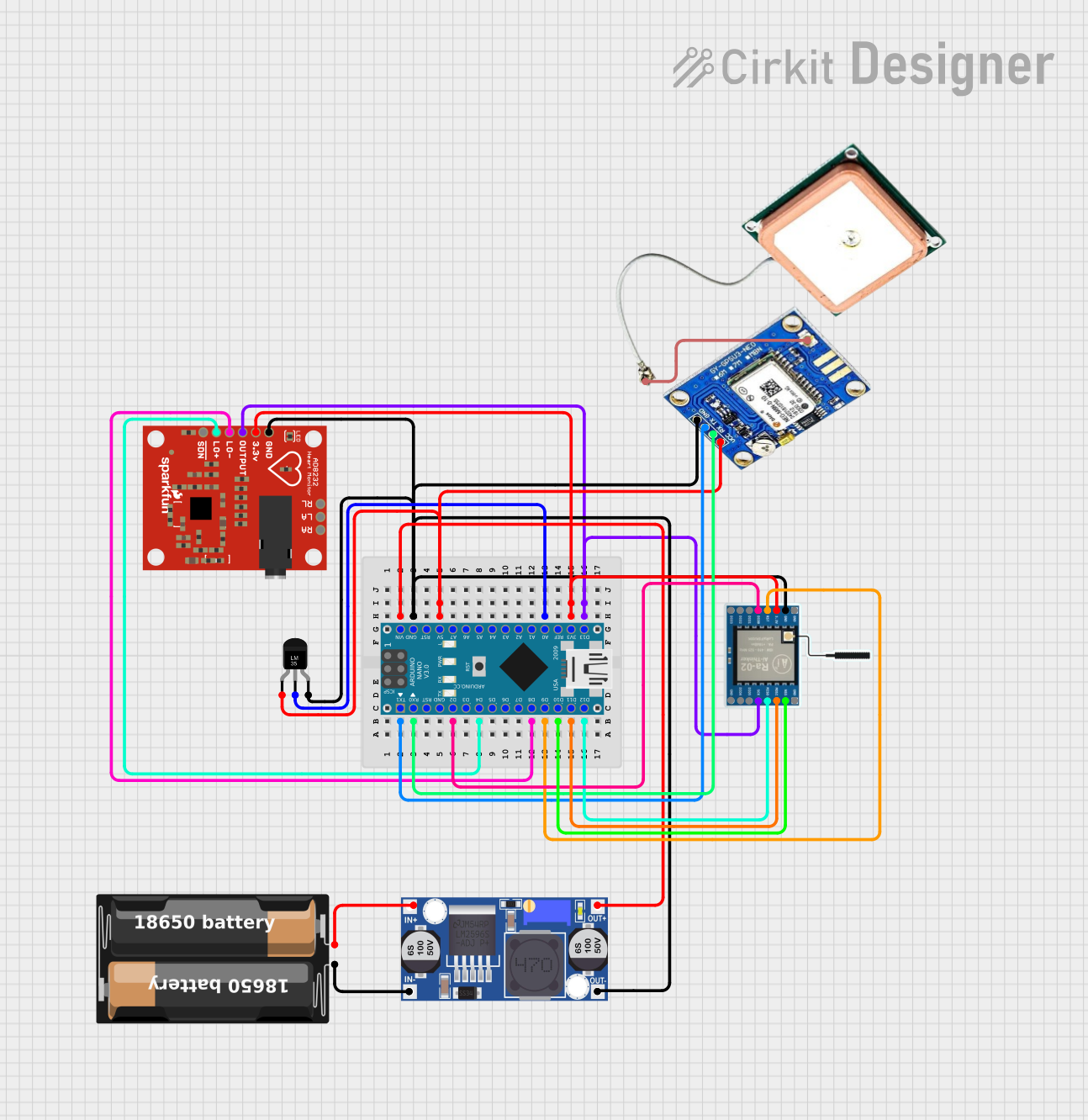
Circuit Documentation
Summary
This document provides a detailed overview of a circuit that integrates an Arduino Nano microcontroller with various sensors and modules, including a GPS module, a temperature sensor, a heart rate monitor, a LoRa module, a buck converter, and a battery case. The circuit is designed to collect and transmit data from the sensors using the LoRa module, while being powered by a battery through a buck converter.
Component List
Arduino Nano
- Description: A small, complete, and breadboard-friendly board based on the ATmega328P.
- Pins: D1/TX, D0/RX, RESET, GND, D2, D3, D4, D5, D6, D7, D8, D9, D10, D11/MOSI, D12/MISO, VIN, 5V, A7, A6, A5, A4, A3, A2, A1, A0, AREF, 3V3, D13/SCK
Ublox NEO-M8N GPS Module
- Description: A GPS module that provides accurate location data.
- Pins: RF coaxial cable connectors, VCC, RX, TX, GND
Temperature Sensor (LM35)
- Description: A precision integrated-circuit temperature sensor with an output voltage linearly proportional to the Centigrade temperature.
- Pins: +Vs, Vout, GND
AD8232 Heart Rate Monitor
- Description: A single lead heart rate monitor front end.
- Pins: GND, 3.3v, OUTPUT, LO-, LO+, SDN, RA, LA, RL
Buck Converter
- Description: A DC-DC converter that steps down voltage from its input to its output.
- Pins: IN+, IN-, OUT+, OUT-
My Battery Case
- Description: A battery holder for powering the circuit.
- Pins: +, -
LoRa Ra-02 SX1278
- Description: A long-range transceiver module for wireless communication.
- Pins: GND, NSS, MOSI, MISO, SCK, D105, DI04, 3.3V, RST, DI00, DI01, D102, DI03
Wiring Details
Arduino Nano
- D1/TX connected to Ublox NEO-M8N GPS module TX
- D0/RX connected to Ublox NEO-M8N GPS module RX
- VIN connected to Buck converter OUT+
- GND connected to LoRa Ra-02 SX1278 GND, Temperature Sensor (LM35) GND, Buck converter OUT-, Ublox NEO-M8N GPS module GND, AD8232 Heart Rate Monitor GND
- 5V connected to Temperature Sensor (LM35) +Vs, Ublox NEO-M8N GPS module VCC
- D2 connected to LoRa Ra-02 SX1278 DI00
- D4 connected to AD8232 Heart Rate Monitor LO+
- D8 connected to AD8232 Heart Rate Monitor LO-
- D9 connected to LoRa Ra-02 SX1278 RST
- A0 connected to Temperature Sensor (LM35) Vout
- D10 connected to LoRa Ra-02 SX1278 NSS
- D11/MOSI connected to LoRa Ra-02 SX1278 MOSI
- 3V3 connected to LoRa Ra-02 SX1278 3.3V, AD8232 Heart Rate Monitor 3.3v
- D12/MISO connected to LoRa Ra-02 SX1278 MISO
- D13/SCK connected to LoRa Ra-02 SX1278 SCK, AD8232 Heart Rate Monitor OUTPUT
Ublox NEO-M8N GPS Module
- TX connected to Arduino Nano D1/TX
- RX connected to Arduino Nano D0/RX
- VCC connected to Arduino Nano 5V
- GND connected to Arduino Nano GND
- RF coaxial cable connectors connected to RF coaxial cable connectors
Temperature Sensor (LM35)
- +Vs connected to Arduino Nano 5V
- Vout connected to Arduino Nano A0
- GND connected to Arduino Nano GND
AD8232 Heart Rate Monitor
- GND connected to Arduino Nano GND
- 3.3v connected to Arduino Nano 3V3
- OUTPUT connected to Arduino Nano D13/SCK
- LO- connected to Arduino Nano D8
- LO+ connected to Arduino Nano D4
Buck Converter
- IN+ connected to My battery case +
- IN- connected to My battery case -
- OUT+ connected to Arduino Nano VIN
- OUT- connected to Arduino Nano GND
My Battery Case
- + connected to Buck converter IN+
- - connected to Buck converter IN-
LoRa Ra-02 SX1278
- GND connected to Arduino Nano GND
- NSS connected to Arduino Nano D10
- MOSI connected to Arduino Nano D11/MOSI
- MISO connected to Arduino Nano D12/MISO
- SCK connected to Arduino Nano D13/SCK
- DI00 connected to Arduino Nano D2
- 3.3V connected to Arduino Nano 3V3
- RST connected to Arduino Nano D9
Documented Code
Arduino Nano Code (sketch.ino)
void setup() {
  // put your setup code here, to run once:

}

void loop() {
  // put your main code here, to run repeatedly:

}
This code is a basic template for the Arduino Nano. The setup function is where you initialize your components and settings, and the loop function is where you place the main code that runs repeatedly.
Additional Documentation (documentation.txt)
This file is currently empty and can be used to add further documentation or notes about the project.