
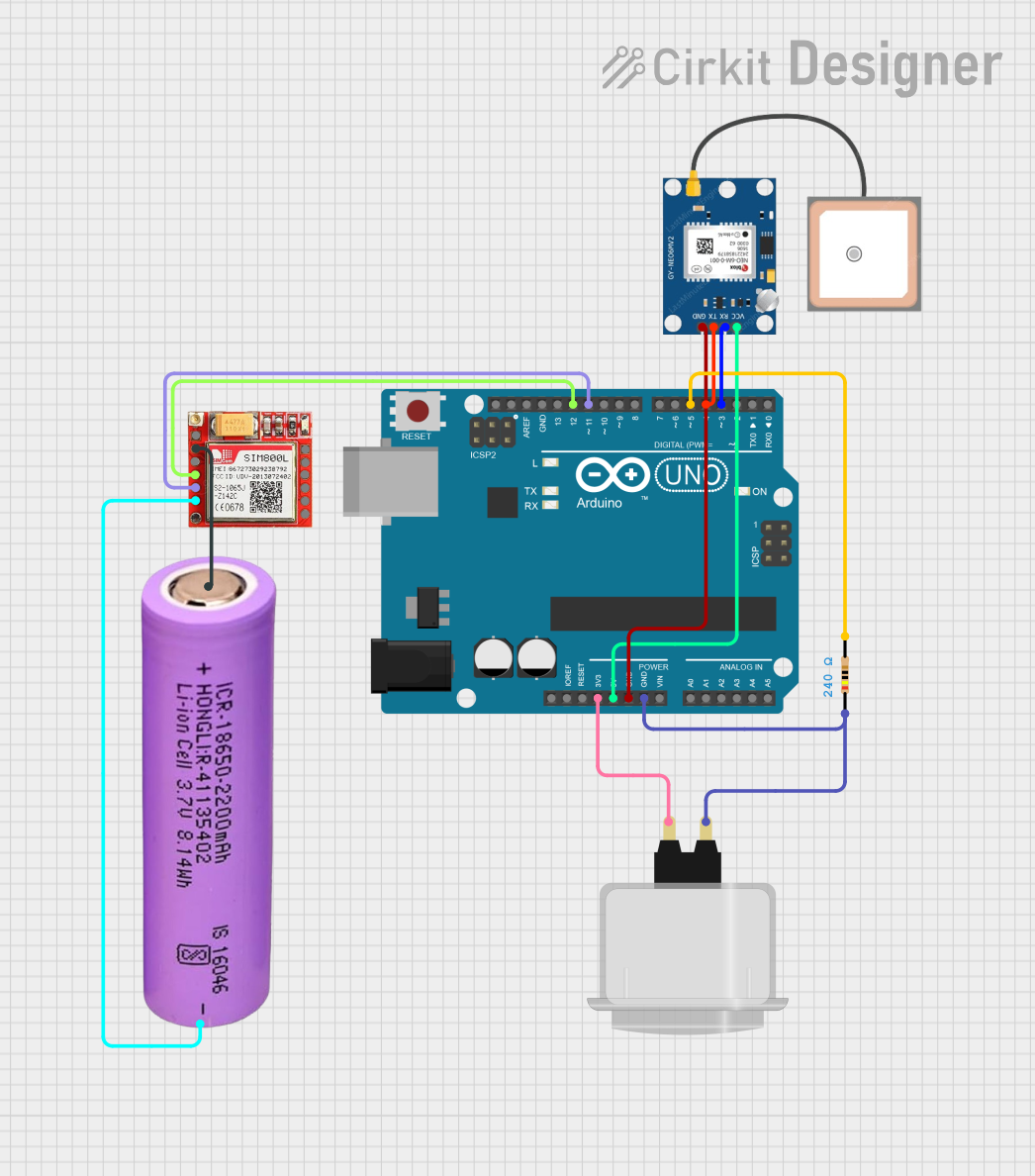
Circuit Documentation
Summary
This circuit is designed to read GPS data from a NEO 6M module and send the current location to a designated phone number via a SIM800L module when a button is pressed twice within a short interval. The circuit is controlled by an Arduino UNO microcontroller.
Component List
SIM800L
- Description: GSM/GPRS module used for sending SMS.
- Pins: NET, VCC, RST, RXD, TXD, GND, RING, DTR, MIC+, MIC-, SPK+, SPK-
Arcade Button (white)
- Description: A simple push button used to trigger the location sending.
- Pins: NO, COM
Arduino UNO
- Description: Microcontroller used to control the circuit.
- Pins: UNUSED, IOREF, Reset, 3.3V, 5V, GND, Vin, A0, A1, A2, A3, A4, A5, SCL, SDA, AREF, D13, D12, D11, D10, D9, D8, D7, D6, D5, D4, D3, D2, D1, D0
Battery 18650
- Description: Power source for the circuit.
- Pins: +, -
Resistor
- Description: 240 Ohms resistor used for current limiting.
- Pins: pin1, pin2
- Properties: Resistance: 240 Ohms
GPS NEO 6M
- Description: GPS module used to get the current location.
- Pins: VCC, RX, TX, GND
Wiring Details
SIM800L
- VCC: Connected to Battery 18650 (+)
- RXD: Connected to Arduino UNO (D12)
- TXD: Connected to Arduino UNO (D11)
- GND: Connected to Battery 18650 (-)
Arcade Button (white)
- NO: Connected to Resistor (pin1)
- COM: Connected to Arduino UNO (3.3V)
Arduino UNO
- D12: Connected to SIM800L (RXD)
- D11: Connected to SIM800L (TXD)
- GND: Connected to Resistor (pin1) and GPS NEO 6M (GND)
- 3.3V: Connected to Arcade Button (COM)
- 5V: Connected to GPS NEO 6M (VCC)
- D3: Connected to GPS NEO 6M (RX)
- D4: Connected to GPS NEO 6M (TX)
- D5: Connected to Resistor (pin2)
Battery 18650
- +: Connected to SIM800L (VCC)
- -: Connected to SIM800L (GND)
Resistor
- pin1: Connected to Arduino UNO (GND) and Arcade Button (NO)
- pin2: Connected to Arduino UNO (D5)
GPS NEO 6M
- VCC: Connected to Arduino UNO (5V)
- RX: Connected to Arduino UNO (D3)
- TX: Connected to Arduino UNO (D4)
- GND: Connected to Arduino UNO (GND)
Code Documentation
/*
 * This Arduino Sketch reads GPS data from a NEO 6M module and sends the current
 * location to a designated phone number via a SIM800L module when a button is
 * pressed twice within a short interval.
 */

#include <SoftwareSerial.h>

// Pin definitions
#define GPS_RX_PIN 3
#define GPS_TX_PIN 4
#define SIM800L_RX_PIN 12
#define SIM800L_TX_PIN 11
#define BUTTON_PIN 5

// Create software serial ports
SoftwareSerial gpsSerial(GPS_TX_PIN, GPS_RX_PIN);
SoftwareSerial sim800lSerial(SIM800L_TX_PIN, SIM800L_RX_PIN);

// Variables for button press detection
unsigned long lastButtonPressTime = 0;
unsigned long buttonPressInterval = 500; // 500 ms
int buttonPressCount = 0;

void setup() {
  // Initialize serial communication
  Serial.begin(9600);
  gpsSerial.begin(9600);
  sim800lSerial.begin(9600);

  // Initialize button pin
  pinMode(BUTTON_PIN, INPUT);

  // Initialize SIM800L
  initializeSIM800L();
}

void loop() {
  // Check for button press
  if (digitalRead(BUTTON_PIN) == HIGH) {
    unsigned long currentTime = millis();
    if (currentTime - lastButtonPressTime < buttonPressInterval) {
      buttonPressCount++;
    } else {
      buttonPressCount = 1;
    }
    lastButtonPressTime = currentTime;
  }

  // If button is pressed twice, send location
  if (buttonPressCount == 2) {
    String location = getGPSLocation();
    sendLocationSMS(location);
    buttonPressCount = 0;
  }
}

void initializeSIM800L() {
  // Send initialization commands to SIM800L
  sim800lSerial.println("AT");
  delay(1000);
  sim800lSerial.println("AT+CMGF=1"); // Set SMS to text mode
  delay(1000);
}

String getGPSLocation() {
  String gpsData = "";
  while (gpsSerial.available()) {
    char c = gpsSerial.read();
    gpsData += c;
  }
  // Parse GPS data to extract location
  // This is a simplified example, actual parsing will depend on GPS data format
  String latitude = "N/A";
  String longitude = "N/A";
  int latIndex = gpsData.indexOf("$GPGGA");
  if (latIndex != -1) {
    latitude = gpsData.substring(latIndex + 18, latIndex + 27);
    longitude = gpsData.substring(latIndex + 30, latIndex + 40);
  }
  return "Lat: " + latitude + ", Lon: " + longitude;
}

void sendLocationSMS(String location) {
  sim800lSerial.print("AT+CMGS=\"+9779861806001\""); // Replace with actual phone number
  delay(1000);
  sim800lSerial.print(location);
  delay(1000);
  sim800lSerial.write(26); // ASCII code for CTRL+Z to send SMS
  delay(1000);
}
This code initializes the GPS and SIM800L modules, reads GPS data, and sends the location via SMS when the button is pressed twice within a short interval.