
Circuit Documentation
Summary of the Circuit
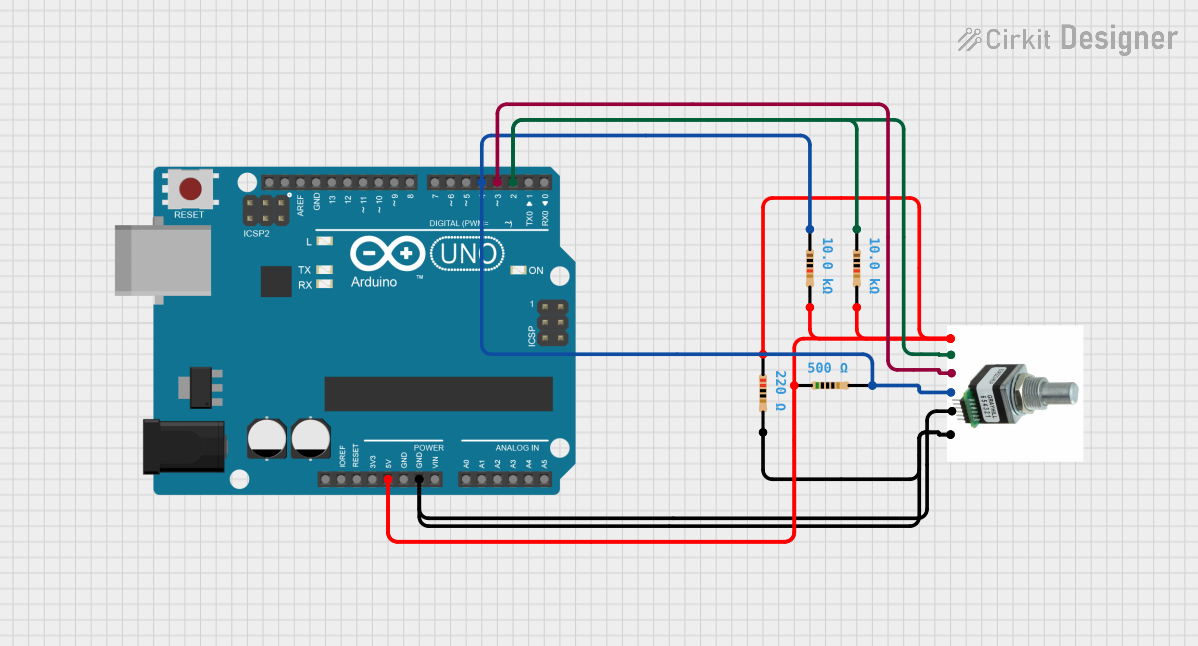
This circuit appears to be designed to interface with a rotary encoder, commonly referred to as "로터리 엔코" in Korean, which is connected to an Arduino UNO microcontroller. The rotary encoder provides multiple forms of input: rotational position via two output pins, a push button, and a switch. The circuit includes four resistors with different resistance values that are likely used for pull-up/pull-down configurations and voltage division. The Arduino UNO is programmed to interact with these inputs, although the specific functionality is not detailed in the provided code.
Component List
Rotary Encoder (로터리 엔코)
- Pins: VCC, OUTPUT A, OUTPUT B, PUSH BUTTON, SWITCH, GND
- Description: A rotary encoder with integrated push-button and switch functionality.
Arduino UNO
- Pins: UNUSED, IOREF, Reset, 3.3V, 5V, GND, Vin, A0-A5, SCL, SDA, AREF, D0-D13
- Description: A microcontroller board based on the ATmega328P, widely used for prototyping and educational purposes.
Resistor (500 Ohms)
- Pins: pin1, pin2
- Description: A resistor with a resistance of 500 Ohms.
Resistor (220 Ohms)
- Pins: pin1, pin2
- Description: A resistor with a resistance of 220 Ohms.
Resistor (10k Ohms)
- Pins: pin1, pin2
- Description: A resistor with a resistance of 10k Ohms.
Resistor (10k Ohms)
- Pins: pin1, pin2
- Description: Another resistor with a resistance of 10k Ohms.
Wiring Details
Rotary Encoder (로터리 엔코)
- VCC: Connected to 5V of Arduino UNO and 500 Ohms resistor.
- OUTPUT A: Connected to D2 of Arduino UNO and 10k Ohms resistor.
- OUTPUT B: Connected to D3 of Arduino UNO.
- PUSH BUTTON: Connected to D4 of Arduino UNO and 10k Ohms resistor.
- SWITCH: Connected to 220 Ohms resistor.
- GND: Connected to GND of Arduino UNO.
Arduino UNO
- 5V: Provides power to the rotary encoder and 500 Ohms resistor.
- D2: Receives signal from OUTPUT A of the rotary encoder.
- D3: Receives signal from OUTPUT B of the rotary encoder.
- D4: Receives signal from the PUSH BUTTON of the rotary encoder.
- GND: Common ground for the circuit.
Resistor (500 Ohms)
- pin1: Connected to 5V of Arduino UNO.
- pin2: Connected to VCC of the rotary encoder.
Resistor (220 Ohms)
- pin1: Connected to SWITCH of the rotary encoder.
- pin2: Connected to GND of the circuit.
Resistor (10k Ohms)
- pin1: Connected to OUTPUT A of the rotary encoder.
- pin2: Connected to GND of the circuit.
Resistor (10k Ohms)
- pin1: Connected to PUSH BUTTON of the rotary encoder.
- pin2: Connected to GND of the circuit.
Documented Code
Arduino UNO Code (sketch.ino)
void setup() {
  // put your setup code here, to run once:

}

void loop() {
  // put your main code here, to run repeatedly:

}
The provided code is a template with empty setup() and loop() functions. The setup() function is intended to contain initialization code that runs once when the Arduino is powered on or reset. The loop() function is meant to contain the main logic of the program, which runs repeatedly as long as the Arduino is powered.
Additional Notes
There is an additional text file named "documentation.txt" mentioned in the code input, but it appears to be empty. This file might be intended for further notes or explanations of the code, which are not provided in the current documentation.