
Arduino UNO Controlled WS2812 RGB LED Strip with Pushbutton Interaction
View and Edit Project In Cirkit Designer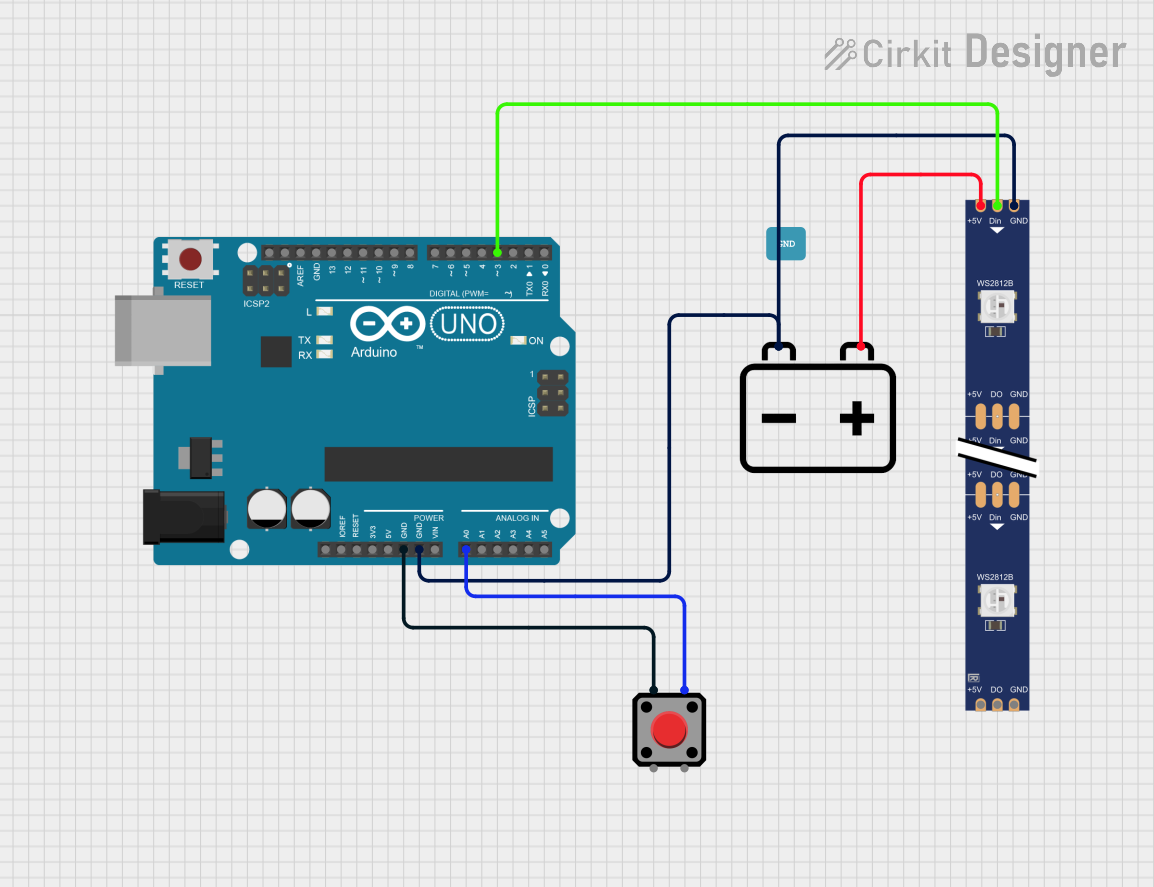
Circuit Documentation
Summary
This circuit involves an Arduino UNO microcontroller, a WS2812 RGB LED strip, a 12V battery, and a red pushbutton. The Arduino UNO controls the LED strip, which displays various lighting effects. The pushbutton is used as an input to the Arduino. The 12V battery powers the LED strip.
Component List
WS2812 RGB LED Strip
- Description: A strip of individually addressable RGB LEDs.
- Pins: DIN, 5V, GND, DO
- Purpose in Circuit: Displays various lighting effects controlled by the Arduino.
Arduino UNO
- Description: A microcontroller board based on the ATmega328P.
- Pins: UNUSED, IOREF, Reset, 3.3V, 5V, GND, Vin, A0, A1, A2, A3, A4, A5, SCL, SDA, AREF, D13, D12, D11, D10, D9, D8, D7, D6, D5, D4, D3, D2, D1, D0
- Purpose in Circuit: Controls the WS2812 RGB LED strip and reads input from the pushbutton.
12V Battery
- Description: A 12V power source.
- Pins: +, -
- Purpose in Circuit: Powers the WS2812 RGB LED strip.
Red Pushbutton
- Description: A pushbutton switch.
- Pins: Pin 2, Pin 1, Pin 3, Pin 4
- Purpose in Circuit: Provides input to the Arduino.
Wiring Details
WS2812 RGB LED Strip
- DIN: Connected to D3 on the Arduino UNO.
- 5V: Connected to the + terminal of the 12V battery.
- GND: Connected to the GND of the Arduino UNO and the - terminal of the 12V battery.
Arduino UNO
- D3: Connected to DIN on the WS2812 RGB LED strip.
- GND: Connected to the - terminal of the 12V battery and Pin 1 of the red pushbutton.
- A0: Connected to Pin 4 of the red pushbutton.
12V Battery
- +: Connected to the 5V pin of the WS2812 RGB LED strip.
- -: Connected to the GND of the Arduino UNO and the GND of the WS2812 RGB LED strip.
Red Pushbutton
- Pin 1: Connected to GND on the Arduino UNO.
- Pin 4: Connected to A0 on the Arduino UNO.
Code
Arduino UNO Code
/*
 * This Arduino sketch controls a WS2812 RGB LED strip connected to pin D3 of an
 * Arduino UNO. The LEDs 68, 69, and 70 blink red with 500ms on and 3000ms off.
 * LEDs 0 to 67 perform a rainbow color dimming up and down while LEDs 68, 69,
 * and 70 are off.
 */

#include <Adafruit_NeoPixel.h>

#define PIN 3
#define NUM_LEDS 70

Adafruit_NeoPixel strip = Adafruit_NeoPixel(NUM_LEDS, PIN, NEO_GRB + NEO_KHZ800);

void setup() {
  strip.begin();
  strip.show(); // Initialize all pixels to 'off'
}

void loop() {
  blinkRed(68, 70, 500, 3000);
  rainbowDimming(0, 66, 2000, 2000);
  blinkRed(68, 70, 500, 3000);
}

void blinkRed(int start, int end, int onTime, int offTime) {
  for (int i = start; i <= end; i++) {
    strip.setPixelColor(i, strip.Color(255, 0, 0));
  }
  strip.show();
  delay(onTime);
  for (int i = start; i <= end; i++) {
    strip.setPixelColor(i, strip.Color(0, 0, 0));
  }
  strip.show();
  delay(offTime);
}

void rainbowDimming(int start, int end, int upTime, int downTime) {
  for (int j = 0; j < 256; j++) { // Dimming up
    for (int i = start; i <= end; i++) {
      strip.setPixelColor(i, Wheel((i * 256 / (end - start + 1) + j) & 255));
    }
    strip.setBrightness(j);
    strip.show();
    delay(upTime / 256);
  }
  for (int j = 255; j >= 0; j--) { // Dimming down
    for (int i = start; i <= end; i++) {
      strip.setPixelColor(i, Wheel((i * 256 / (end - start + 1) + j) & 255));
    }
    strip.setBrightness(j);
    strip.show();
    delay(downTime / 256);
  }
}

uint32_t Wheel(byte WheelPos) {
  WheelPos = 255 - WheelPos;
  if (WheelPos < 85) {
    return strip.Color(255 - WheelPos * 3, 0, WheelPos * 3);
  }
  if (WheelPos < 170) {
    WheelPos -= 85;
    return strip.Color(0, WheelPos * 3, 255 - WheelPos * 3);
  }
  WheelPos -= 170;
  return strip.Color(WheelPos * 3, 255 - WheelPos * 3, 0);
}
WS2812 RGB LED Strip Code
/*
 * This Arduino sketch controls a WS2812 RGB LED strip connected to pin D6 of an
 * Arduino Mega 2560. The LEDs 68, 69, and 70 blink red with 500ms on and 500ms
 * off. LEDs 0 to 68 perform a rainbow color dimming up over 2000ms and dimming
 * down over 500ms, then stop for 2 seconds before repeating.
 */

#include <Adafruit_NeoPixel.h>

#define PIN 3
#define NUM_LEDS 70

Adafruit_NeoPixel strip = Adafruit_NeoPixel(NUM_LEDS, PIN, NEO_GRB + NEO_KHZ800);

void setup() {
  strip.begin();
  strip.show(); // Initialize all pixels to 'off'
}

void loop() {
  blinkRed(68, 70, 500);
  rainbowDimming(0, 68, 2000, 500);
  delay(2000); // Stop for 2 seconds
}

void blinkRed(int start, int end, int delayTime) {
  for (int i = start; i <= end; i++) {
    strip.setPixelColor(i, strip.Color(255, 0, 0));
  }
  strip.show();
  delay(delayTime);
  for (int i = start; i <= end; i++) {
    strip.setPixelColor(i, strip.Color(0, 0, 0));
  }
  strip.show();
  delay(delayTime);
}

void rainbowDimming(int start, int end, int upTime, int downTime) {
  for (int j = 0; j < 256; j++) { // Dimming up
    for (int i = start; i <= end; i++) {
      strip.setPixelColor(i, Wheel((i * 256 / (end - start + 1) + j) & 255));
    }
    strip.setBrightness(j);
    strip.show();
    delay(upTime / 256);
  }
  for (int j = 255; j >= 0; j--) { // Dimming down
    for (int i = start; i <= end; i++) {
      strip.setPixelColor(i, Wheel((i * 256 / (end - start + 1) + j) & 255));
    }
    strip.setBrightness(j);
    strip.show();
    delay(downTime / 256);
  }
}

uint32_t Wheel(byte WheelPos) {
  WheelPos = 255 - WheelPos;
  if (WheelPos < 85) {
    return strip.Color(255 - WheelPos * 3, 0, WheelPos * 3);
  }
  if (WheelPos < 170) {
    WheelPos -= 85;
    return strip.Color(0, WheelPos * 3, 255 - WheelPos * 3);
  }
  WheelPos -= 170;
  return strip.Color(WheelPos * 3, 255 - WheelPos * 3, 0);
}