
ESP32-Based Automatic Water Level Controller with Ultrasonic Sensor and OLED Display
View and Edit Project In Cirkit Designer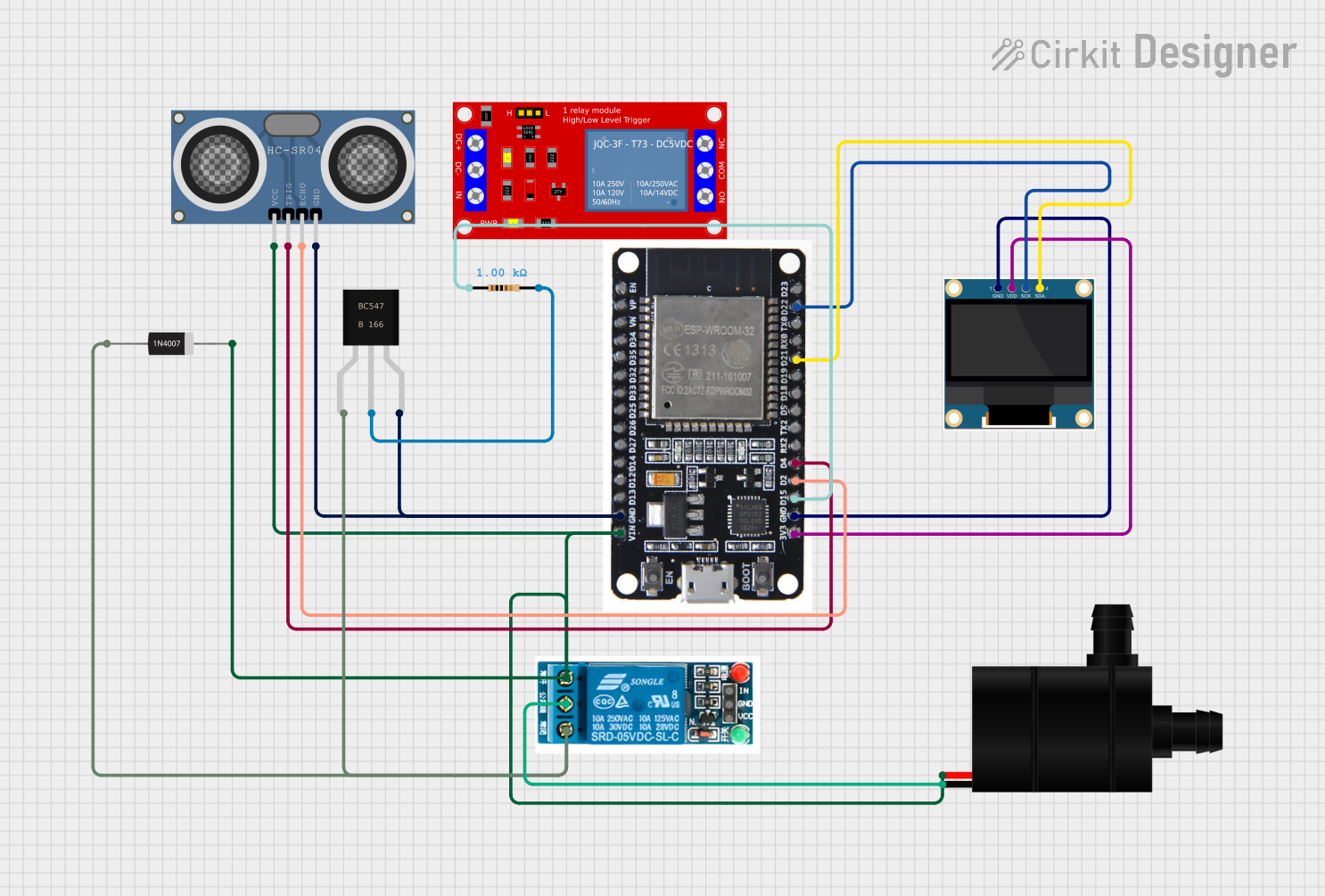
Circuit Documentation
Summary of the Circuit
This circuit is designed as an Automatic Water Level Controller. It uses an ESP32 microcontroller to monitor the water level through an HC-SR04 Ultrasonic Distance Sensor. Based on the detected water level, the ESP32 controls a 5V relay to turn a water pump on or off. The water level is also displayed on a 0.96" OLED screen. The circuit includes a resistor and a bc547 transistor to interface the ESP32 with the relay, and a 1N4007 diode for protection against voltage spikes from the relay coil.
Component List
ESP32
- Description: A microcontroller with Wi-Fi and Bluetooth capabilities.
- Pins: EN, VP, VN, D34, D35, D32, D33, D25, D26, D27, D14, D12, D13, GND, VIN, 3V3, D15, D2, D4, RX2, TX2, D5, D18, D19, D21, RX0, TX0, D22, D23, BOOT
5V Relay
- Description: An electromechanical switch used to control the water pump.
- Pins: Normally Open, Common terminal, Normally Closed, In, GND, VCC
Water Pump
- Description: A pump used to move water based on the control signal from the relay.
- Pins: VCC, GND
0.96" OLED
- Description: A small display to show the water level.
- Pins: GND, VDD, SCK, SDA
HC-SR04 Ultrasonic Distance Sensor
- Description: A sensor to measure the distance to the water surface.
- Pins: VCC, TRIG, ECHO, GND
Resistor (1k Ohm)
- Description: A resistor used to limit current to the base of the bc547 transistor.
- Pins: pin1, pin2
- Properties: Resistance: 1000 Ohms
1N4007 Rectifier Diode
- Description: A diode used to protect the circuit from reverse voltage spikes.
- Pins: Cathode, Anode
bc547
- Description: A general-purpose NPN transistor.
- Pins: collector, base, Emitter
Wiring Details
ESP32
- GND connected to the GND of HC-SR04, OLED, and the Emitter of bc547.
- VIN connected to the Cathode of 1N4007 Diode and Normally Open of the 5V relay.
- 3V3 connected to VDD of OLED.
- D15 connected to one end of the Resistor.
- D2 connected to ECHO of HC-SR04.
- D4 connected to TRIG of HC-SR04.
- D21 connected to SDA of OLED.
- D22 connected to SCK of OLED.
5V Relay
- Common terminal connected to GND of Water Pump.
- Normally Open connected to VCC of Water Pump.
- Normally Closed connected to Anode of 1N4007 Diode.
Water Pump
- GND connected to Common terminal of 5V relay.
HC-SR04 Ultrasonic Distance Sensor
- GND connected to GND of ESP32.
- VCC connected to Cathode of 1N4007 Diode.
- TRIG connected to D4 of ESP32.
- ECHO connected to D2 of ESP32.
0.96" OLED
- GND connected to GND of ESP32.
- VDD connected to 3V3 of ESP32.
- SCK connected to D22 of ESP32.
- SDA connected to D21 of ESP32.
Resistor (1k Ohm)
- pin1 connected to D15 of ESP32.
- pin2 connected to the base of bc547.
1N4007 Rectifier Diode
- Cathode connected to VIN of ESP32 and VCC of HC-SR04.
- Anode connected to Normally Closed of the 5V relay.
bc547
- Emitter connected to GND of ESP32.
- Base connected to pin2 of Resistor.
- Collector connected to Normally Closed of the 5V relay and Anode of 1N4007 Diode.
Documented Code
/*
 * Automatic Water Level Controller
 * This code controls a water pump based on the water level detected by an
 * ultrasonic sensor. It also displays the water level on an OLED display.
 */

#include <Wire.h>
#include <Adafruit_GFX.h>
#include <Adafruit_SSD1306.h>

#define SCREEN_WIDTH 128
#define SCREEN_HEIGHT 64
#define OLED_RESET    -1
Adafruit_SSD1306 display(SCREEN_WIDTH, SCREEN_HEIGHT, &Wire, OLED_RESET);

#define TRIG_PIN 4
#define ECHO_PIN 2
#define PUMP_PIN 15

long duration;
int distance;

void setup() {
  pinMode(TRIG_PIN, OUTPUT);
  pinMode(ECHO_PIN, INPUT);
  pinMode(PUMP_PIN, OUTPUT);
  digitalWrite(PUMP_PIN, LOW);

  if(!display.begin(SSD1306_SWITCHCAPVCC, 0x3C)) {
    for(;;);
  }
  display.clearDisplay();
  display.setTextSize(1);
  display.setTextColor(SSD1306_WHITE);
  display.setCursor(0, 0);
  display.print("Water Level:");
  display.display();
}

void loop() {
  digitalWrite(TRIG_PIN, LOW);
  delayMicroseconds(2);
  digitalWrite(TRIG_PIN, HIGH);
  delayMicroseconds(10);
  digitalWrite(TRIG_PIN, LOW);

  duration = pulseIn(ECHO_PIN, HIGH);
  distance = duration * 0.034 / 2;

  display.clearDisplay();
  display.setCursor(0, 0);
  display.print("Water Level: ");
  display.print(distance);
  display.print(" cm");
  display.display();

  if (distance < 10) {
    digitalWrite(PUMP_PIN, HIGH);
  } else {
    digitalWrite(PUMP_PIN, LOW);
  }

  delay(1000);
}
This code initializes the OLED display and sets up the pins for the ultrasonic sensor and the pump control. In the main loop, it triggers the ultrasonic sensor to measure the distance, updates the OLED display with the current water level, and controls the pump based on the water level. If the water level is below 10 cm, the pump is turned on; otherwise, it is turned off.