
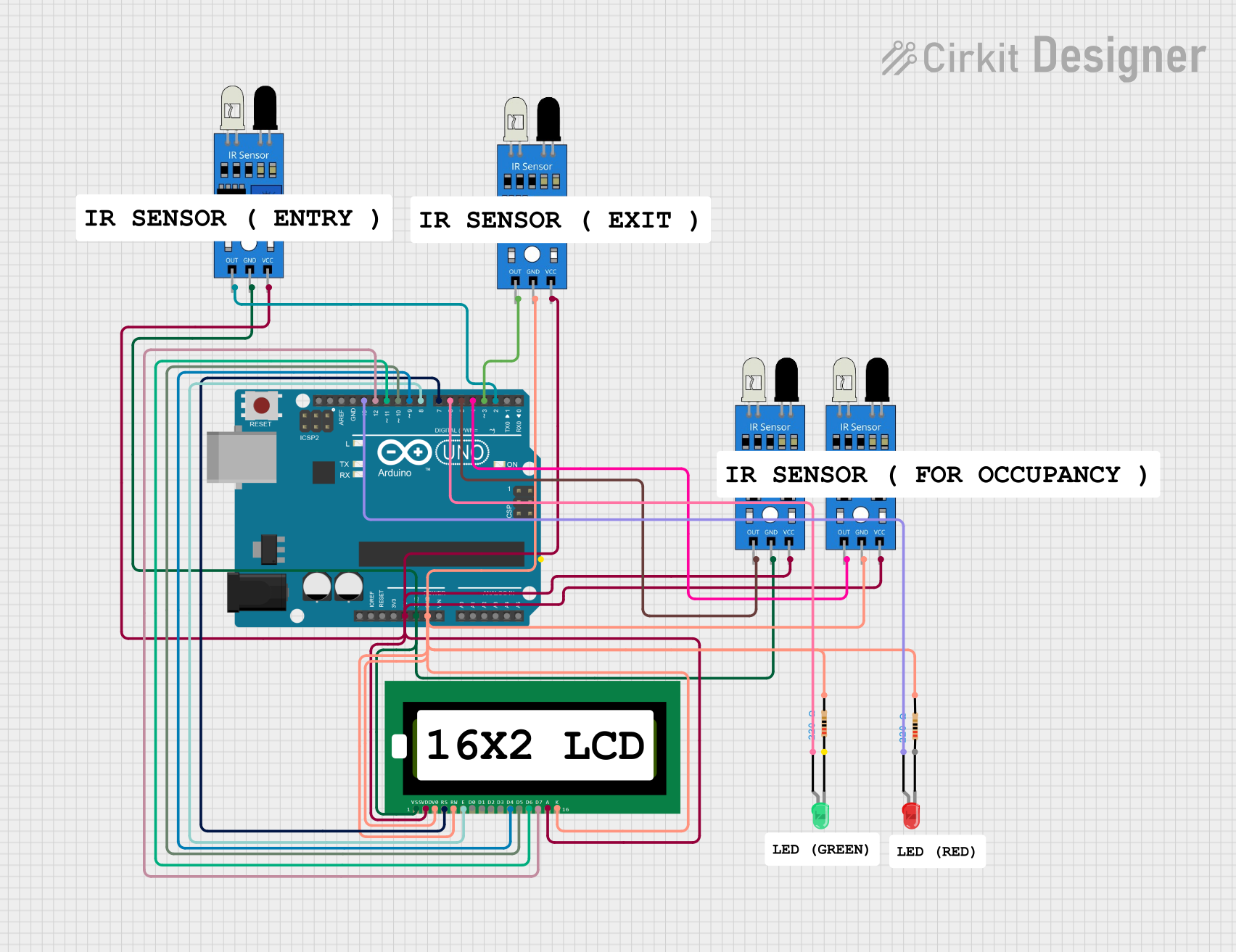
Circuit Documentation
Summary
The circuit is designed to monitor and display the status of parking spaces using infrared (IR) sensors and a 16x2 LCD display. It includes an Arduino UNO microcontroller to process signals from the IR sensors and control the output to the LCD and LEDs. The circuit uses four IR sensors to detect the presence of cars in parking spaces and the entry/exit of cars. Two LEDs (red and green) indicate the occupancy status of the parking spaces. The 16x2 LCD displays the number of available parking spaces. The circuit is powered by the 5V output from the Arduino UNO.
Component List
- IR Sensors: Used to detect the presence of cars in parking spaces and the entry/exit points.
- LED (Red): Indicates that parking spaces are occupied.
- LED (Green): Indicates that parking spaces are available.
- Resistors (220 Ohms): Limit current to the LEDs to prevent damage.
- Arduino UNO: The microcontroller unit that processes sensor inputs and controls the LCD and LEDs.
- 16x2 LCD: Displays the number of available parking spaces.
Wiring Details
IR Sensors
- VCC: Connected to the 5V output from the Arduino UNO.
- GND: Connected to the ground (GND) on the Arduino UNO.
- OUT: Connected to digital input pins on the Arduino UNO (D2, D3, D4, D5).
LEDs
- Red LED
- Anode: Connected to digital pin D13 on the Arduino UNO.
- Cathode: Connected to ground through a 220 Ohm resistor.
- Green LED
- Anode: Connected to digital pin D6 on the Arduino UNO.
- Cathode: Connected to ground through a 220 Ohm resistor.
Resistors (220 Ohms)
- Connected in series with the LEDs to limit the current.
Arduino UNO
- 5V and GND: Provide power to the IR sensors and the 16x2 LCD.
- Digital Pins (D2-D13): Receive signals from the IR sensors and control the LEDs and the 16x2 LCD.
16x2 LCD
- VDD (Pin 2): Connected to 5V on the Arduino UNO.
- VSS (Pin 1), V0 (Pin 3), RW (Pin 5), K (Pin 16): Connected to ground.
- RS (Pin 4), E (Pin 6), D4-D7 (Pins 11-14): Connected to digital pins D7-D10 on the Arduino UNO.
- A (Pin 15): Connected to 5V for backlight.
Documented Code
#include <LiquidCrystal.h>

// Initialize the LCD (RS, E, D4, D5, D6, D7)
LiquidCrystal lcd(7, 8, 9, 10, 11, 12);

// IR sensor pins
const int entryIR = 2;       // Entry sensor
const int exitIR = 3;        // Exit sensor
const int occupancyIR1 = 4;  // Occupancy sensor for space 1
const int occupancyIR2 = 5;  // Occupancy sensor for space 2
const int greenLED = 6;      // Green LED for available
const int redLED = 13;       // Red LED for occupied

// Parking space counter
int parkingSpaces = 0; // Track number of parked cars
const int totalSpaces = 2; // Total parking spaces

void setup() {
  lcd.begin(16, 2);
  pinMode(entryIR, INPUT);
  pinMode(exitIR, INPUT);
  pinMode(occupancyIR1, INPUT);
  pinMode(occupancyIR2, INPUT);
  pinMode(greenLED, OUTPUT);
  pinMode(redLED, OUTPUT);

  lcd.print("Parking System");
  delay(2000);
}

void loop() {
  // Read the entry and exit IR sensors
  int entryStatus = digitalRead(entryIR);
  int exitStatus = digitalRead(exitIR);

  // Check if a car has entered
  if (entryStatus == LOW) { // Assuming LOW means a car has entered
    if (parkingSpaces < totalSpaces) {
      parkingSpaces++;
      delay(1000); // Debounce delay
    }
  }

  // Check if a car has exited
  if (exitStatus == LOW) { // Assuming LOW means a car has exited
    if (parkingSpaces > 0) {
      parkingSpaces--;
      delay(1000); // Debounce delay
    }
  }

  // Check occupancy sensors
  int occupied1 = digitalRead(occupancyIR1);
  int occupied2 = digitalRead(occupancyIR2);

  // Update LEDs based on occupancy
  if (occupied1 == LOW || occupied2 == LOW) {
    digitalWrite(redLED, HIGH);  // If any space is occupied, turn on the red LED
    digitalWrite(greenLED, LOW);  // Turn off the green LED
  } else {
    digitalWrite(redLED, LOW);    // No space occupied
    digitalWrite(greenLED, HIGH); // Turn on the green LED
  }

  // Update the LCD display
  lcd.clear();
  lcd.setCursor(0, 0);
  lcd.print("Parking Spaces:");
  lcd.setCursor(0, 1);
  lcd.print(parkingSpaces);

  delay(500); // Refresh rate for the LCD display
}
This code is designed to run on an Arduino UNO and uses the LiquidCrystal library to interface with a 16x2 LCD. It reads inputs from IR sensors to determine the occupancy of parking spaces and updates the LCD and LEDs accordingly.